
Integrating payment gateways into website builders can boost your online business. It allows customers to make smooth transactions directly on your site.
Whether you run a small shop or a large e-commerce site, accepting payments online is crucial. A payment gateway connects your website to a bank. It helps process transactions securely. Integrating it into your website builder might seem tough, but it is easier than you think.
Many website builders support popular payment gateways. This guide will walk you through the steps. By the end, you will understand how to set up a payment gateway. Your customers will enjoy a seamless shopping experience, making your business thrive. Let’s dive in and make your website ready for online payments.
Choosing The Right Payment Gateway
Integrating a payment gateway into your website builder is crucial. The right gateway ensures smooth transactions and customer satisfaction. Choosing the perfect payment gateway can be daunting. Many factors need consideration to make an informed decision.
Factors To Consider
Security is a top priority. Ensure the gateway complies with PCI DSS (Payment Card Industry Data Security Standard). This keeps customer data safe.
Fees vary among gateways. Consider setup fees, transaction fees, and monthly charges. Lower fees mean higher profits.
Compatibility with your website builder is essential. Not all gateways work with all builders. Check for seamless integration.
User Experience impacts customer satisfaction. A smooth, quick checkout process reduces cart abandonment.
Support is crucial. Choose a gateway with responsive customer service. Problems need quick resolution.
Global Reach matters if you sell internationally. Ensure the gateway supports multiple currencies and languages.
Popular Options
Several payment gateways dominate the market. Each has unique features and benefits.
| Payment Gateway | Key Features |
|---|---|
| PayPal | Easy setup, secure, widely accepted, supports multiple currencies. |
| Stripe | Developer-friendly, customizable, supports recurring payments. |
| Square | In-person and online payments, no monthly fees, easy integration. |
| Authorize.Net | Advanced security, reliable, extensive customer support. |
Choose a gateway that fits your needs and budget. Each option offers unique benefits. Evaluate them based on the factors mentioned. This ensures a smooth and secure payment experience for your customers.
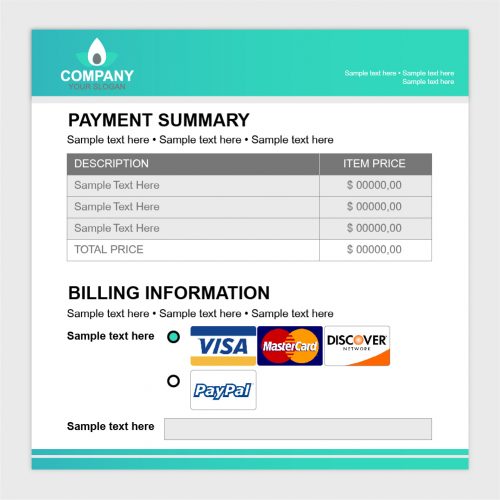
Credit: www.transformeddesign.com
Preparing Your Website Builder
Integrating a payment gateway into your website builder can boost your business. Your customers can complete transactions directly on your site. But first, you need to prepare your website builder. This involves ensuring compatibility and setting up accounts. Follow these steps to ensure a smooth integration process.
Compatibility Check
First, check if your website builder supports the payment gateway. Visit the support page of your website builder. Look for a list of supported payment gateways. This ensures you can integrate the gateway without issues. If your chosen gateway is not supported, you may need to consider alternatives.
Account Setup
Next, set up an account with the payment gateway provider. Visit the provider’s website and register. You may need to provide business details. Ensure all information is accurate. After registration, you will receive API keys. These keys are crucial for integration. Keep them safe and accessible.
Configuring Payment Gateway Settings
Easily integrate payment gateways into website builders by accessing the settings menu. Enable secure transactions for customers. Simplify the payment process on your site.
Configuring payment gateway settings is a crucial step in integrating payment gateways into website builders. This process involves entering necessary details, ensuring security, and testing the setup. Proper configuration ensures smooth transactions and safeguards sensitive data.Api Keys And Credentials
API keys and credentials are required to connect your website to the payment gateway. Obtain these keys from your payment gateway provider. Enter them in the settings section of your website builder. Double-check the accuracy of these keys. Incorrect entries can cause integration issues. Ensure you use the live keys for the production environment.Security Settings
Security settings protect your transactions and customer data. Enable SSL certificates on your website. SSL encrypts the data transferred between your site and the payment gateway. Activate fraud detection features if available. Regularly update your website and payment gateway software. This ensures protection against new vulnerabilities. Always follow security guidelines provided by your payment gateway.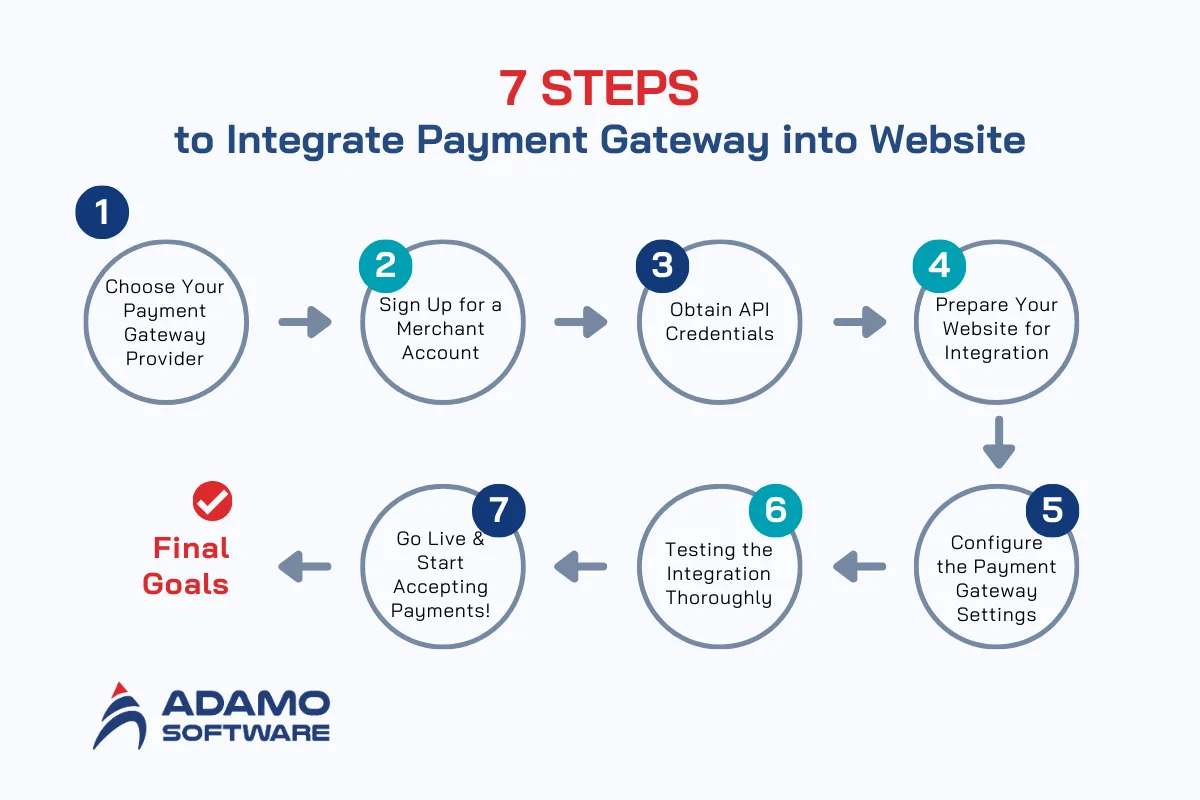
Credit: adamosoft.com
Integrating With E-commerce Platforms
Integrating payment gateways into e-commerce platforms allows businesses to accept online payments. This process is essential for any online store. It enhances the customer experience and boosts sales. Below, we will discuss how to integrate payment gateways into two popular e-commerce platforms: Shopify and WooCommerce.
Shopify
Shopify is a widely-used e-commerce platform. To integrate a payment gateway, start by logging into your Shopify admin panel. Go to the “Settings” section and click on “Payments.” Here, you will see various payment gateway options.
Select the payment gateway you want to use. Follow the on-screen instructions to set it up. You will need to enter your payment gateway credentials. Once done, click “Activate” to enable the gateway.
Ensure the payment gateway is working by making a test transaction. This step confirms everything is set up correctly. If issues arise, consult Shopify’s support documentation or contact the gateway provider.
Woocommerce
WooCommerce is a popular e-commerce plugin for WordPress. To integrate a payment gateway, first, log into your WordPress admin panel. Navigate to “WooCommerce” and then to “Settings.” Click on the “Payments” tab.
Here, you will see a list of available payment gateways. Select the one you wish to integrate. Click “Setup” and follow the instructions provided. You will need to enter your payment gateway account details. Save the settings once completed.
Perform a test transaction to ensure the gateway is functioning properly. This step ensures that your customers can make payments without any issues. If you encounter problems, refer to WooCommerce’s support documentation or contact the gateway provider.
Testing The Integration
Integrating payment gateways into website builders requires thorough testing. Ensuring smooth transactions and security is essential. The testing phase is crucial to identify and resolve potential issues. This section will focus on how to test the integration effectively.
Sandbox Environment
Start by using a Sandbox Environment. This is a safe space to test the payment gateway. It mimics real transactions without processing actual payments. Follow these steps to set up your sandbox:
- Sign up for a sandbox account with your payment gateway provider.
- Obtain sandbox API keys and credentials.
- Configure your website builder with the sandbox credentials.
Using the sandbox prevents real financial risks during testing.
Transaction Testing
Once the sandbox is set, proceed with Transaction Testing. This involves simulating various transaction scenarios to ensure everything works correctly. Here are some tests to perform:
- Successful Payment: Ensure that a payment is processed successfully.
- Failed Payment: Test scenarios where the payment fails (e.g., insufficient funds, incorrect card details).
- Refund Process: Verify that refunds are processed correctly.
- Edge Cases: Test unusual scenarios (e.g., network failures, double-clicking the payment button).
Document each test case and its results. This documentation helps in tracking issues and verifying fixes. Below is a sample table to record your transaction tests:
| Test Case | Expected Result | Actual Result | Status |
|---|---|---|---|
| Successful Payment | Payment processed successfully | Payment processed successfully | Pass |
| Failed Payment | Payment fails with an error message | Payment fails with error | Pass |
| Refund Process | Refund processed successfully | Refund processed successfully | Pass |
| Edge Case: Network Failure | Appropriate error message displayed | Error message displayed | Pass |
Ensure all tests pass before moving to a live environment. This ensures a smooth, secure experience for your customers.
Handling Common Issues
Integrating payment gateways into website builders can be challenging. Sometimes, things don’t go as planned. This section covers common issues and how to handle them.
Troubleshooting Errors
Errors can happen during integration. Check your API keys first. Ensure they are correct. Sometimes, keys are expired or invalid. Verify your credentials to rule this out. Next, review the documentation. Each gateway has unique steps. Follow them carefully. Look for any missed steps.
Ensure your website builder is compatible. Some builders work better with certain gateways. Check if there are known issues. Update your website builder. Sometimes, updates fix bugs. If you see specific error codes, search for solutions. Many errors have common fixes.
Customer Support
Don’t hesitate to contact customer support. Payment gateways often have dedicated support teams. They know their systems well. Explain your issue clearly. Provide error codes and messages. This helps support understand your problem. They might offer step-by-step solutions.
Many gateways also have forums. Check these for similar issues. Community members often share fixes. Look for official guides too. They can provide detailed help. If your website builder has support, contact them as well. They might know about specific integration problems.
Optimizing For User Experience
Integrating payment gateways into website builders is crucial for online businesses. A seamless user experience can boost customer satisfaction and increase sales. To optimize the user experience, focus on the checkout process and ensure mobile compatibility.
Checkout Process
A smooth checkout process is essential for user satisfaction. Keep the steps minimal. Only ask for necessary information. Use clear instructions and progress indicators. Provide multiple payment options. This includes credit cards, digital wallets, and local payment methods. Ensure the security of the payment process. Display trust badges and SSL certificates. Make the checkout process as straightforward as possible. Avoid unnecessary redirects. This keeps users engaged and reduces cart abandonment.
Mobile Compatibility
Many users shop on their mobile devices. Ensure your payment gateway is mobile-friendly. Use responsive design for all elements. This includes forms, buttons, and payment options. Test the process on various devices and screen sizes. Simplify the input fields for mobile users. Use autofill options where possible. Ensure fast loading times. A slow mobile experience can deter users. Optimize images and scripts for speed. Prioritize a smooth and quick payment process on mobile.
Monitoring And Maintenance
Once you integrate a payment gateway into your website builder, the job is not over. Monitoring and maintenance are crucial to ensure smooth transactions. Regular checks help in identifying and solving issues quickly.
Regular Updates
Always keep your payment gateway and website builder updated. Updates often include essential security patches. They also improve performance and add new features. To ensure safety and functionality, follow these steps:
- Check for updates weekly.
- Read update notes to understand changes.
- Test your site after each update.
Performance Tracking
Performance tracking helps you understand how well your payment gateway is working. It provides insights into transaction speeds and success rates. Use these methods to track performance:
- Monitor transaction times.
- Track failed transactions.
- Analyze customer feedback.
Consider using analytics tools to get detailed reports. These tools can show trends and help in making informed decisions.
| Action | Frequency |
|---|---|
| Check for updates | Weekly |
| Test site after updates | After every update |
| Monitor transactions | Daily |

Credit: www.youtube.com
Frequently Asked Questions
Can You Integrate A Payment Gateway With A Website?
Yes, we can integrate a payment gateway with your website. This allows secure online transactions. Contact us for more details.
How To Integrate Payment Gateway In Website Medium?
To integrate a payment gateway, choose a provider, create an account, obtain API keys, and follow their integration guides. Ensure security compliance.
How To Integrate A Payment Gateway Into Your Application?
Integrate a payment gateway by selecting a provider, creating an account, and obtaining API keys. Implement the API in your application. Test the integration thoroughly before going live. Ensure compliance with security standards.
How To Integrate Paypal Payment Gateway In Website?
Integrate PayPal by signing up for a business account, obtaining API credentials, and adding PayPal’s code to your website. Follow PayPal’s developer documentation for detailed steps.
Conclusion
Integrating payment gateways into website builders is simpler than it seems. Follow the steps, and your site will accept payments smoothly. Choose a reliable gateway that suits your needs. Ensure it supports your preferred payment methods. Test thoroughly before going live.
This ensures a seamless experience for your customers. Always keep security in mind to protect sensitive data. With the right setup, you can enhance your website’s functionality. Happy building and good luck!


