
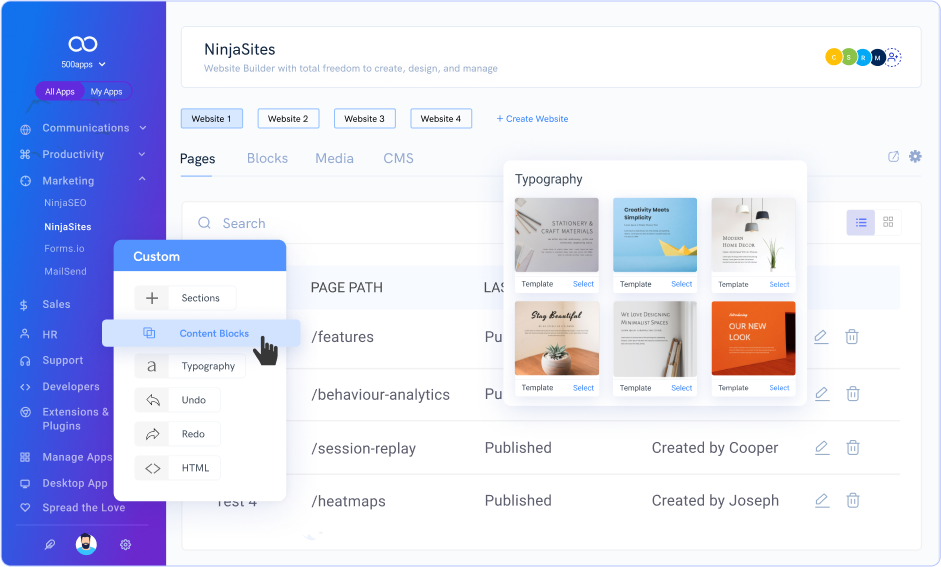
A drag-and-drop website builder is a tool for creating websites without coding. It allows you to build web pages by simply dragging elements into place.
In today’s digital age, having a website is essential for businesses, freelancers, and even hobbyists. But not everyone knows how to code. This is where drag-and-drop website builders come in handy. They let you design and customize your site visually.
You can add text, images, buttons, and more with ease. This user-friendly approach makes website creation accessible to everyone. Whether you’re a beginner or just short on time, these tools simplify the process. In this blog, we’ll explore how drag-and-drop website builders work and their benefits. Get ready to learn how you can create a professional website with minimal effort.
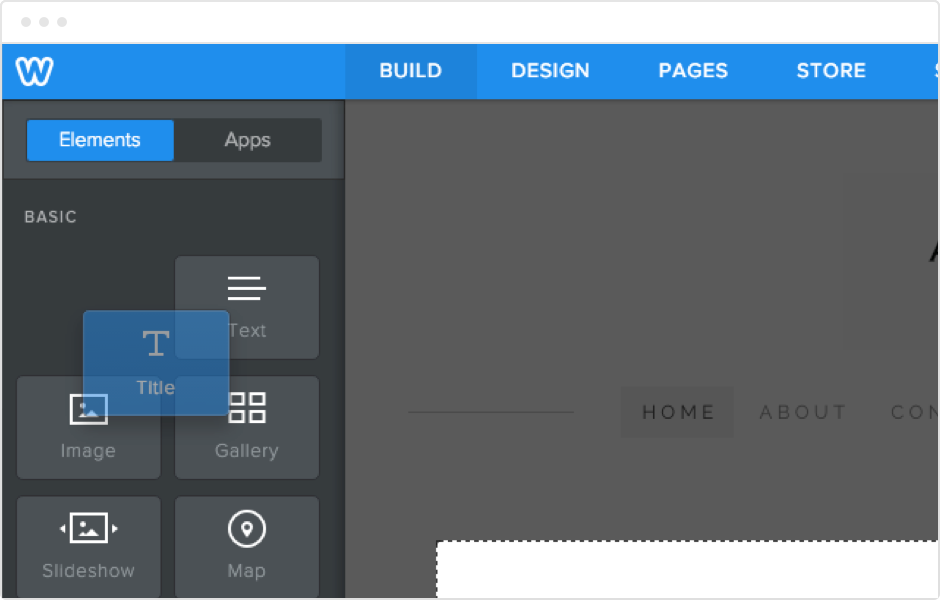
Credit: www.weebly.com
Introduction To Drag-and-drop Builders
In today’s digital world, creating a website is essential. Not everyone is a web developer. This is where drag-and-drop website builders come in. They make website creation simple and quick.
Definition
A drag-and-drop website builder allows you to create websites without coding knowledge. You can use your mouse to drag elements like text boxes, images, and buttons. Then you drop them on your webpage where you want them. These tools provide a visual interface. So, you can see how your website looks while you build it.
Purpose And Benefits
The main purpose of drag-and-drop builders is to make web design easy. They are perfect for beginners. Here are some benefits:
- No coding skills needed: Anyone can create a website.
- Time-saving: Build websites faster than traditional methods.
- Cost-effective: No need to hire a developer.
- Customization: Easily change layouts and styles.
| Benefit | Description |
|---|---|
| No coding skills needed | Anyone can create a website without technical knowledge. |
| Time-saving | Build websites faster than traditional methods. |
| Cost-effective | No need to hire a developer. |
| Customization | Easily change layouts and styles to suit your needs. |
Drag-and-drop builders offer a user-friendly experience. They help you create professional websites with ease. These tools are perfect for small business owners, bloggers, and anyone needing a website.
Credit: www.hubspot.com
How Drag-and-drop Works
Drag-and-drop website builders have simplified web design for everyone. These tools offer an intuitive way to create websites without coding. But how does this drag-and-drop method actually work? Let’s explore the basic functionality and user interface of these builders.
Basic Functionality
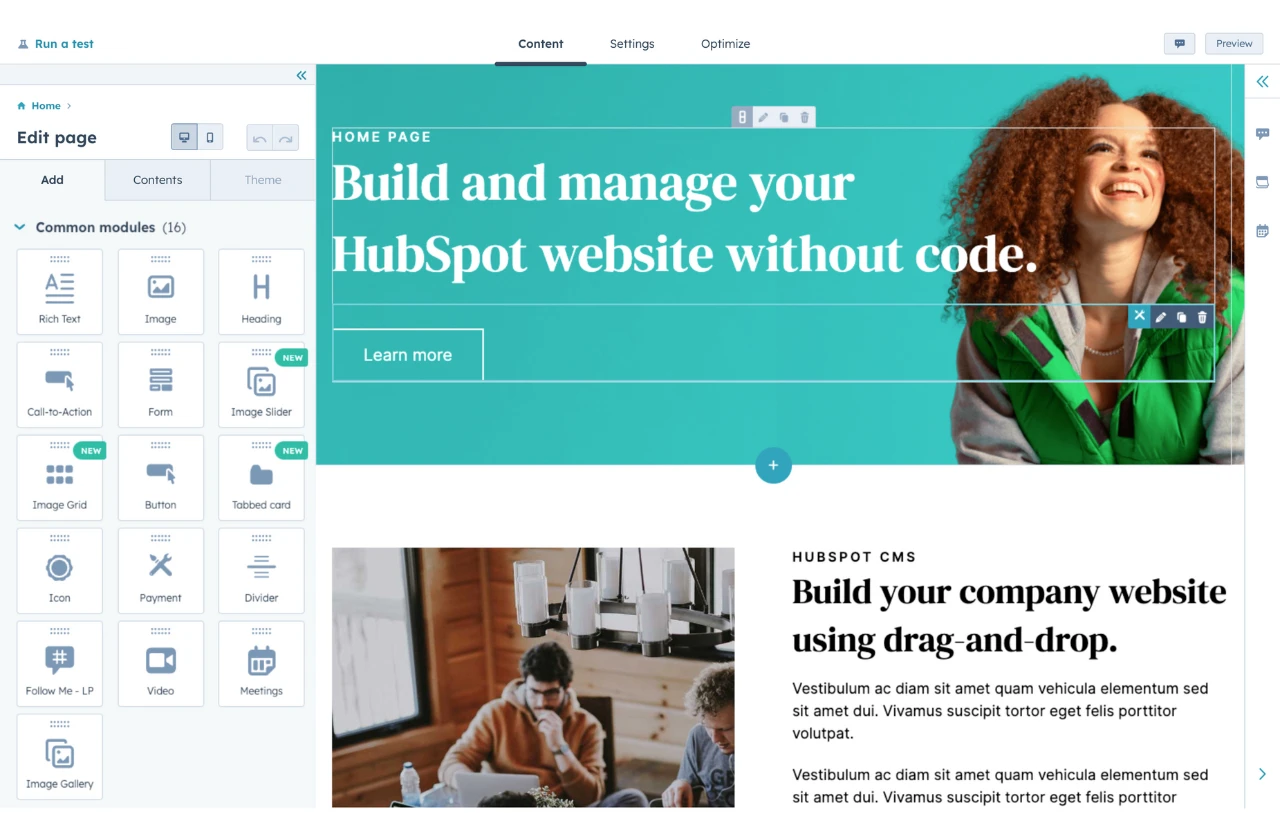
The core idea of drag-and-drop website builders is simple. You select an element, drag it to your desired spot, and drop it. This element could be a text box, an image, or a button. The builder then automatically adjusts the layout. No coding or technical skills are needed. You can see changes in real-time. This makes the process quick and user-friendly.
User Interface Overview
The user interface of drag-and-drop builders is straightforward. It usually includes a sidebar with different elements. You can find text boxes, images, videos, forms, and more. Dragging an element from the sidebar to your canvas is easy. The canvas is your website preview. You can arrange elements as you like. Most builders also offer templates. These templates give you a head start. You can customize them to fit your needs. The interface also includes options for styling. You can change colors, fonts, and sizes with simple clicks.
Key Features
Drag-and-drop website builders have made web design accessible to everyone. Their intuitive interfaces allow users to create professional websites without coding. Let’s explore some key features that make these tools popular.
Templates And Themes
Templates and themes are crucial for a drag-and-drop website builder. They offer a variety of pre-designed layouts and styles. Users can select a template that suits their business or personal site.
These templates are often categorized by industry, such as:
- Business
- Portfolio
- Blog
- eCommerce
This categorization helps users find the perfect design quickly. Moreover, themes ensure a consistent look across all pages of the website. They include color schemes, fonts, and other stylistic elements.
Customization Options
Customization options are another standout feature. They allow users to personalize their website’s appearance and functionality. Users can easily drag and drop elements like text boxes, images, and buttons.
Here are some common customization options:
| Element | Customization |
|---|---|
| Text | Font size, color, style |
| Images | Resize, crop, filter |
| Buttons | Color, shape, link |
| Background | Color, image, pattern |
These options help in creating a unique and engaging website. Users can also add custom code for advanced features. This flexibility makes drag-and-drop builders suitable for both beginners and experienced users.
Popular Drag-and-drop Builders
Popular drag-and-drop website builders are well-loved for their simplicity. They let anyone create stunning websites without coding skills. Let’s explore three popular options: Wix, Squarespace, and Weebly.
Wix
Wix is known for its user-friendly interface. It offers a wide range of templates and customization options.
- Easy-to-Use Editor: Drag and drop elements with ease.
- Template Variety: Choose from hundreds of designs.
- App Market: Add functionalities with various apps.
Squarespace
Squarespace is perfect for creatives. It emphasizes design and aesthetics.
- Beautiful Templates: Stunning and professional designs.
- Responsive Design: Sites look great on any device.
- Integrated Analytics: Track your site’s performance easily.
Weebly
Weebly is ideal for small businesses. It offers an intuitive builder and e-commerce features.
- Simple Drag-and-Drop: Build your site quickly.
- E-commerce Ready: Sell products with ease.
- SEO Tools: Improve your site’s visibility.
| Builder | Key Feature | Best For |
|---|---|---|
| Wix | Wide range of templates | General use |
| Squarespace | Beautiful templates | Creatives |
| Weebly | E-commerce features | Small businesses |
Pros And Cons
Drag-and-drop website builders are popular for creating websites without coding. They have advantages and disadvantages. Below, we explore the pros and cons of using these tools.
Advantages
Using a drag-and-drop website builder has many benefits:
- Easy to Use: No coding knowledge required. Just drag elements.
- Quick Setup: Get your website up and running in hours.
- Cost-Effective: Affordable plans compared to hiring developers.
- Design Flexibility: Customize templates to fit your brand.
- Built-In Features: Access to SEO tools, forms, and e-commerce options.
- Support: Most builders offer customer support and tutorials.
Disadvantages
Despite the benefits, there are some drawbacks:
- Limited Customization: May not meet unique needs or complex designs.
- Performance Issues: Some builders can slow down your site.
- Dependency: You rely on the platform’s availability and updates.
- SEO Limitations: Some tools lack advanced SEO features.
- Scalability: May not handle high traffic or large sites well.
- Cost Over Time: Monthly fees can add up, especially for premium features.
Using a drag-and-drop website builder is a choice with both advantages and disadvantages. It’s vital to weigh these before deciding.
Choosing The Right Builder
Selecting the ideal drag-and-drop website builder can be daunting. Different builders offer different features and benefits. The right choice depends on your specific needs and goals. This section will help you make an informed decision.
Assessing Your Needs
Start by understanding your own needs. What kind of website are you building? Is it for a blog, a business, or an online store? Knowing your end goal helps you pick the right features.
- Website Type: Blog, business, e-commerce, or portfolio.
- Budget: How much are you willing to spend?
- Technical Skill Level: Are you a beginner or do you have some experience?
- Customization Needs: Do you need advanced design options or templates?
Comparing Features
Different builders offer different features. Comparing these can help you find the best fit. Here’s a table to help you compare common features:
| Feature | Builder A | Builder B | Builder C |
|---|---|---|---|
| Ease of Use | Very Easy | Easy | Moderate |
| Template Variety | Wide Range | Moderate | Limited |
| SEO Tools | Advanced | Basic | Moderate |
| Customer Support | 24/7 | Business Hours | Email Only |
Consider the features that matter most to you. If you need ease of use, Builder A might be your best bet. If you need advanced SEO tools, Builder A again stands out. Each builder has its own strengths and weaknesses.
Cost And Pricing Models
Understanding the cost and pricing models of drag-and-drop website builders is crucial. Different builders offer various plans catering to different needs. This section will help you navigate the costs involved, from free plans to potential hidden costs.
Free Vs Paid Plans
Many drag-and-drop website builders offer a free plan. These plans are great for beginners. They allow you to test the platform without any investment. Free plans often come with limitations like:
- Limited storage
- Basic templates
- Watermarked branding
- No custom domain
For more advanced features, you need to opt for a paid plan. Paid plans typically offer:
- More storage
- Advanced templates
- Custom domains
- Priority support
Paid plans usually range from a few dollars a month to more expensive options for businesses. Choosing between free and paid plans depends on your needs and budget.
Hidden Costs
While the base cost of a drag-and-drop website builder might seem low, hidden costs can add up. Consider these potential additional expenses:
| Cost Type | Description |
|---|---|
| Domain Registration | Fee for registering and renewing a custom domain |
| Premium Templates | Cost for purchasing advanced or unique templates |
| Third-party Integrations | Fees for connecting other services like email marketing tools |
| Additional Storage | Extra cost if your site exceeds the storage limit |
| SSL Certificates | Annual fee for securing your site with SSL |
Be sure to review the pricing details carefully. Knowing about these hidden costs can help you budget better. This ensures you don’t face unexpected expenses later.
Tips For Effective Use
Drag-and-drop website builders offer an easy way to create a website. With just a few clicks, you can design and publish your site. But to make the most of these tools, you need some tips. This guide will help you use drag-and-drop website builders effectively.
Design Best Practices
Keep your design simple and clean. A cluttered layout can confuse visitors. Use white space to make your content stand out. Choose a consistent color scheme that matches your brand. This helps create a cohesive look. Use readable fonts. Avoid using too many different fonts. Stick to two or three at most.
Make sure your site is mobile-friendly. Many visitors use their phones to browse. Check how your site looks on different devices. Use high-quality images. Blurry or pixelated images can make your site look unprofessional. Optimize images for fast loading times.
Common Mistakes To Avoid
Do not overuse animations. They can slow down your site. Also, too many animations can distract visitors. Avoid using too much text. Break up long paragraphs into shorter ones. Use bullet points to make lists clear.
Check for broken links. These can frustrate visitors and hurt your search rankings. Make sure all links work properly. Do not ignore user feedback. Listen to what your visitors say. Make changes based on their input. Keep your content updated. An outdated site can lose trust with visitors.
Future Of Drag-and-drop Builders
The future of drag-and-drop website builders looks bright. These tools are becoming more popular among users of all skill levels. They offer an easy way to create websites without coding. But what does the future hold for these builders?
Emerging Trends
One emerging trend is AI integration. AI can suggest design elements and layouts. This helps users create better websites faster. Another trend is the use of templates. More templates mean more design options for users. This makes it easier to create a unique website.
Mobile optimization is also a key trend. More people use smartphones to browse the web. Drag-and-drop builders are adapting. They now offer mobile-friendly design tools. This ensures websites look good on all devices.
Technological Advancements
Technological advancements are shaping the future of these builders. One major advancement is real-time collaboration. Users can now work on a website together. This feature is useful for teams and agencies. It saves time and improves productivity.
Another advancement is the integration of third-party apps. Users can now add features like chatbots and e-commerce tools. This makes drag-and-drop builders more versatile. They can be used for a wider range of projects.
Cloud-based technology is also improving. It allows users to access their website from any device. This makes it easier to make updates and changes on the go. It also improves website performance and security.
Credit: www.hubspot.com
Frequently Asked Questions
What Is Drag And Drop Website Builder?
A drag and drop website builder allows users to create websites by simply dragging elements into place, no coding needed.
What Are The Disadvantages Of Drag And Drop Website Builder?
Drag and drop website builders often offer limited customization options. They can also lead to slower website loading times. SEO capabilities may be restricted. Users might face scalability issues as their site grows. These builders sometimes lack advanced features needed by experienced developers.
Is Shopify A Drag And Drop Website Builder?
Yes, Shopify is a drag and drop website builder. It offers user-friendly tools for easy customization.
Is Wix A Drag And Drop Website Builder?
Yes, Wix is a drag and drop website builder. It offers an intuitive interface for easy website creation.
Conclusion
Drag-and-drop website builders make creating websites easy for everyone. No coding skills needed. Just select, drag, and drop elements. It’s that simple. These tools save time and effort. Perfect for beginners and small businesses. They provide templates and customization options.
You control your website’s look and feel. Try a drag-and-drop builder today. Start building your online presence effortlessly. Enjoy the process and watch your website come to life.


