
Web hosting is the service that allows your website to be accessible on the internet. It involves storing your website files on a server and providing the technology for them to be viewed online.
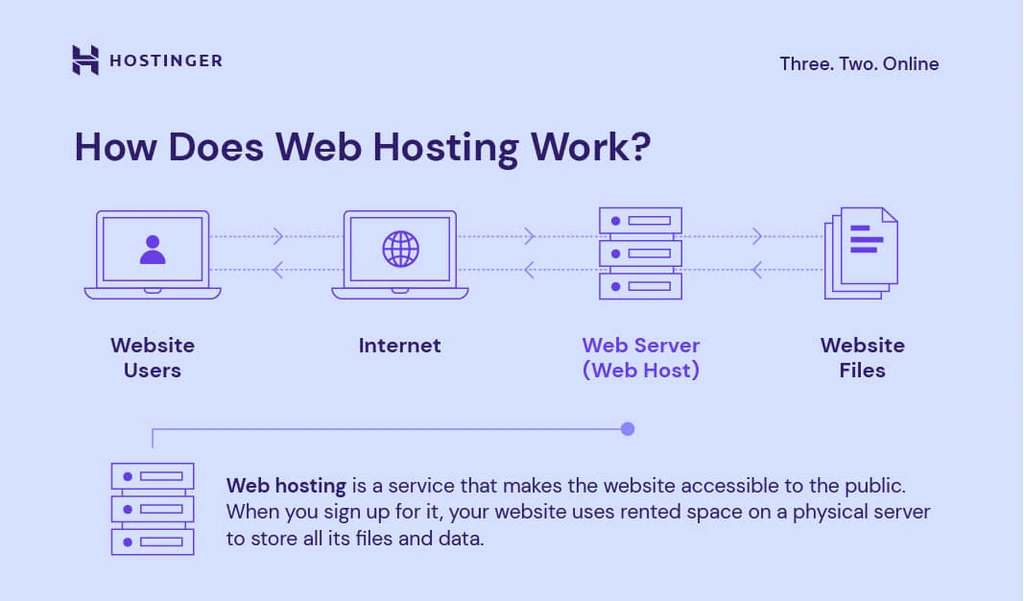
Understanding how web hosting works is crucial for anyone looking to create a website. When you type a website address in your browser, it connects to the hosting server where the site is stored. This server sends the website’s files back to your browser, which displays the website on your screen.
Web hosting involves various types of services and features, like storage space, bandwidth, and security. Knowing how these elements work together helps you choose the right hosting plan for your needs. This knowledge can lead to a better, more reliable website experience.
Introduction To Web Hosting
Web hosting is a crucial part of the internet. It allows websites to be accessible online. Without it, your website would not exist on the web. Let’s dive into the basics of web hosting.
What Is Web Hosting?
Web hosting is a service. It stores your website files on a server. This server makes your site visible on the internet. Think of it as renting space on the web. Different types of hosting exist, such as shared, VPS, and dedicated hosting.
Importance Of Web Hosting
Good web hosting is important for your site’s success. It affects your website’s speed and uptime. A fast, reliable site keeps visitors happy. It also improves your search engine ranking. Poor hosting can lead to slow load times and frequent downtimes. This can drive visitors away.
Types Of Web Hosting
Understanding the different types of web hosting can help you choose the right one for your website. Each type offers unique features and benefits. Let’s explore the main types of web hosting available.
Shared Hosting
Shared hosting is the most affordable option. Your website shares server resources with other websites. This makes it cost-effective. But it can affect performance during high traffic periods.
Vps Hosting
VPS stands for Virtual Private Server. It provides more control and resources than shared hosting. You still share a server, but with fewer websites. It’s ideal for growing sites needing more power.
Dedicated Hosting
Dedicated hosting means your website gets its own server. No sharing with other websites. This offers the highest performance and security. It’s best for large businesses or high-traffic websites.
Cloud Hosting
Cloud hosting uses multiple servers to host your website. This ensures better reliability and scalability. If one server fails, others take over. It’s a flexible option for websites with variable traffic.
Key Components Of Web Hosting
Understanding the key components of web hosting is essential. These components ensure your website runs smoothly and efficiently. Let’s explore the primary elements that make web hosting work.
Servers
Servers are powerful computers. They store your website’s data and deliver it to users. They run 24/7 to ensure your site is always accessible. Different types of servers exist, such as shared, VPS, and dedicated servers. Each type offers varying levels of performance and control.
Data Centers
Data centers house multiple servers. They provide a secure and stable environment. Proper cooling and power backups are crucial in data centers. This ensures the servers operate without interruptions. Data centers also have high-speed internet connections. This guarantees fast access to your website from anywhere in the world.
Bandwidth And Storage
Bandwidth and storage are critical for web hosting. Bandwidth refers to the amount of data transferred between your site and users. Higher bandwidth allows more visitors to access your site simultaneously. Storage is the space available for your website’s files, images, and databases. Adequate storage ensures all your content is available and loads quickly.
How Web Hosting Works
Understanding how web hosting works is essential for anyone with a website. Web hosting allows your site to be accessible on the internet. It involves storing your website files on a server. This server is managed by a web hosting company. When users want to visit your site, their computers connect to this server. Let’s dive into the details of web hosting.
Domain Name System (dns)
The Domain Name System, or DNS, is like a phone book for the internet. It translates domain names into IP addresses. When you type a website address in the browser, DNS finds the correct IP address. This process directs your computer to the right server. Without DNS, remembering IP addresses would be difficult.
Server Configuration
Server configuration is crucial for web hosting. It involves setting up the server to store and manage your website files. A properly configured server ensures your website loads quickly and securely. Hosting companies handle this setup. They ensure the server is optimized for performance. Different types of servers exist, like shared, VPS, and dedicated servers.
Content Delivery
Content delivery focuses on how your website content reaches users. It involves delivering your site files quickly and efficiently. Content Delivery Networks (CDNs) help in this process. CDNs store copies of your website across multiple locations. This ensures faster loading times for users worldwide. Speed and reliability are key factors in content delivery.
Choosing The Right Web Hosting Provider
Choosing the right web hosting provider is crucial for your online success. With numerous options available, making the best choice can feel overwhelming. This section will guide you through the key aspects to consider when selecting a web hosting provider.
Evaluating Needs
First, understand your website’s needs. Is your site a blog, an e-commerce store, or a portfolio? Different sites have different requirements. Determine the expected traffic to your site. Higher traffic needs more robust hosting solutions. Consider your site’s technical requirements. Does it need specific software or configurations?
Comparing Features
Next, compare the features offered by different providers. Look for essential features like uptime guarantees, storage space, and bandwidth. Check if the provider offers easy-to-use control panels and one-click installations. Customer support is vital. Ensure 24/7 support through various channels.
Security features are also important. Look for SSL certificates, backups, and malware protection. Some providers offer free domain registration and site migration services. These can save you time and money.
Budget Considerations
Finally, consider your budget. Web hosting costs vary widely. Look for providers offering good value for the price. Avoid the cheapest options if they compromise on essential features. Consider renewal rates as they can be higher than initial costs.
Look for discounts or promotions for new customers. Ensure the hosting plan you choose aligns with your budget and needs.
Setting Up Your Website
Setting up your website is a crucial step in bringing your online presence to life. This process involves several key tasks that ensure your site is accessible to users worldwide. Let’s break down the essentials of setting up your website.
Registering A Domain
First, you need to register a domain name. This is your website’s address on the internet, like example.com. Choose a name that is easy to remember and relevant to your content. Use a domain registrar to check if the name you want is available. Once you find an available name, register it by providing your details and paying a fee.
Uploading Website Files
Next, upload your website files to your web hosting server. These files include HTML, CSS, images, and other assets that make up your site. Use an FTP client or a file manager provided by your web host. Organize your files in folders for better management. Ensure all files are correctly linked to display your website properly.
Configuring Settings
Finally, configure your website settings. Adjust server settings for optimal performance. Set up email accounts associated with your domain. Enable security features to protect your site from threats. Customize settings for backups to prevent data loss. Review all settings to make sure everything is configured correctly.
Maintaining Your Website
Maintaining your website is crucial for its success. A well-maintained site runs smoothly and ensures a good user experience. There are several aspects to focus on for proper website maintenance.
Regular Backups
Regular backups are essential for your website’s safety. They help you restore your site if something goes wrong. Backups protect your data from loss. Use automated backup tools to save time. Always store backups in a secure location. This practice ensures your data is always safe.
Security Measures
Security measures safeguard your website from threats. Use strong passwords for all accounts. Update your software regularly to fix vulnerabilities. Install security plugins to monitor and protect your site. Always use HTTPS to secure data transmission. These steps help keep your website safe.
Performance Monitoring
Performance monitoring helps keep your website running smoothly. Regularly check your site’s speed. Use tools to identify and fix performance issues. Monitor your site’s uptime to ensure it’s always accessible. Track user behavior to improve the user experience. Good performance keeps visitors happy and engaged.
Credit: www.quora.com
Common Web Hosting Issues
Web hosting is essential for any website. Yet, it often comes with various issues. Knowing these common problems can help you choose the right hosting service and keep your site running smoothly.
Downtime
Downtime refers to periods when your website is not accessible. This can be due to server maintenance, unexpected crashes, or other technical issues. Frequent downtime can hurt your site’s reputation and lead to loss of visitors and revenue. Monitoring your site’s uptime and choosing a reliable web host can help mitigate this issue.
Slow Loading Speeds
Slow loading speeds frustrate users and can negatively impact your site’s SEO rankings. Several factors contribute to slow speeds. These include server performance, website design, and traffic volume. To improve loading speeds, optimize your website’s code, use content delivery networks (CDNs), and choose a host with good server performance.
Technical Support
Good technical support is crucial for resolving web hosting issues quickly. Problems can occur at any time, and having access to reliable support can save your site from prolonged downtime or other issues. Look for web hosts that offer 24/7 support through multiple channels, such as phone, email, and live chat. Check user reviews to ensure the support team is knowledgeable and responsive.
Future Trends In Web Hosting
The web hosting industry is constantly evolving. Future trends are shaping how websites are hosted. Understanding these trends is crucial for staying ahead. Let’s explore some key trends.
Green Hosting
Green hosting is gaining popularity. It focuses on using renewable energy. Hosting providers are reducing their carbon footprint. They use wind and solar energy. This helps in conserving the environment. Opting for green hosting is both eco-friendly and cost-effective.
Ai Integration
AI integration is transforming web hosting. AI helps in managing servers efficiently. It predicts and fixes issues before they occur. AI enhances customer support through chatbots. These chatbots provide instant help. AI also optimizes website performance. It ensures faster loading times and improves user experience.
Enhanced Security
Enhanced security is a top priority. Cyber threats are becoming more advanced. Hosting providers are implementing stronger security measures. This includes advanced firewalls and encryption. Regular security updates are crucial. They protect websites from vulnerabilities. Secure hosting builds trust among users.

Credit: www.godaddy.com
Credit: www.hostinger.com
Frequently Asked Questions
How Does The Web Hosting Work?
Web hosting stores your website’s files on a server. This allows users to access your site online. Hosting providers manage these servers.
What Happens When You Host A Website?
Hosting a website makes it accessible on the internet. Your web files get stored on a server. Users can then visit your site by entering your domain name.
How Much Do I Pay To Host A Website?
Website hosting costs vary from $2 to $500 per month. Pricing depends on hosting type and provider.
Do I Really Need A Host For My Website?
Yes, you need a web host to store your website files and make them accessible online. It ensures reliability and security.
Conclusion
Web hosting is essential for any website. It stores your site’s data. It makes your site accessible online. Choosing the right host is crucial. Consider speed, security, and support. Understand different hosting types. Shared hosting is affordable. Dedicated hosting offers more control.
Cloud hosting is scalable. Managed hosting simplifies management. Research and select based on your needs. With the right web host, your site will thrive. Happy hosting!


