
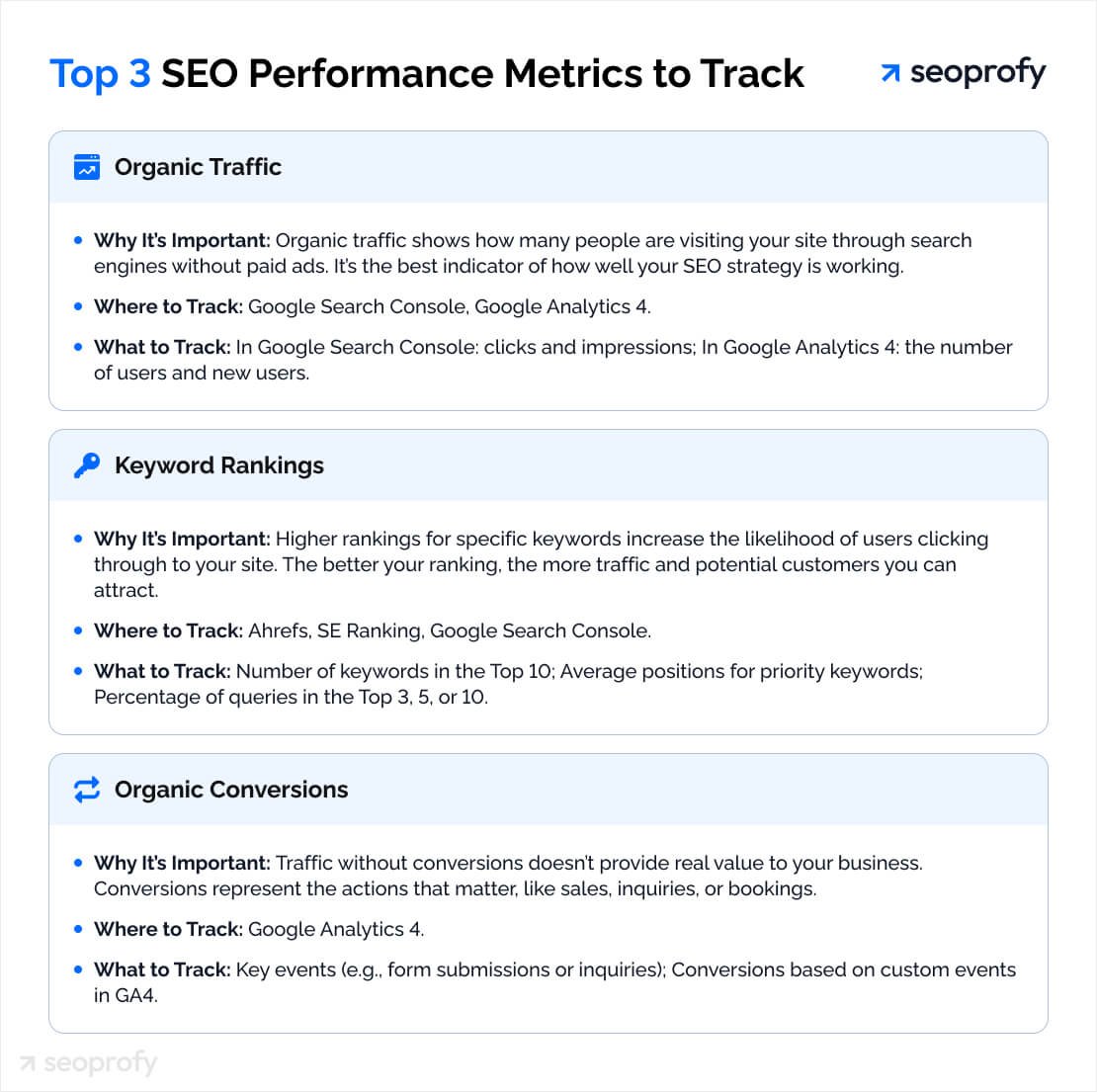
Tracking organic search performance is crucial for understanding your website’s visibility. It helps you see how well you’re doing in search engines.
Organic search performance reveals the health of your SEO efforts. Knowing where you stand can guide your strategy and improve your online presence. This guide will show you the steps to track your organic search performance effectively. You’ll learn about the tools and metrics that matter.
Dive in to make data-driven decisions and boost your site’s rankings. Understanding this can help you attract more visitors and grow your business. Let’s start tracking and improving your organic search performance.
Introduction To Organic Search Performance
Organic search performance is a critical aspect of digital marketing. It refers to the results generated from search engine queries without paid advertisements. Understanding how your website performs in organic search is essential. It helps you improve visibility and attract more visitors.
Importance Of Tracking
Tracking organic search performance gives valuable insights into your website’s health. It shows how well your site ranks on search engines. Higher rankings mean more traffic. More traffic can lead to more conversions and sales. Tracking helps you understand what works and what needs improvement. This way, you can make informed decisions to enhance your SEO strategies.
Key Metrics To Monitor
Several key metrics are crucial for monitoring organic search performance. These metrics provide a clear picture of your website’s effectiveness.
1. Organic Traffic: This is the number of visitors coming from search engines. High organic traffic indicates good SEO practices.
2. Keyword Rankings: Track where your site ranks for specific keywords. Higher rankings for targeted keywords increase visibility.
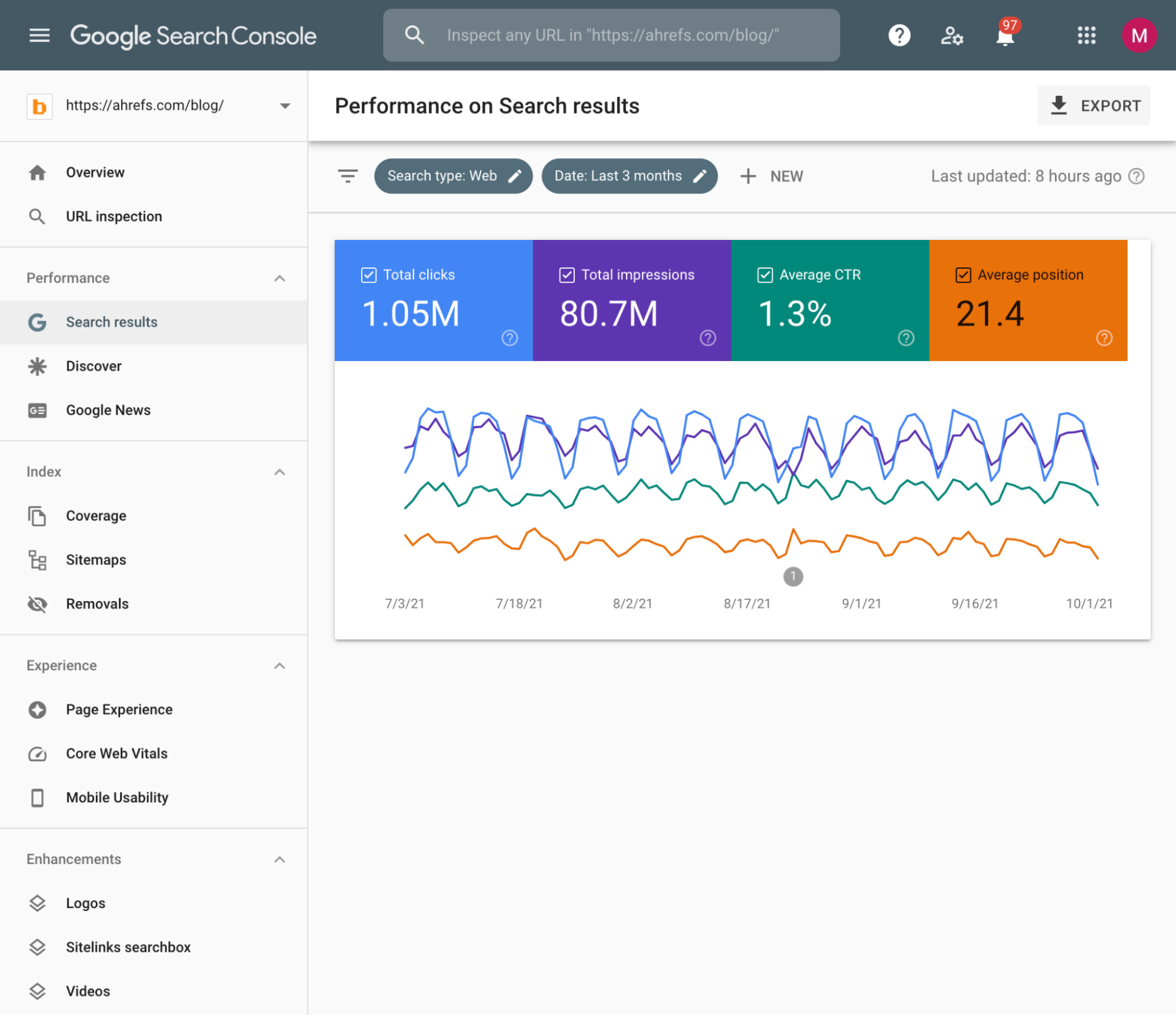
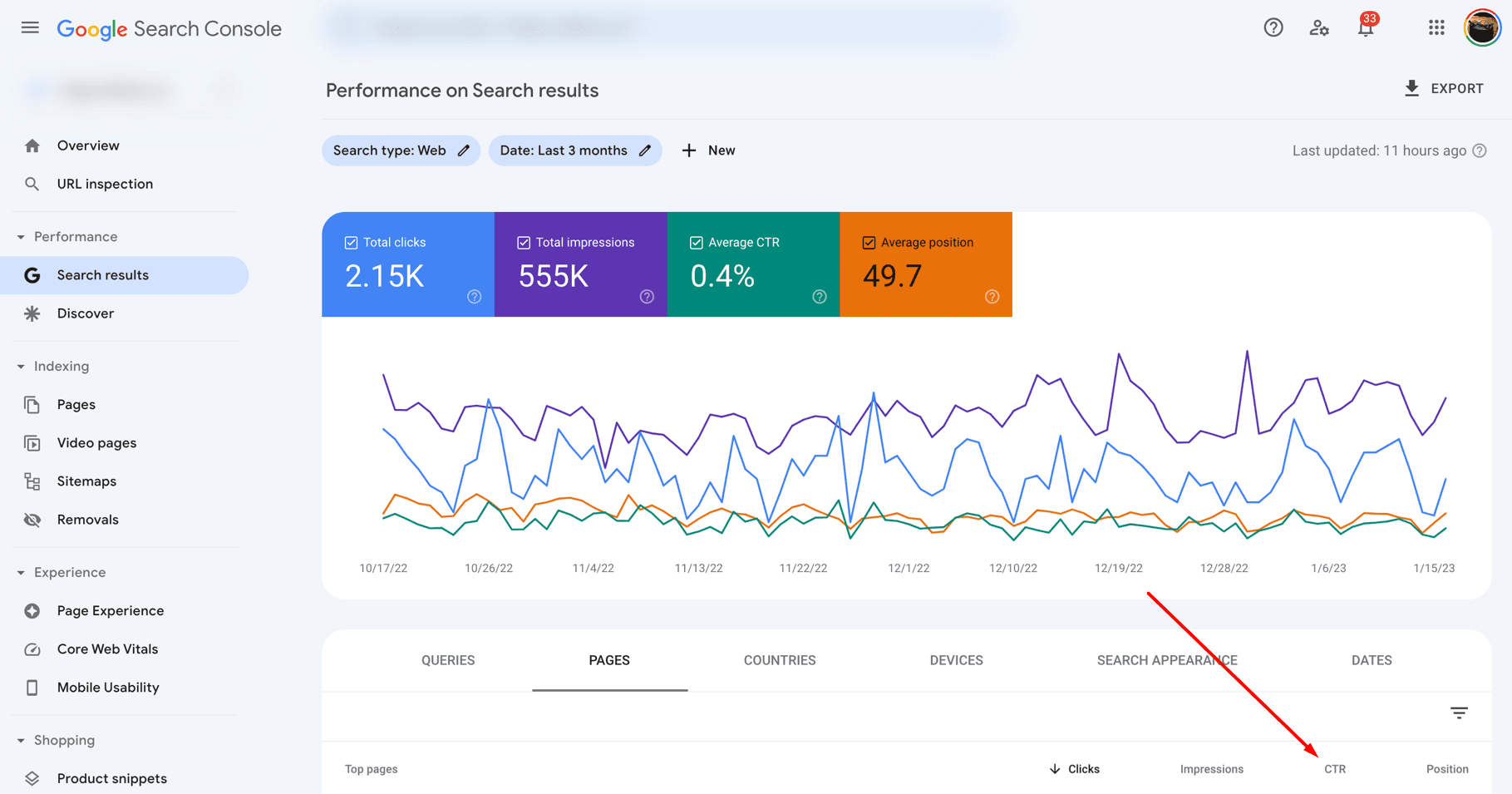
3. Click-Through Rate (CTR): This measures the percentage of users who click on your link. A higher CTR means your search listings are appealing to users.
4. Bounce Rate: This is the percentage of visitors who leave your site quickly. A high bounce rate may indicate issues with your content or user experience.
5. Conversion Rate: This metric shows the percentage of visitors who complete a desired action. Higher conversion rates mean your site effectively meets user needs.
By monitoring these metrics, you can gauge your website’s organic search performance. This knowledge enables you to refine your SEO efforts for better results.
Setting Up Analytics Tools
Setting up analytics tools is essential for tracking your organic search performance. These tools help you understand your audience and measure the success of your SEO strategies. With the right analytics setup, you can see where your traffic comes from and how users interact with your site.
Choosing The Right Tool
Start by selecting the right analytics tool for your needs. Google Analytics is popular and free. Other tools like SEMrush or Ahrefs offer advanced features. Consider your budget and the metrics you need to track. Look for tools that provide detailed insights and are easy to use.
Installing And Configuring
Once you choose a tool, the next step is installing it. For Google Analytics, create an account and get your tracking code. Copy this code and paste it into the header of your website. Many content management systems have plugins to simplify this process.
After installation, configure your settings. Set up goals to track important actions on your site. These can include purchases, sign-ups, or downloads. Customize your reports to highlight the metrics that matter most. Regularly check your data to see how well your SEO strategies are working.
Keyword Research And Tracking
Tracking your organic search performance starts with Keyword Research and Tracking. Understanding and monitoring your keywords helps you measure your website’s visibility. This section will guide you through the essential steps. From identifying relevant keywords to monitoring their rankings, you’ll learn how to keep your SEO efforts on track.
Identifying Relevant Keywords
Begin by identifying the relevant keywords for your niche. Use tools like Google Keyword Planner, Ahrefs, or SEMrush. These tools show the search volume, competition, and trends for each keyword. Focus on long-tail keywords. They often have lower competition and higher conversion rates.
Create a list of potential keywords. Organize them based on relevance and search volume. You can use a simple table to keep track of your keywords:
| Keyword | Search Volume | Competition |
|---|---|---|
| Keyword 1 | 1000 | Low |
| Keyword 2 | 5000 | Medium |
| Keyword 3 | 300 | High |
Monitoring Keyword Rankings
Once you’ve identified your keywords, start tracking their performance. Monitor the keyword rankings regularly. Use tools like Google Search Console, Moz, or SERPWatcher. These tools help you track your keyword positions over time.
Set up alerts for significant ranking changes. This helps you quickly respond to drops or improvements. Here’s a simple step-by-step process:
- Add your website to a keyword tracking tool.
- Enter the list of keywords you’ve identified.
- Monitor the rankings weekly or monthly.
- Analyze the data and adjust your SEO strategy as needed.
Keep an eye on your competitors’ keyword rankings too. This gives you a benchmark for your performance. Adjust your keywords based on the competitive landscape. Always aim for continuous improvement in your rankings.
Analyzing Traffic Sources
Understanding where your website traffic comes from is crucial. Analyzing traffic sources helps identify what works and what needs improvement. This section covers the differences between organic and paid traffic and highlights your top-performing pages.
Organic Vs. Paid Traffic
It’s important to differentiate between organic and paid traffic. Organic traffic comes from unpaid search results. Paid traffic comes from advertisements.
Use Google Analytics to see the sources of your traffic. Navigate to Acquisition > All Traffic > Channels. Here, you can see how much traffic is organic and how much is paid.
| Traffic Source | Description | Example |
|---|---|---|
| Organic Traffic | Unpaid search results | Google search results |
| Paid Traffic | Paid advertisements | Google Ads |
Knowing the difference helps you understand the effectiveness of your SEO efforts and advertising campaigns.
Top Performing Pages
Identifying your top performing pages is vital. These pages bring the most visitors. You can find these in Google Analytics.
- Go to Behavior > Site Content > All Pages.
- Here, you see the pages with the highest traffic.
Look at metrics like page views, average time on page, and bounce rate. These metrics show which pages attract and engage users the most.
Focus on these pages to understand what content works best. This insight helps you create more high-performing content.
Evaluating User Engagement
Tracking organic search performance involves more than just monitoring traffic. Evaluating user engagement is crucial. It helps understand how visitors interact with your website. Two key metrics to focus on are Bounce Rate and Average Session Duration. These metrics provide insight into user behavior and content effectiveness.
Bounce Rate
Bounce Rate measures the percentage of visitors who leave your site after viewing only one page. A high bounce rate may indicate that visitors are not finding what they need. It can also suggest that your content is not engaging enough.
To reduce bounce rate:
- Ensure your content is relevant to the user’s search intent.
- Improve page load speed.
- Enhance the overall user experience.
- Use clear and compelling calls to action.
- Make sure your site is mobile-friendly.
Monitoring bounce rate helps identify pages that need improvement. It also aids in understanding user preferences.
Average Session Duration
Average Session Duration indicates the average amount of time visitors spend on your site during a single session. Longer sessions typically suggest higher engagement. They indicate that visitors find your content valuable and interesting.
To increase average session duration:
- Create in-depth, high-quality content.
- Use internal linking to guide users to more content.
- Incorporate multimedia elements like videos and images.
- Optimize your website’s navigation.
- Regularly update your content to keep it fresh.
Tracking this metric helps in assessing content performance. It also provides insights into how well your site retains visitor attention.
Both bounce rate and average session duration are essential for evaluating user engagement. They offer valuable insights for improving your website’s organic search performance.
Credit: ahrefs.com
Assessing Conversion Rates
Understanding your organic search performance involves more than just traffic numbers. One critical aspect is assessing conversion rates. This helps you see how many visitors complete a desired action, like making a purchase or filling out a form. Let’s dive into setting up goals and tracking conversions to better measure your success.
Setting Up Goals
Before you can assess conversion rates, you need to set up goals in your analytics tool. Goals help you track specific actions you want visitors to take. Here’s how to do it:
- Login to your analytics account.
- Navigate to the ‘Admin’ section.
- In the ‘View’ column, click on ‘Goals’.
- Click ‘+ New Goal’ to create a new goal.
- Choose a goal template or create a custom goal.
Common goals include:
- Making a purchase
- Filling out a contact form
- Signing up for a newsletter
Once set up, these goals will help you monitor how well your site converts visitors.
Tracking Conversions
After setting up goals, the next step is tracking conversions. Conversion tracking allows you to measure goal completions. Follow these steps:
- Go to the ‘Conversions’ section in your analytics dashboard.
- Select ‘Goals’ to see a list of your goals.
- Review the number of completions and conversion rates.
- Analyze the data to identify trends and areas for improvement.
Here’s a simple table to help you track and analyze your conversions:
| Goal | Completions | Conversion Rate |
|---|---|---|
| Purchase | 150 | 2.5% |
| Newsletter Signup | 300 | 5% |
| Contact Form | 50 | 1% |
Regularly review your conversion data. This helps you understand which areas need improvement. Better conversion rates lead to more success in your organic search efforts.
Competitor Analysis
Competitor analysis is a crucial aspect of tracking organic search performance. By understanding your competitors’ strategies, you can identify gaps and opportunities to improve your own SEO efforts. It involves identifying your competitors, comparing their performance, and learning from their successes and mistakes.
Identifying Competitors
To start, you need to identify your main competitors. These are the websites that rank for the same keywords as yours. Use tools like Google Search, SEMrush, or Ahrefs to find these sites.
Make a list of at least five competitors. Look at the top results for your target keywords. Also, consider indirect competitors who offer similar products or services.
- Direct competitors: Compete for the same keywords.
- Indirect competitors: Offer similar products or services.
Comparing Performance
Once you have identified your competitors, compare their performance. Look at their organic search traffic, backlink profile, and keyword rankings.
Use the following tools and metrics:
| Tool | Metric | Purpose |
|---|---|---|
| SEMrush | Organic Traffic | Estimate monthly visits from search |
| Ahrefs | Backlink Profile | Analyze quality and quantity of backlinks |
| Google Search Console | Keyword Rankings | Track keyword positions |
Check for gaps in their strategies. Are they missing keywords you can target? Do they have weak backlinks you can outperform?
Finally, create a plan based on your findings. Focus on improving your site’s weaknesses and exploiting your competitors’ gaps.

Credit: www.simplilearn.com
Regular Reporting And Optimization
Regular reporting and optimization are crucial for tracking organic search performance. By creating detailed performance reports, you can see how well your content performs. Implementing improvements based on these reports can help you boost your site’s visibility.
Creating Performance Reports
Begin by gathering data from tools like Google Analytics and Google Search Console. These tools offer insights into your organic search traffic. Focus on metrics such as organic traffic, bounce rate, and average session duration. Look for trends and patterns in the data.
Organize this data into a clear, easy-to-read report. Use charts and graphs to visualize key metrics. Highlight areas where your site performs well and areas needing improvement. Provide a summary of the findings at the beginning of the report for quick reference.
Implementing Improvements
After creating your performance report, identify specific areas to improve. This could include optimizing underperforming pages or targeting new keywords. Focus on improving content quality and relevance. Make sure your keywords are naturally integrated into the text.
Monitor the results of your changes. Track whether your optimization efforts improve your metrics. Make adjustments as needed based on ongoing performance data. Continual optimization helps maintain and grow your organic search performance.
Credit: agencyanalytics.com
Frequently Asked Questions
How Do You Measure Organic Search?
Measure organic search using tools like Google Analytics. Track metrics like organic traffic, keyword rankings, and click-through rates.
How Do I Track Organic Search Traffic?
Use Google Analytics to track organic search traffic. Navigate to Acquisition > All Traffic > Channels > Organic Search. This provides detailed insights.
How Do You Estimate Organic Search Traffic?
Estimate organic search traffic by analyzing keyword rankings, search volume, click-through rates, and using tools like Google Analytics.
What Is A Good Organic Search Rate?
A good organic search rate typically ranges between 2% to 5%. Higher rates indicate better performance and effective SEO strategies.
Conclusion
Tracking organic search performance is crucial. It helps improve your website’s visibility. Use tools like Google Analytics and Search Console. These tools provide valuable insights. Monitor key metrics regularly. Focus on organic traffic, bounce rates, and keyword rankings. Regular analysis helps refine your SEO strategy.
Staying consistent is key. Keep optimizing for better results. Remember, understanding your data leads to better decisions. Happy tracking!


