
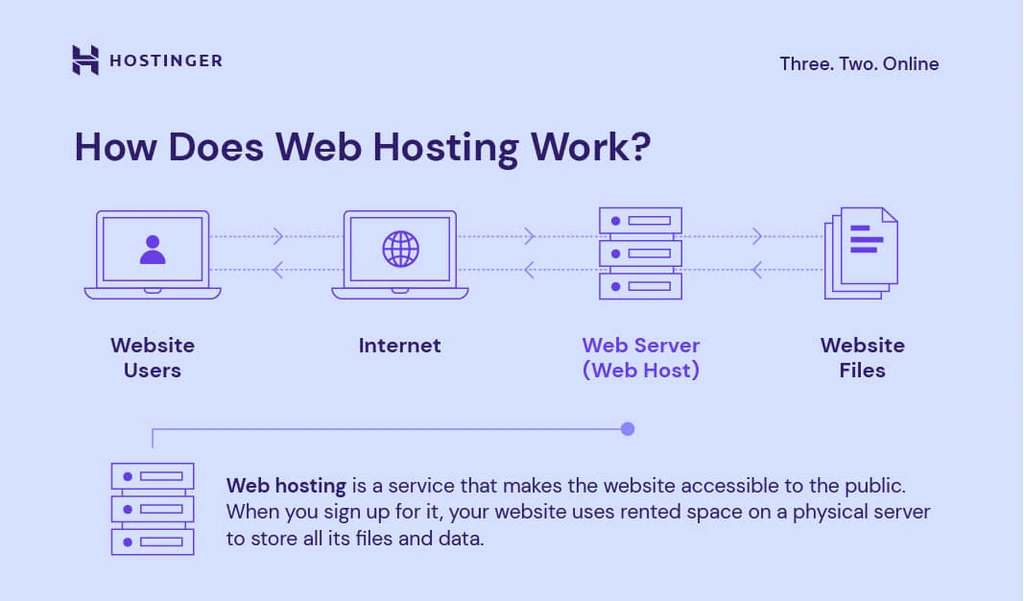
Web hosting is a service that allows individuals and organizations to make their websites accessible on the internet. It involves storing website files on a server, which delivers these files to visitors when they type in your website address.
Understanding web hosting is crucial for anyone looking to create an online presence. Whether you are setting up a personal blog, an e-commerce site, or a business website, web hosting is the foundation. It ensures your site runs smoothly and is always available to users.
In this blog post, we will explore what web hosting is, why it’s important, and the different types available. By the end, you will have a clear understanding of web hosting and how to choose the best option for your needs.
Credit: www.hostinger.com
Introduction To Web Hosting
Welcome to our guide on web hosting. If you want to create a website, you need to understand web hosting. This is the first step in your online journey. Let’s dive into the basics.
Definition
Web hosting is a service that allows you to publish your website on the internet. A web host is a company that provides the technologies and services needed for your website to be viewed on the Internet. Websites are hosted or stored on special computers called servers.
When internet users want to view your website, they type your website address or domain into their browser. Their computer then connects to your server and your web pages will be delivered to them through the browser.
Importance
Web hosting is essential for any website. Without it, your site cannot be accessed by others. Here are some key reasons why web hosting is important:
- Website Accessibility: Web hosting makes your website accessible to users worldwide.
- Storage Space: It provides space to store your website files, images, and videos.
- Security: Hosting companies offer security features to protect your site from hackers.
- Performance: Good web hosting ensures fast loading times and better site performance.
Choosing the right web hosting service is crucial. Your website’s success depends on it.
Here’s a quick comparison of different types of web hosting:
| Type of Hosting | Features | Best For |
|---|---|---|
| Shared Hosting | Cheap, easy to use, limited resources | Small websites, beginners |
| VPS Hosting | More resources, more control, higher cost | Medium-sized websites, growing businesses |
| Dedicated Hosting | Full control, high performance, expensive | Large websites, high traffic sites |
Now you know the basics of web hosting. It’s time to choose the right service for your website.

Credit: www.godaddy.com
Types Of Web Hosting
Choosing the right web hosting is vital for your website’s success. There are several types of web hosting. Each has its own pros and cons. Understanding these types helps you make the best choice.
Shared Hosting
Shared hosting is the most common type. Multiple websites share the same server. This makes it affordable. It is ideal for small websites or beginners. The downside is slower speed and less control. If one site gets a lot of traffic, others can slow down.
Vps Hosting
VPS (Virtual Private Server) hosting offers more control. The server is divided into virtual servers. Each website has its own resources. This provides better performance and security. It is a good choice for medium-sized websites. VPS hosting costs more than shared hosting but less than dedicated hosting.
Dedicated Hosting
Dedicated hosting gives you an entire server for your website. This means better performance and complete control. It is ideal for large websites with high traffic. You can customize the server to meet your needs. The drawback is the higher cost. It requires technical knowledge to manage the server.
Cloud Hosting
Cloud hosting uses multiple servers to host your website. If one server fails, another one takes over. This ensures high uptime and reliability. It can handle high traffic and is scalable. You only pay for the resources you use. It is suitable for growing websites.
| Type | Cost | Control | Performance | Ideal For |
|---|---|---|---|---|
| Shared Hosting | Low | Low | Basic | Small Websites |
| VPS Hosting | Medium | Medium | Good | Medium Websites |
| Dedicated Hosting | High | High | Excellent | Large Websites |
| Cloud Hosting | Variable | Medium | Very Good | Growing Websites |
Choosing the right type of hosting is crucial. It impacts your website’s performance and user experience. Consider your website’s needs and your budget. This will help you make the best decision.
How Web Hosting Works
Understanding how web hosting works can seem complex. But let’s break it down. Web hosting is essential for any website to be accessible on the internet. It involves several key components working together.
Servers
Servers are powerful computers that store your website’s data. They run all day, every day. This ensures your website is always available. Think of them as the backbone of web hosting. They hold your web pages, images, videos, and other files. When someone visits your website, their browser connects to the server. The server then sends the requested data back to the browser.
Domains
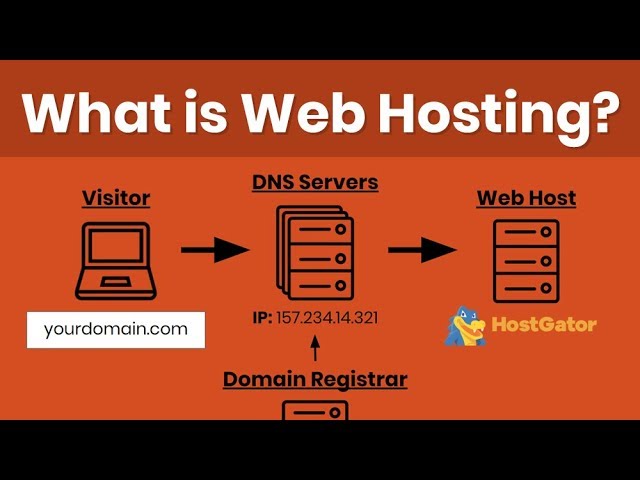
A domain is your website’s address on the internet. It is what users type into their browsers to find your site. For example, www.example.com is a domain. Your domain name points to the server where your website is hosted. It acts as a user-friendly link to your site. Without a domain name, users would have to enter a series of numbers (an IP address) to visit your site.
Dns
DNS stands for Domain Name System. It is like the internet’s phone book. DNS translates domain names into IP addresses. When you type a domain name into your browser, DNS finds the corresponding IP address. This process allows your browser to locate the correct server. Then, it retrieves the website’s data for you to view.
By understanding these components, you can grasp how web hosting works. It involves servers, domains, and DNS working together. This ensures your website is accessible to users around the world.
Choosing The Right Web Hosting
Choosing the right web hosting is crucial for your website’s success. Your website’s performance, security, and growth depend on it. Let’s explore how to make the best choice.
Assessing Needs
First, assess your website’s needs. Understand the purpose of your site. Is it a blog, an e-commerce store, or a portfolio? Different types of sites have different hosting requirements.
- Traffic: Estimate your expected traffic. High traffic sites need more resources.
- Storage: Determine how much storage space you need. Media-heavy sites need more space.
- Performance: Consider speed and reliability. Fast loading times are essential for user experience.
Make a list of these needs. This will guide your hosting choice.
Budget Considerations
Web hosting comes in various price ranges. It’s important to balance cost and features. Here are some points to consider:
- Shared Hosting: Affordable but limited resources. Suitable for small websites.
- VPS Hosting: More expensive but offers better performance. Good for growing sites.
- Dedicated Hosting: Highest cost but maximum control and resources. Ideal for large businesses.
Review your budget. Choose a hosting plan that fits your financial limits without compromising on essential features.
Scalability
Scalability is key for future growth. Your hosting should grow with your website. Here’s what to look for:
| Hosting Type | Scalability |
|---|---|
| Shared Hosting | Limited scalability |
| VPS Hosting | Moderate scalability |
| Dedicated Hosting | High scalability |
Choose a hosting provider that offers easy upgrades. This ensures your site can handle increased traffic without downtime.
Top Web Hosting Providers
Choosing the right web hosting provider is crucial for your website’s success. With many options available, it can be hard to decide. This section will help you compare top web hosting providers. We will look at their features and pricing to help you make an informed decision.
Features Comparison
Different web hosting providers offer various features. Some provide unlimited bandwidth, while others offer free domain registration. Let’s compare some of the key features of top web hosting providers:
- Bluehost: Free domain, SSL certificate, and 24/7 support.
- SiteGround: Daily backups, free CDN, and enhanced security features.
- HostGator: Unlimited storage, free website builder, and a 99.9% uptime guarantee.
Bluehost is known for its user-friendly interface. SiteGround is praised for its security features. HostGator offers excellent uptime and storage options. Consider what features are most important for your website.
Pricing Comparison
Pricing is another critical factor when selecting a web hosting provider. Different providers offer various pricing plans. Here is a comparison of the starting prices for some top web hosting providers:
- Bluehost: Starts at $2.95 per month.
- SiteGround: Starts at $3.99 per month.
- HostGator: Starts at $2.75 per month.
Bluehost offers the most affordable starting plan. SiteGround is slightly more expensive but offers enhanced security. HostGator’s pricing is competitive, with great uptime and storage. Evaluate your budget and choose the plan that fits your needs.
Setting Up Web Hosting
Web hosting stores your website’s files on a server, making them accessible online. It ensures your site runs smoothly.
Setting up web hosting is an essential step in bringing your website to life. This process involves several crucial steps that ensure your site runs smoothly. Let’s delve into the details of setting up web hosting.Registering A Domain
The first step is to register a domain. A domain is your website’s address on the internet. Choose a domain name that reflects your brand or purpose. Use a domain registrar service to check if your desired name is available. Once you find an available name, register it. This usually involves providing some basic information and paying a registration fee.Uploading Website Files
After registering your domain, the next step is to upload your website files. These files include HTML, CSS, images, and other content. Use an FTP (File Transfer Protocol) client to transfer these files from your computer to the web server. Many web hosting services offer built-in file managers. These tools can make the uploading process easier. Ensure all your files are in the correct directories.Configuring Settings
The final step is configuring the settings. This involves setting up email accounts, databases, and security features. Access your web hosting control panel to adjust these settings. Configure your DNS (Domain Name System) to point to your web server. Set up SSL certificates to secure your site. Test your site to ensure everything works correctly. Proper configuration is key to a successful website.Managing Your Web Hosting
Managing your web hosting is crucial for maintaining a smooth website. It involves overseeing various tools and services that ensure your website runs efficiently. Below, we explore three essential aspects of managing your web hosting.
Control Panels
A control panel is a web-based interface provided by your hosting service. It allows you to manage your server and website easily. Popular control panels include cPanel and Plesk. These tools help you handle email accounts, domains, and databases.
Control panels offer a graphical interface. This makes it easier to perform tasks without needing technical knowledge. You can install applications, monitor resources, and handle security settings with a few clicks.
Ftp Access
FTP stands for File Transfer Protocol. It is a standard network protocol used to transfer files from one host to another. With FTP access, you can upload, download, and manage your website files.
To use FTP, you need an FTP client like FileZilla. Enter your server credentials and connect to your web hosting. This method is faster and more reliable for transferring large files.
FTP also supports secure connections through FTPS and SFTP. These protocols ensure your data is transferred safely.
Backup Solutions
Regular backups are vital for protecting your website data. Backup solutions ensure you can restore your website in case of data loss or server issues. Many hosting providers offer automated backup services.
Backup solutions can be categorized into:
- Full backups: Complete copies of all your website data.
- Incremental backups: Only new or changed data since the last backup.
- Differential backups: All data changed since the last full backup.
Choose a backup solution based on your needs. Some services even store backups on remote servers for added security.
Managing your web hosting properly ensures your website stays online and performs well. By using control panels, FTP access, and backup solutions, you can maintain your website with ease.
Common Web Hosting Issues
Web hosting is essential for any website. But, it can come with its challenges. Common web hosting issues can affect your site’s performance and security. Knowing these issues can help you manage your website better. Below are some common web hosting issues that you might face.
Downtime
Downtime happens when your website is not available. It can be due to server problems or maintenance. Frequent downtime can hurt your site’s reputation. It also affects user experience and SEO rankings. Choose a reliable web hosting provider to minimize downtime.
Security Concerns
Security is crucial for any website. Cyber-attacks can steal data and harm your site. Poor security measures can make your site vulnerable. Ensure your web hosting provider offers strong security features. Use SSL certificates and regular backups to protect your site.
Performance Problems
Slow website performance can drive visitors away. It also affects your SEO rankings. Performance issues can result from poor server speed. Overloaded servers can also slow down your site. Optimize your website and choose a good hosting plan. This will improve your site’s performance.
Tips For Optimizing Your Web Hosting
Optimizing your web hosting improves your website’s performance and reliability. Proper optimization can lead to faster load times, better security, and a smoother user experience. Here are some essential tips to help you optimize your web hosting effectively.
Improving Speed
Website speed is crucial for user satisfaction. A slow website can frustrate visitors and drive them away. To improve speed, choose a hosting plan that offers enough resources. Utilize content delivery networks (CDNs) to distribute your content globally. Regularly optimize images and other media files. Use caching plugins to reduce load times.
Enhancing Security
Security is vital for protecting your website and user data. Select a hosting provider that offers robust security features. Enable SSL certificates to encrypt data between your site and visitors. Regularly update your website software, themes, and plugins. Use strong, unique passwords for all accounts. Consider using security plugins to monitor and protect your site from threats.
Regular Maintenance
Regular maintenance keeps your website running smoothly. Schedule regular backups to avoid data loss. Monitor website performance to identify and fix issues promptly. Keep your hosting plan updated to accommodate growing traffic and content. Regularly clean up your database by removing unnecessary files and data.
Credit: www.youtube.com
Frequently Asked Questions
What Is Meant By Web Hosting?
Web hosting is a service that allows individuals and organizations to make their website accessible via the internet. Hosting providers offer storage space on their servers for websites. This ensures that users can access the website online.
Do I Really Need Web Hosting?
Yes, you need web hosting to make your website accessible online. It stores your site’s files on a server.
Is Godaddy A Web Host?
Yes, GoDaddy is a web host. It offers hosting services, domain registration, and website building tools.
What Is Web Hosting Vs Domain?
Web hosting provides server space for your website. A domain is the address where users find your site online.
Conclusion
Web hosting is crucial for any website. It stores your site’s files. It also makes your site accessible online. Understanding web hosting helps in choosing the right service. A good host ensures your site runs smoothly. This improves user experience.
It also boosts your site’s performance. Invest time in researching web hosting options. This can save you headaches later. Make sure to select a reliable provider. Your website deserves the best support.


