
Web hosting is essential for any website. It allows your site to be accessible online.
But how does web hosting work exactly? Web hosting involves storing your website files on a server. This server is connected to the internet. When someone types your website address, their browser requests your site from this server. The server then sends the files to their browser, displaying your website.
It’s like renting space on the internet. Understanding web hosting can help you choose the right plan for your needs. This article will explain the basics of web hosting, its types, and how it impacts your website’s performance. Whether you are a beginner or looking to enhance your knowledge, this guide will provide clear insights.
Introduction To Web Hosting
Web hosting is a crucial part of having a website. It allows your website to be accessible on the internet. Without web hosting, your website won’t be visible to others. This makes understanding web hosting essential for anyone with a website.
What Is Web Hosting?
Web hosting is a service that stores your website files. These files include text, images, and videos. A web host provides the technology to view your website online. Think of it as renting space on the internet for your site.
Importance Of Web Hosting
Web hosting impacts your website’s performance. A good web host ensures your site loads fast. It also offers security features to protect your data. Reliable hosting can prevent your site from crashing. This keeps your visitors happy and your site accessible.
Types Of Web Hosting
Understanding the types of web hosting is crucial for choosing the right plan. Different hosting types suit different needs, budgets, and technical requirements. Below, we explore the various options available.
Shared Hosting
Shared hosting is the most economical choice. Multiple websites share a single server. This means shared resources like CPU and RAM. Ideal for small businesses and personal blogs. It’s cost-effective and easy to manage. However, heavy traffic can slow down your site.
Vps Hosting
VPS stands for Virtual Private Server. It offers a middle ground between shared and dedicated hosting. Each website gets its own partitioned space. More resources and better performance than shared hosting. Suitable for growing websites and small businesses. VPS hosting provides more control and flexibility.
Dedicated Hosting
Dedicated hosting means you get an entire server to yourself. No sharing of resources with other websites. This ensures maximum performance and security. Ideal for large businesses and high-traffic websites. Comes with a higher cost but offers the best control. You can customize the server to meet your needs.
Cloud Hosting
Cloud hosting uses multiple servers to host your website. Resources are distributed across various locations. This ensures high availability and reliability. If one server fails, another takes over. Scalable to handle traffic spikes. Great for growing businesses and e-commerce sites. Offers flexibility and pay-as-you-go pricing.
How Web Hosting Works
Understanding how web hosting works is essential for anyone who wants to create a website. Web hosting involves several components that work together to make your website accessible on the internet. Below, we will explore the key elements involved in web hosting.
Servers And Data Centers
Web hosting relies on servers, which are powerful computers that store your website’s data. These servers are housed in data centers, which are secure facilities designed to keep them running smoothly. Data centers have backup power supplies, climate control, and security measures to protect the servers.
Servers must be reliable and fast. This ensures that your website is always accessible to visitors. Data centers are strategically located around the world to provide quicker access to users from different regions.
Domain Names And Dns
A domain name is the address people use to visit your website. It is a human-friendly representation of your website’s IP address. Examples include www.example.com or www.mywebsite.org. A domain name makes it easier for users to find your site.
The Domain Name System (DNS) translates domain names into IP addresses. When someone types your domain name into their browser, the DNS finds the corresponding IP address and directs them to your server. This process ensures that visitors reach the correct website.
Hosting Providers
Hosting providers are companies that offer web hosting services. They own and maintain the servers and data centers that store your website. They provide various hosting plans to meet different needs, from small personal blogs to large e-commerce sites.
When choosing a hosting provider, consider factors like uptime guarantees, customer support, and pricing. Some popular hosting providers include Bluehost, HostGator, and SiteGround. These companies offer a range of services to help you get your website online quickly and efficiently.
| Hosting Provider | Features |
|---|---|
| Bluehost | Free domain, 24/7 support, easy WordPress integration |
| HostGator | Unlimited storage, free website transfer, 99.9% uptime guarantee |
| SiteGround | Daily backups, free SSL, excellent customer service |
Choosing The Right Web Hosting
Choosing the right web hosting is vital for your website’s success. The right host ensures your site runs smoothly. It impacts speed, security, and user experience. Let’s dive into the key factors to consider.
Assessing Your Needs
Start by understanding what your website requires. Are you running a blog, an online store, or a portfolio? Different sites have different needs. A small blog may need less power. An online store needs more resources.
Think about traffic. Estimate how many visitors you expect. High traffic sites need robust hosting. Consider your site’s growth potential. Choose a host that can scale with you. Understand your technical skills. Managed hosting offers support. If you can handle tech issues, you might choose a basic plan.
Comparing Features
Look at the features each host provides. Check for uptime guarantees. Your site should be available 24/7. Look at storage and bandwidth limits. Ensure they meet your needs. Security features are crucial. Look for SSL certificates, backups, and firewalls.
Consider control panel options. A user-friendly panel makes management easy. Some hosts offer one-click installers for popular apps. This can save time. Customer support is key. Read reviews about their support quality. Ensure they offer support in your preferred language.
Budget Considerations
Budget plays a big role in your choice. Compare prices of different hosts. Look for hidden fees. Some hosts offer low initial rates. Renewal rates might be higher.
Consider the value you get. Sometimes paying a bit more offers better service. Balance cost with features. Free hosting is available. It often comes with limitations. Paid plans offer more reliability.
Choose a host that fits your budget and meets your needs. Invest wisely in hosting. It impacts your site’s performance and success.
Setting Up Your Web Hosting
Setting up your web hosting is a crucial step to get your website online. This process involves a few key steps to ensure your site is accessible to visitors. Here’s how you can set up your web hosting efficiently.
Registering A Domain
The first step is to register a domain name. A domain name is your website’s address on the internet. Choose a name that represents your brand or content. Use a domain registrar to register it. Ensure the name is easy to remember and type. Once registered, you own that domain for a specified period.
Configuring Dns
Next, configure the Domain Name System (DNS) settings. DNS links your domain name to your web server’s IP address. This process helps browsers locate your website. Log in to your domain registrar’s dashboard. Find the DNS settings section. Enter the IP address provided by your web hosting service. Save the changes. It may take a few hours for the changes to propagate.
Uploading Website Files
Finally, upload your website files to the web server. Use an FTP client to transfer files from your computer to the server. Ensure you place your files in the correct directory, usually the public_html folder. Once uploaded, your site should be live. Check by typing your domain name in a browser.
Credit: www.quora.com
Managing Your Web Hosting
Managing your web hosting is crucial for a smooth-running website. Understanding the basics can save you time and headaches. Below, we cover some key aspects to help you manage your web hosting effectively.
Control Panel Basics
The control panel is your web hosting dashboard. It lets you manage files, databases, and email accounts. Most hosts provide a control panel like cPanel or Plesk.
Here are some basic features you will find:
- File Manager: Upload, download, and organize your website files.
- Domain Management: Manage your domains and subdomains.
- Email Accounts: Create and manage email accounts associated with your domain.
- Database Management: Create and manage databases for your website.
Knowing how to use these tools can help you maintain your website easily.
Monitoring Performance
Website performance is key for user experience and SEO. Slow loading times can drive visitors away.
Here are some ways to monitor performance:
- Server Uptime: Regularly check your server’s uptime. Aim for at least 99.9% uptime.
- Page Load Speed: Use tools like Google PageSpeed Insights. Aim for a load time under 3 seconds.
- Resource Usage: Monitor CPU, RAM, and disk usage. Keep an eye on your resource limits.
Regular monitoring helps you address issues before they affect your visitors.
Regular Backups
Regular backups are essential. They protect your data from loss due to errors or attacks.
Consider these backup practices:
- Automatic Backups: Set up automatic backups. Most hosts offer this feature.
- Manual Backups: Perform manual backups before major updates.
- Off-Site Storage: Store backups off-site for extra security.
Having recent backups can save your website if something goes wrong.
By understanding these aspects, you can manage your web hosting more effectively. A well-managed hosting environment leads to a more reliable and secure website.
Common Web Hosting Issues
Web hosting can encounter several challenges. These issues can affect your site’s performance and security. Understanding these common problems helps you better manage your website. Let’s explore some frequent web hosting issues.
Downtime And Uptime
Downtime refers to the period when your website is unavailable. High downtime can frustrate visitors. It can lead to lost revenue and poor user experience. Uptime is the time when your website is accessible. Most hosting providers promise 99.9% uptime. Still, occasional downtime can occur due to server maintenance or unexpected issues.
To minimize downtime:
- Choose a reliable hosting provider.
- Monitor your website’s uptime regularly.
- Have a backup plan for unexpected outages.
Security Concerns
Security is crucial for any website. Web hosting can pose several security challenges. Common threats include malware, hacking, and data breaches. Protecting your website should be a top priority.
To enhance security:
- Use strong passwords and change them regularly.
- Enable SSL certificates to encrypt data.
- Keep your software and plugins updated.
- Regularly backup your data.
Remember, a secure website builds trust with your visitors.
Scalability Challenges
Scalability means your website can handle growing traffic. As your site grows, it needs more resources. Some hosting plans may not support this growth. This can lead to slow loading times or even crashes.
To address scalability:
- Choose a hosting plan that offers scalability options.
- Consider cloud hosting for flexible resource management.
- Monitor your website’s performance and upgrade when needed.
Ensuring your website can scale smoothly is key to long-term success.

Credit: www.bluehost.com
Future Of Web Hosting
The world of web hosting is evolving quickly. New technologies and practices are shaping the future. Understanding these changes helps you stay ahead of the curve. Let’s explore what the future holds.
Emerging Technologies
Technology is advancing at a rapid pace. Web hosting is no exception. Here are some emerging technologies to watch:
- Edge Computing: This technology brings data storage closer to the user. It reduces latency and improves performance.
- AI and Machine Learning: These technologies help in managing servers. They predict and fix issues before they happen.
- Quantum Computing: It promises faster data processing. It could change how we handle complex tasks.
Trends To Watch
Several trends are shaping the future of web hosting. Keeping an eye on these trends can give you a competitive edge:
- Serverless Architecture: This model allows developers to focus on code. The infrastructure scales automatically.
- Increased Security Measures: Cyber threats are growing. Hosting providers are investing in better security protocols.
- Greater Focus on User Experience: Speed and reliability are key. Users expect websites to load quickly and run smoothly.
Sustainable Hosting
Sustainability is becoming a priority. Web hosting companies are looking for eco-friendly solutions:
| Initiative | Benefit |
|---|---|
| Green Energy | Reduces carbon footprint |
| Energy-efficient Servers | Lowers energy consumption |
| Recycling Programs | Minimizes e-waste |
Choosing sustainable hosting options can help protect our planet. It’s a win-win for everyone involved.
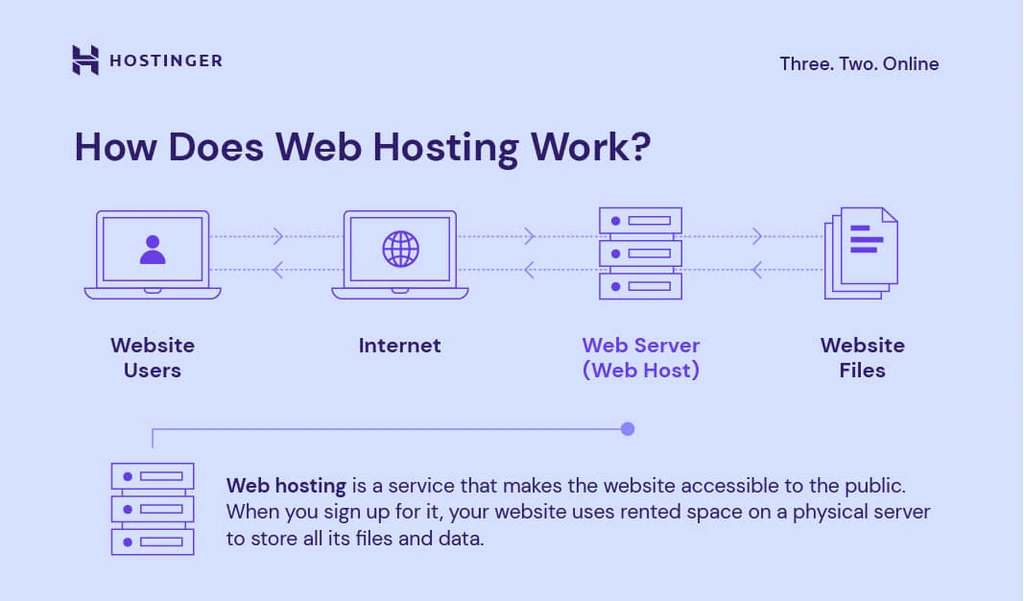
Credit: www.hostinger.com
Frequently Asked Questions
What Is Web Hosting?
Web hosting is a service that allows websites to be accessible on the internet. It involves storing website files on servers, which are maintained by hosting providers.
How Do Web Hosting Services Work?
Web hosting services store your website’s data on their servers. When users type your domain, the server delivers your site to their browser.
What Are The Types Of Web Hosting?
The main types of web hosting are shared, VPS, dedicated, and cloud hosting. Each type offers different levels of performance and control.
Why Is Web Hosting Important?
Web hosting is crucial for making your website accessible online. Without it, your site cannot be viewed by users on the internet.
Conclusion
Understanding web hosting is crucial for your online presence. It keeps your website accessible and secure. Choose a reliable provider to ensure smooth performance. Remember, your website’s speed and reliability depend on good hosting. Explore different options and pick what suits your needs best.
With the right web hosting, you can confidently manage your online space. Now you know how web hosting works. Get started and let your website thrive.


