
Web hosting is a service that makes websites accessible on the internet. It stores your website data on special computers called servers.
Curious about how websites appear online? Web hosting is the key. Without it, your site remains invisible to the world. Picture web hosting as renting space on the internet for your website. This space is on a server, a powerful computer that keeps your site up and running.
Web hosting companies provide this service, ensuring your site is always available to visitors. They handle all the technical stuff, so you don’t have to worry. Understanding web hosting can help you choose the right service for your needs. Let’s dive into the basics and explore why it’s essential for your online presence.
Introduction To Web Hosting
Web hosting is a service that allows your website to be accessible on the internet. Without web hosting, your site cannot be viewed by anyone online. It is like renting space on the internet for your website.
Importance Of Web Hosting
Web hosting is crucial for any website. It ensures your site is available to users 24/7. Good web hosting improves your site’s performance and speed. It also affects your site’s security and reliability. Without it, your website would not exist online.
Basic Concept Of Web Hosting
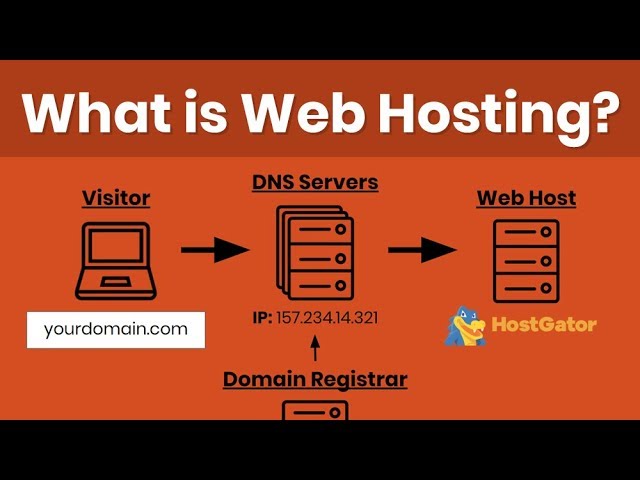
Web hosting works by storing your website files on a server. This server is a powerful computer that runs 24/7. When someone types your website address, the server sends your site files to their browser. This allows users to view your website.
There are different types of web hosting, such as shared hosting, VPS hosting, and dedicated hosting. Each type has its own benefits and limitations. Choosing the right one depends on your website’s needs and traffic.

Credit: www.godaddy.com
Types Of Web Hosting
Choosing the right web hosting type is crucial for your website’s success. Different types of web hosting offer various features and benefits. Let’s explore the most common types of web hosting.
Shared Hosting
Shared hosting is the most economical option. Here, multiple websites share a single server’s resources. This includes CPU, RAM, and storage. It’s perfect for small websites and blogs with low traffic. The main advantage is its low cost. However, performance may suffer if other sites on the server experience high traffic.
Vps Hosting
VPS hosting stands for Virtual Private Server hosting. It offers a middle ground between shared and dedicated hosting. In VPS hosting, a physical server is divided into multiple virtual servers. Each virtual server operates independently. This means better performance and more control. It’s ideal for websites with moderate traffic.
Dedicated Hosting
Dedicated hosting means you get an entire server for your website. No sharing of resources. This hosting type offers the best performance and security. It’s suitable for large websites with high traffic. Dedicated hosting is more expensive but provides complete control over the server.
Cloud Hosting
Cloud hosting uses a network of virtual servers. These servers pull resources from various physical servers. This ensures high availability and scalability. If one server fails, another takes over. It’s perfect for websites with fluctuating traffic. Cloud hosting is also cost-effective. You pay only for the resources you use.
| Hosting Type | Best For | Cost | Performance |
|---|---|---|---|
| Shared Hosting | Small Websites | Low | Low |
| VPS Hosting | Moderate Traffic | Moderate | Moderate |
| Dedicated Hosting | High Traffic | High | High |
| Cloud Hosting | Fluctuating Traffic | Varies | High |
How Web Hosting Works
Web hosting is the service that allows websites to be accessible on the internet. Understanding how web hosting works is key to choosing the right hosting service for your site. This section breaks down the process into easy-to-understand parts.
Server And Storage
Web hosting involves storing your website’s files on a server. A server is a powerful computer designed to store and manage website data. These files include HTML, CSS, images, and scripts.
Hosting providers offer different types of servers:
- Shared servers: Multiple websites share the same server.
- Dedicated servers: One website has the entire server to itself.
- VPS (Virtual Private Server): A mix of shared and dedicated hosting.
The server’s storage, known as disk space, is crucial. More disk space means your site can store more files and handle more traffic.
Bandwidth And Uptime
Bandwidth is the amount of data transferred between your site and its users. Higher bandwidth means your site can handle more visitors and data transfers.
Hosting providers usually offer different bandwidth limits. Choose a plan that fits your site’s needs.
Uptime is the percentage of time your website is accessible online. High uptime guarantees your site is available to users most of the time.
Most hosting services offer 99.9% uptime. This means your site is offline for less than an hour per month.
Understanding these key elements helps you choose the best web hosting service for your needs.
Credit: www.youtube.com
Choosing The Right Web Hosting Provider
Choosing the right web hosting provider is crucial for your website’s success. It affects site speed, security, and overall performance. Not all web hosting providers are equal. Make an informed decision by considering several key factors.
Factors To Consider
First, look at the provider’s uptime guarantee. Your website should be accessible at all times. A high uptime percentage ensures this.
Second, consider the customer support options available. Reliable support can solve issues quickly. Look for 24/7 availability and multiple contact methods.
Third, check the scalability options. Your website might grow. You should be able to upgrade your hosting plan easily.
Fourth, review the security features. A good hosting provider offers SSL certificates, firewalls, and regular backups. These protect your data.
Finally, think about the cost. Compare the prices and features of different providers. Choose the one that offers the best value.
Popular Web Hosting Providers
Several hosting providers stand out for their reliability and features:
Bluehost: Known for excellent customer support and easy setup.
SiteGround: Offers high performance and strong security features.
HostGator: Provides affordable plans and a user-friendly interface.
InMotion Hosting: Excels in speed and customer service.
A2 Hosting: Focuses on speed and offers multiple data centers.
Each of these providers has unique strengths. Choose the one that best fits your needs.
Setting Up A Web Hosting Account
Web hosting stores your website files on a server, making them accessible online. Setting up an account involves choosing a host and plan.
Setting up a web hosting account is the first step to getting your website online. This process can seem confusing, but it is simpler than it appears. Let’s break it down into easy steps.Registering A Domain
Your domain name is your website’s address on the internet. Choose a name that is easy to remember and relevant to your content. Many hosting providers offer domain registration services. Search for your desired name to see if it is available. If it is, you can register it with a few clicks. Make sure to check the domain’s cost and renewal fees.Configuring Hosting Settings
Once your domain is registered, the next step is configuring your hosting settings. Log in to your hosting account dashboard. This is where you control your website’s backend. Set up your website’s root directory. This is the main folder where your website files will be stored. Ensure your domain is linked to this directory. Update your DNS settings to point your domain to your hosting server. This process may take a few hours to complete. Follow these steps, and your web hosting account will be ready. Your website will be live and accessible to users worldwide. “`Managing Your Web Hosting
Managing your web hosting is crucial for a successful online presence. It involves various tasks, such as using control panels and monitoring website performance. Proper management ensures your website runs smoothly and efficiently.
Using Control Panels
Control panels simplify the management of web hosting. They offer a user-friendly interface to handle various tasks. Here are some common features:
- Domain Management: Easily add, remove, or update domain names.
- Email Accounts: Create and manage email accounts linked to your domain.
- File Management: Upload, download, or modify website files.
- Database Management: Create and manage databases with ease.
- Security Settings: Configure security options to protect your site.
Two popular control panels are cPanel and Plesk. Both provide intuitive interfaces and powerful features.
Monitoring Website Performance
Monitoring website performance is essential for maintaining a fast and reliable site. It helps identify issues and optimize performance. Key metrics to monitor include:
| Metric | Description |
|---|---|
| Uptime | Percentage of time your website is online. |
| Load Time | Time taken for your website to load. |
| Response Time | Time taken for the server to respond to requests. |
| Traffic | Number of visitors to your website. |
Several tools can help monitor these metrics:
- Google Analytics: Provides detailed traffic and performance reports.
- Pingdom: Monitors uptime and performance.
- GTmetrix: Analyzes website speed and provides optimization tips.
Regular monitoring helps ensure your website remains efficient and user-friendly.
Web Hosting Security
Web hosting security is crucial for protecting your website. A secure web host helps keep your data safe and your site running smoothly. Without proper security, your website could face many threats. These threats include hacking, data breaches, and malware attacks.
Importance Of Security
Security is essential for any website. It protects your data and your users’ information. A secure website builds trust with your audience. It also helps you avoid legal issues and financial losses. Hackers often target websites with weak security. This can lead to stolen data and damaged reputations.
Search engines prefer secure websites. A secure site can improve your SEO rankings. It also ensures that your website loads correctly for all users. This leads to a better user experience.
Security Best Practices
Implementing the best security practices can protect your website. Here are some key steps:
- Use strong passwords: Create complex passwords and change them regularly.
- Enable SSL certificates: Secure your website with HTTPS.
- Regular backups: Backup your website data frequently.
- Update software: Keep your website software up-to-date.
- Monitor activity: Regularly check for any suspicious activities.
You can also use security plugins. These plugins can help detect and prevent threats. They can also offer additional layers of protection.
| Security Measure | Description |
|---|---|
| Firewall | Blocks unauthorized access to your website. |
| Two-Factor Authentication | Requires a second form of verification for login. |
| Anti-Malware Software | Detects and removes malware from your site. |
Troubleshooting Common Web Hosting Issues
Web hosting issues can disrupt your online presence. Addressing these issues promptly ensures a smooth user experience. Here are some common web hosting problems and how to troubleshoot them.
Website Downtime
Website downtime can frustrate visitors. It can also affect your site’s reputation. First, check your hosting provider’s status page. They often post updates about outages. If the hosting service is working, check your domain settings. Ensure your DNS records point to the correct server.
Sometimes, a plugin or theme can cause downtime. Disable recently added plugins or themes. If your site comes back, you’ve found the issue. Always keep backups. They help restore your site quickly if something goes wrong.
Slow Loading Speeds
Slow loading speeds can drive visitors away. To diagnose the issue, use tools like Google PageSpeed Insights. These tools offer insights into speed bottlenecks. Large images can slow down your site. Compress images to reduce load times.
Another common cause is too many plugins. Disable unnecessary plugins to speed up your site. Also, consider upgrading your hosting plan. Shared hosting can slow down during peak times. A better plan can improve performance.
Technical Support
Good technical support is crucial for resolving issues. Check your hosting provider’s support options. Many offer 24/7 support via chat, phone, or email. Prepare detailed information before contacting support. This includes error messages and steps taken to fix the issue.
Join forums and online communities. They can offer solutions from other users. Sometimes, hosting providers have knowledge bases. These can provide quick answers to common problems.
Future Trends In Web Hosting
The world of web hosting is constantly evolving. As technology advances, new trends emerge, shaping the future of web hosting. Two key trends stand out: Green Hosting and AI and Automation. These trends are changing how we host websites.
Green Hosting
Green hosting focuses on reducing the environmental impact of web hosting. Data centers consume a lot of energy. Green hosting providers use renewable energy sources. They also implement energy-efficient practices. This reduces their carbon footprint. Customers who care about the environment prefer green hosting. It helps the planet and improves the provider’s reputation.
Ai And Automation
AI and automation are transforming web hosting. AI can optimize server performance. It can predict and prevent issues before they happen. Automation simplifies many tasks. It handles backups, updates, and security checks. This makes web hosting more efficient. It also reduces the need for manual intervention. AI and automation improve the user experience. They make web hosting more reliable and secure.
Credit: www.youtube.com
Frequently Asked Questions
What Is Web Hosting?
Web hosting is a service allowing individuals and organizations to publish a website or web page on the Internet. It involves storing website files on a server, making them accessible to visitors online.
How Does Web Hosting Work?
Web hosting works by storing website files on a server. When users enter your domain name, their browsers fetch these files from the server, displaying your website.
What Are The Types Of Web Hosting?
There are several types of web hosting, including shared hosting, VPS hosting, dedicated hosting, and cloud hosting. Each type varies in cost, performance, and control.
Why Is Web Hosting Important?
Web hosting is crucial as it ensures your website is accessible online. It provides the necessary resources and infrastructure to keep your website running smoothly.
Conclusion
Web hosting is essential for any website to be online. It stores your website’s files securely. Choosing the right host impacts your site’s speed and reliability. Consider your needs and budget before deciding. Always look for good customer support. Now you know the basics of web hosting.
Make an informed choice and keep your website running smoothly. Happy hosting!


