

Upgrading your web hosting plan is simpler than you think. First, you need to assess your current hosting needs.
Then, follow the steps to upgrade your plan. Web hosting is crucial for your website’s performance and growth. As your site expands, you may need more resources. This is when upgrading your hosting plan becomes essential. Whether it’s increased traffic, more storage, or better security, a higher-tier plan offers many benefits.
Understanding how to make this switch can seem challenging. But, with the right guidance, the process is straightforward. In this post, we will walk you through the steps to upgrade your web hosting plan. You’ll gain a clear idea of what to consider and how to make the transition smoothly. Ready to boost your website’s performance? Let’s dive in!
Introduction To Web Hosting Upgrades
Web hosting is the foundation of your website. Over time, your website grows. As it grows, so does the need for better resources. Upgrading your web hosting plan is essential. This guide will help you understand why and when to upgrade.
Importance Of Upgrading
Upgrading your web hosting plan offers many benefits. Here are some reasons:
- Increased Traffic: A growing audience needs more resources.
- Better Performance: Faster load times improve user experience.
- Enhanced Security: Advanced plans offer better protection.
- Scalability: Easily handle future growth and spikes in traffic.
When To Consider Upgrading
Knowing when to upgrade is crucial. Look for these signs:
- Frequent Downtime: If your site is often down, it’s time to upgrade.
- Slow Loading Times: Slow pages can drive visitors away.
- Running Out of Resources: Hitting your resource limits often? Consider a higher plan.
- Need for Better Security: Enhanced security features are vital for growing sites.
- Adding New Features: If you plan to add new features, you might need more resources.
Upgrading your web hosting plan is a step towards better performance and growth. Evaluate your current needs and future plans. Then, choose a plan that matches them.
Assess Current Hosting Performance
Upgrading your web hosting plan can improve your website’s performance. Before upgrading, assess your current hosting performance. This helps identify areas needing improvement. Understanding your site’s needs will guide your decision.
Analyze Site Speed
Site speed affects user experience and SEO. Slow-loading pages can drive visitors away. Use tools like Google PageSpeed Insights to check your site’s speed. Identify areas where load times lag. Faster sites retain more visitors and rank better on search engines.
Evaluate Downtime Issues
Frequent downtime can harm your site’s reputation. It can also affect your search engine ranking. Monitor your site’s uptime using tools like UptimeRobot. Look for patterns or frequent outages. Consistent downtime suggests your current hosting plan may not be sufficient.
Identify Hosting Requirements
Before upgrading your web hosting plan, you need to identify your specific hosting requirements. This ensures you choose a plan that meets your website’s needs. The right hosting plan enhances your website’s performance and user experience. Here are the key areas to consider:
Traffic And Bandwidth
Consider your website’s traffic and bandwidth needs. Bandwidth is the amount of data your site can transfer to users. If your site receives a lot of traffic, you need a higher bandwidth. Here are some points to consider:
- Analyze your current traffic statistics.
- Estimate future traffic growth.
- Ensure your hosting plan can handle peak traffic times.
Storage And Resources
Your website’s storage and resources are crucial. Storage refers to the space available for your site’s files. Resources include CPU, RAM, and other server capabilities. Here are some factors to consider:
- Determine the storage needs of your website.
- Assess the size of your database and media files.
- Check if your current plan offers enough CPU and RAM.
Review these requirements carefully before upgrading your web hosting plan. This ensures your website operates smoothly and efficiently.
Credit: www.ryrob.com
Explore Upgrade Options
Upgrading your web hosting plan can seem overwhelming. But, understanding the options can make the process easier. Let’s explore the different upgrade options available to you.
Shared Vs. Vps Hosting
Shared hosting means your website shares a server with others. This is cost-effective but has limited resources. It’s good for small sites with low traffic.
VPS (Virtual Private Server) hosting, on the other hand, gives you a part of a server. You get dedicated resources, which means better performance. Ideal for growing sites.
| Feature | Shared Hosting | VPS Hosting |
|---|---|---|
| Cost | Low | Medium |
| Performance | Basic | High |
| Security | Standard | Enhanced |
| Resources | Shared | Dedicated |
Dedicated Vs. Cloud Hosting
With dedicated hosting, you get an entire server for your site. This offers maximum control and performance. It’s best for large sites with heavy traffic.
Cloud hosting uses multiple servers to host your site. This means high scalability and reliability. It’s great for sites that experience variable traffic.
- Dedicated Hosting: Complete server control, high cost, best for large sites.
- Cloud Hosting: Multiple servers, scalable, good for varying traffic.
Choosing the right upgrade depends on your needs. Consider your site’s traffic, performance, and security needs.
Compare Hosting Providers
Upgrading your web hosting plan is a significant decision. It impacts your website’s performance and user experience. One crucial step is to compare hosting providers. This ensures you choose the right plan for your needs.
Pricing And Plans
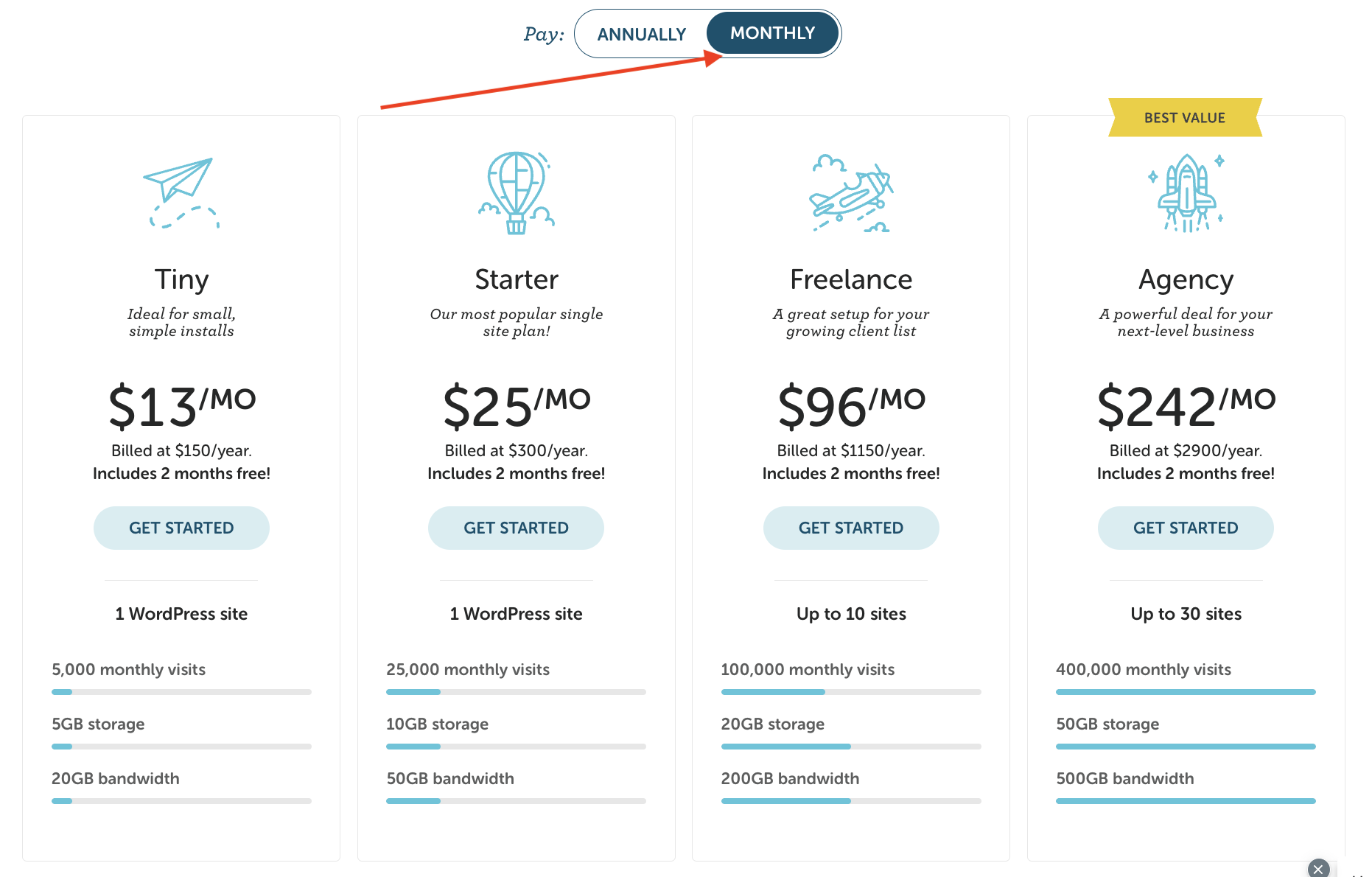
Evaluate the pricing and plans of various hosting providers. Some offer basic plans with limited features. Others provide more comprehensive plans with added benefits. Compare the cost of these plans. Ensure you get value for your money. Look at the storage, bandwidth, and other resources included.
Some providers offer discounts for long-term commitments. Check if there are hidden fees. These can increase your costs unexpectedly. Make sure you understand what each plan offers. Choose a plan that fits your budget and needs.
Customer Support And Reviews
Customer support is crucial when upgrading your web hosting plan. Look for providers with 24/7 support. This ensures you get help whenever needed. Read customer reviews to gauge the quality of support. Reviews can reveal common issues faced by users.
Pay attention to how providers handle complaints. Quick and effective responses are a good sign. Avoid providers with many negative reviews. They may not offer reliable support. Good customer support can save you a lot of headaches. Choose a provider known for excellent service.
Backup Your Website
Before upgrading your web hosting plan, it is essential to backup your website. This ensures your data remains safe during the transition. Backing up your website involves creating a copy of all your site’s files and databases.
Backup Methods
There are several ways to backup your website. You can choose manual or automated methods.
- Manual Backup: Download your files and database via FTP and cPanel.
- Automated Backup: Use hosting provider tools or third-party services.
Tools And Plugins
Using tools and plugins simplifies the backup process. They save time and reduce errors.
Here are some popular options:
| Tool/Plugin | Description | Features |
|---|---|---|
| UpdraftPlus | WordPress plugin for backups. |
|
| BackupBuddy | Complete WordPress backup solution. |
|
| Jetpack | WordPress plugin with backup features. |
|
Choose a method and tool that best fits your needs. This ensures a smooth transition during your hosting upgrade.
Upgrade And Migrate
Upgrading your web hosting plan is essential when your website grows. More traffic means a need for better performance. The process involves two main tasks: Upgrade and Migrate. Let’s explore these steps further.
Step-by-step Migration
Migration is moving your website from one hosting plan to another. Follow these steps:
- Backup your website. Use plugins or manual backup methods.
- Export your website’s database. This ensures all data is safe.
- Download your website files. This includes all media and content.
- Choose your new hosting plan. Ensure it meets your needs.
- Upload your website files to the new host. Use FTP or the hosting control panel.
- Import your database to the new host. This restores your data.
- Update your domain settings. Point the domain to the new host.
Each step is crucial for a smooth migration. Missing steps may cause issues. Use this table for a quick reference:
| Step | Action |
|---|---|
| 1 | Backup your website |
| 2 | Export your website’s database |
| 3 | Download website files |
| 4 | Choose a new hosting plan |
| 5 | Upload files to the new host |
| 6 | Import database |
| 7 | Update domain settings |
Testing The New Setup
After migration, test the new setup. This ensures everything works. Check these:
- Website load time. Faster load time means better performance.
- Functionality. Ensure all features work correctly.
- Links. Test internal and external links.
- Forms. Check if all forms are working.
- Database connections. Ensure no errors in database interactions.
Testing helps identify and fix issues early. This avoids downtime and ensures a smooth user experience. Following these steps ensures a successful upgrade and migration of your web hosting plan.
Post-upgrade Optimization
After upgrading your web hosting plan, it’s crucial to make necessary optimizations. This ensures your website takes full advantage of the new resources. The focus should be on speed optimization and security enhancements. These steps will enhance performance and protect your site from threats.
Speed Optimization
Speed is vital for a successful website. A faster site improves user experience and boosts search engine rankings. Follow these steps to optimize speed:
- Enable Caching: Use caching plugins to store static files. This reduces server load and speeds up page load times.
- Optimize Images: Compress images without losing quality. Use tools like TinyPNG or WP Smush.
- Minimize CSS and JavaScript: Reduce file sizes by minifying CSS and JavaScript. Tools like WP Rocket can help.
- Use a Content Delivery Network (CDN): Distribute content across multiple servers worldwide. This ensures faster delivery to users.
Security Enhancements
Protecting your site is as important as optimizing speed. Upgrading your hosting plan should include strengthening security measures. Implement these steps:
- Install SSL Certificates: SSL encrypts data, securing information between the server and users.
- Regular Backups: Schedule regular backups to ensure data recovery in case of breaches.
- Update Software: Keep your CMS, plugins, and themes up to date. This fixes vulnerabilities and improves security.
- Use Strong Passwords: Ensure all users have strong, unique passwords. Consider using a password manager.
- Enable Two-Factor Authentication (2FA): Adds an extra layer of security by requiring a second form of identification.
By focusing on speed optimization and security enhancements, your upgraded hosting plan will be more effective. Your website will perform better and be more secure.
Monitoring And Maintenance
Upgrading your web hosting plan is a big step towards better site performance. But, it is not a one-time task. Regular monitoring and maintenance are essential. They ensure your website continues to run smoothly. This section will discuss how to monitor and maintain your upgraded web hosting plan.
Regular Performance Checks
Regular performance checks help identify potential issues early. They help you understand how your website is performing. Tools like Google Analytics provide insights. You can monitor site speed, uptime, and user experience. Check for any spikes in traffic or downtime. These checks help maintain optimal performance.
Ongoing Support
Good web hosting providers offer ongoing support. Their support team can help with technical issues. They can assist with server configurations and software updates. Regular contact with support ensures you use all the features of your hosting plan. It also helps in resolving issues quickly.

Credit: www.greengeeks.com
Credit: www.godaddy.com
Frequently Asked Questions
Can You Upgrade An Hosting Plan?
Yes, you can upgrade your hosting plan easily. Contact your hosting provider or access your account dashboard for options.
How Do I Update My Website Hosting?
To update your website hosting, choose a new provider, backup your website, transfer files, update DNS settings, and verify the migration.
How Do I Update My Hosting?
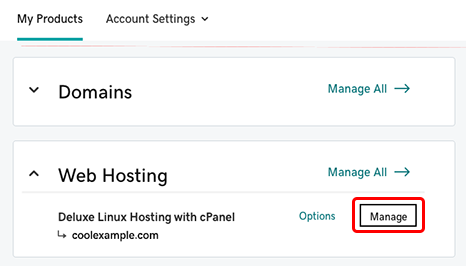
Log in to your hosting account. Go to the hosting management section. Choose “Update Plan” or “Upgrade”. Follow the on-screen instructions. Confirm the changes.
Can You Change The Web Hosting Service?
Yes, you can change your web hosting service. Choose a new provider, backup your site, and transfer your files.
Conclusion
Upgrading your web hosting plan is a smart move for better performance. Assess your current needs first. Then, research and compare options. Choose a plan that fits your growth. Follow the upgrade process provided by your hosting provider. Don’t forget to back up your website before upgrading.
This ensures no data loss. Finally, monitor your website after the upgrade. Enjoy the benefits of improved speed and reliability. Upgrading your plan can help your website thrive.


