
Setting up a domain with DNS can seem tricky. But with the right steps, it’s manageable.
DNS, or Domain Name System, connects your domain name to your website. When you set it up correctly, visitors can reach your site without any issues. This guide will walk you through the process. You’ll learn the basics of DNS and how to link your domain name.
By the end, you will feel more confident about managing your domain settings. So, let’s get started and make your website accessible to everyone.
Choosing A Domain Name
Choosing the right domain name is crucial for your website’s success. Your domain name represents your brand, makes it easy for visitors to find you, and impacts your SEO. Here’s how to choose the best domain name for your site.
Tips For Selecting A Domain
Follow these tips to select a perfect domain name:
- Keep it Short and Simple: Shorter names are easier to remember and type.
- Use Keywords: Including keywords can improve your search engine ranking.
- Avoid Numbers and Hyphens: They can be confusing and hard to remember.
- Make it Unique: Stand out from competitors with a unique name.
- Think Long-Term: Choose a name that will work as your business grows.
Checking Domain Availability
Before you settle on a domain name, check if it’s available. Here’s how:
- Visit a domain registration site like GoDaddy or Namecheap.
- Enter your desired domain name in the search bar.
- Check the availability status. If it’s taken, try variations.
- Consider alternative domain extensions like .net or .co if .com is unavailable.
Ensure your chosen domain name is not similar to existing brands to avoid legal issues.
Registering Your Domain
To establish an online presence, registering your domain is crucial. This step marks the beginning of your journey on the internet. A domain name serves as your unique address online. It allows users to find your website easily.
Selecting A Domain Registrar
Choosing the right domain registrar is essential. A domain registrar is a company that manages the reservation of internet domain names. Popular options include GoDaddy, Namecheap, and Bluehost. Consider factors like pricing, customer support, and additional services. Some registrars offer free privacy protection. This keeps your personal information safe.
Completing The Registration Process
Once you select a registrar, it’s time to register your domain. Start by checking the availability of your desired domain name. Most registrars have a search tool for this purpose. If your chosen name is available, proceed to the registration form.
Fill out the necessary details. This includes your name, address, and contact information. Review your details to ensure accuracy. Pay the registration fee to finalize the process. Your domain is now registered. You are ready to set up DNS and build your website.
Understanding Dns Basics
Understanding DNS basics is essential for setting up a domain. DNS, or Domain Name System, is like the phonebook of the internet. It translates human-friendly domain names into IP addresses that computers use to identify each other. Without DNS, we would need to remember long strings of numbers to visit websites. This section will help you grasp the fundamentals of DNS.
What Is Dns?
DNS stands for Domain Name System. It converts domain names into IP addresses. For example, when you type “example.com,” DNS translates it into an IP address like “192.0.2.1”. This process makes it easier to navigate the internet. Imagine having to remember IP addresses instead of domain names. That’s why DNS is crucial.
How Dns Works
DNS works through a series of steps. First, you enter a domain name in your browser. The browser sends a query to a DNS resolver. This resolver is usually provided by your internet service provider. The resolver then queries other DNS servers to find the IP address. Finally, it returns the IP address to your browser. Your browser can now connect to the website’s server.
This process happens in milliseconds. It ensures a smooth and quick browsing experience. Understanding how DNS works helps you set up your domain correctly. You’ll know what to expect and how to troubleshoot issues.
Setting Up Dns Records
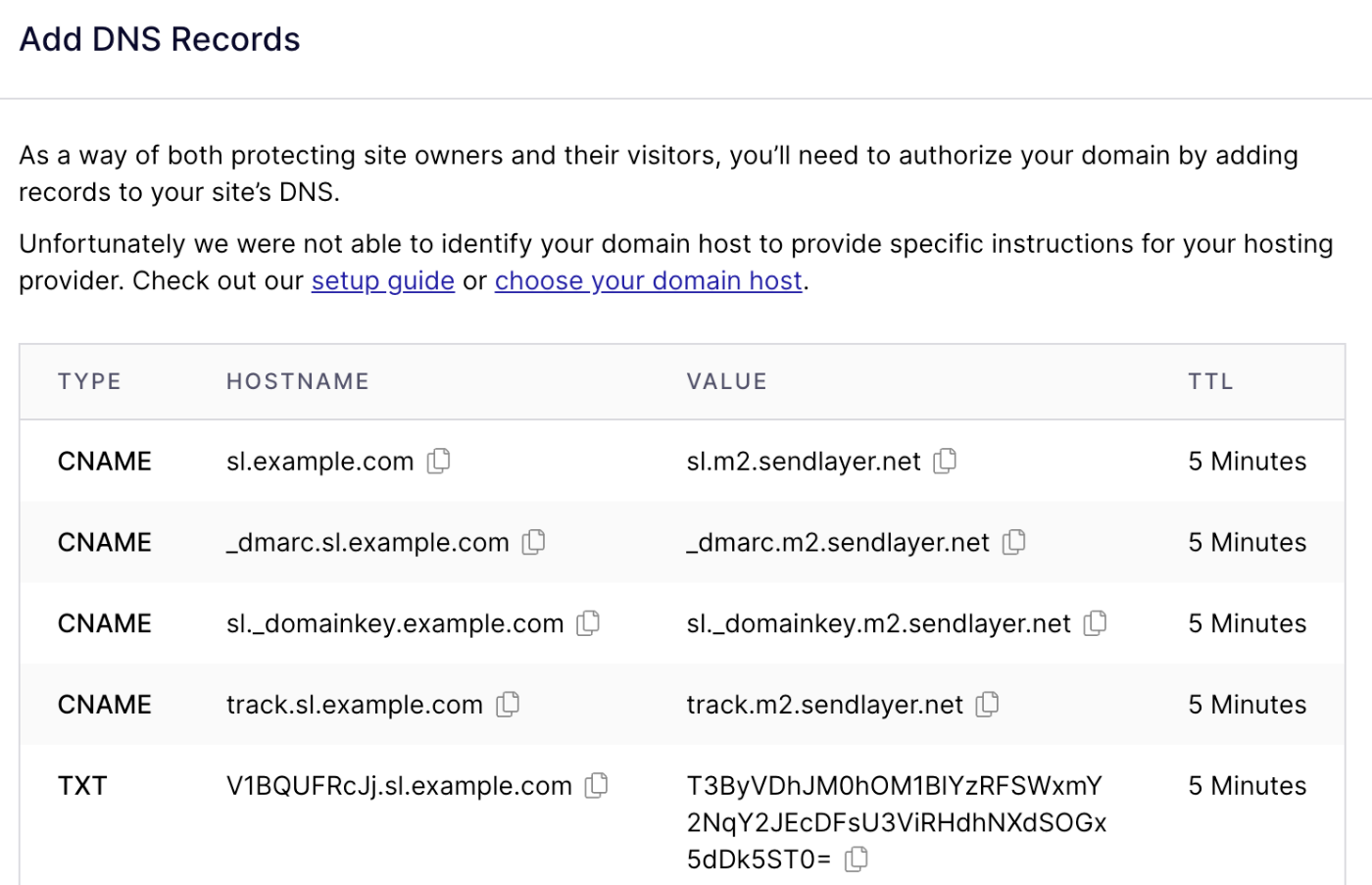
Setting up DNS records is a critical step in managing your domain. DNS records help direct internet traffic to your website. They ensure your domain name points to the correct server. Let’s dive into the different types of DNS records and how to create and edit them.
Types Of Dns Records
There are several types of DNS records you need to know. Each type serves a different purpose:
- A Record: Maps a domain to an IP address.
- MX Record: Directs email to a mail server.
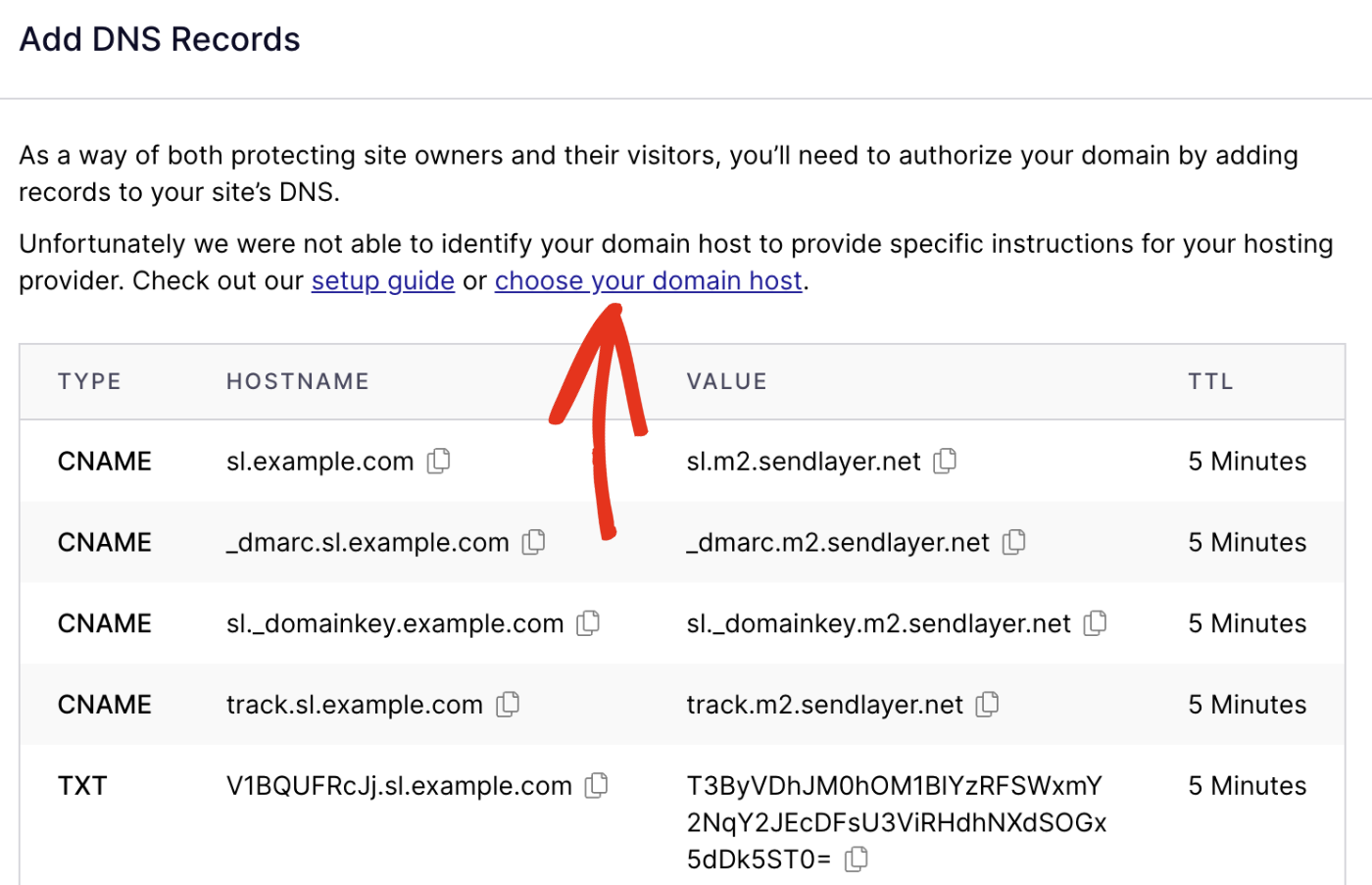
- CNAME Record: Points a domain to another domain name.
- TXT Record: Stores text information for various uses.
Understanding these records is essential. It helps you configure your domain correctly.
Creating And Editing Dns Records
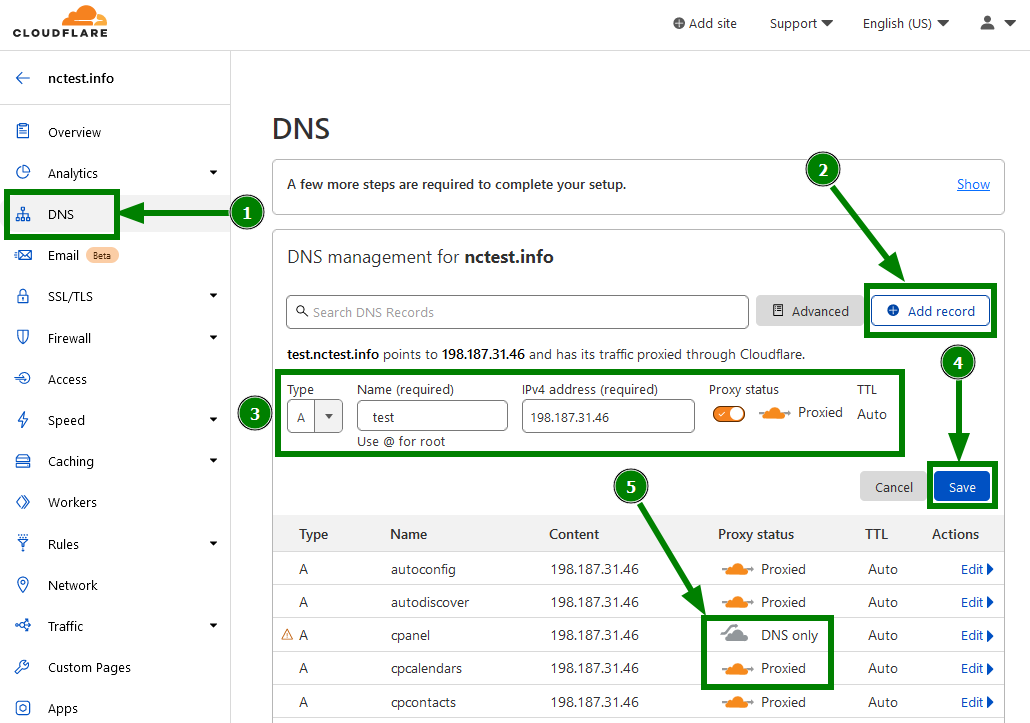
To create or edit DNS records, follow these steps:
- Log in to your domain registrar’s control panel.
- Navigate to the DNS settings section.
- Select the type of DNS record you want to create or edit.
- Enter the required information. For example, for an A Record, you need the IP address.
- Save your changes.
Let’s look at an example of adding an A Record:
| Field | Value |
|---|---|
| Type | A |
| Name | @ |
| Value | 192.168.1.1 |
Repeat these steps for each DNS record you need. This ensures your domain is set up correctly.
Configuring Your Domain
Configuring your domain is a key step in setting up your online presence. It involves linking your domain to various services. These services include your web host and email provider. This helps make sure your domain works correctly.
Proper configuration ensures your website appears when visitors type in your domain. It also allows you to send and receive emails from your custom domain. Let’s explore how to configure your domain. We’ll start with pointing it to a web host.
Pointing Domain To A Web Host
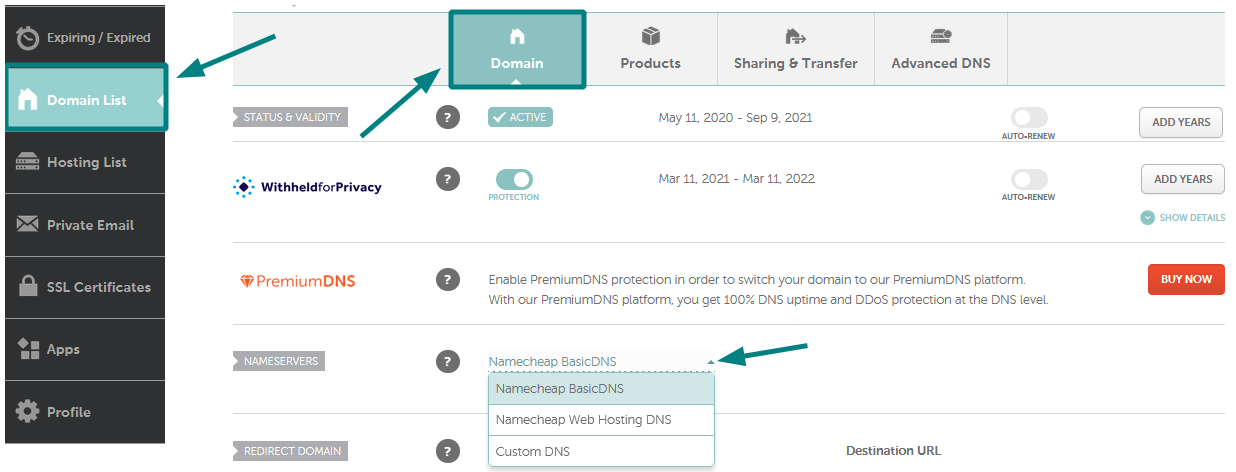
Pointing your domain to a web host is essential. This step connects your domain to the server hosting your website. First, log in to your domain registrar’s account. Find the DNS settings or domain management area.
Next, locate the section for custom nameservers. Your web host provides these nameservers. Copy the nameservers from your web host. Paste them into the nameserver fields in your domain registrar’s settings.
Save the changes. It may take up to 48 hours for the changes to propagate. Once completed, your domain will point to your web host. Visitors will see your website when they type in your domain.
Setting Up Email With Your Domain
Setting up email with your domain adds a professional touch. It allows you to use an email address with your domain name. First, log in to your domain registrar’s account. Navigate to the DNS settings.
Locate the section for adding MX records. MX records direct email to your mail server. Your email provider will give you the necessary MX records. Enter these records into the fields provided in your DNS settings.
Save the changes. It may take some time for the changes to update. Once done, you can send and receive emails using your custom domain. This setup makes your email communication look more professional.
Credit: www.namecheap.com
Testing Your Dns Setup
After setting up your domain with DNS, the next crucial step is to test your DNS setup. Testing ensures that your domain points to the correct IP address. This step is vital to avoid any connectivity issues. In this section, you will learn about using DNS lookup tools and troubleshooting common issues.
Using Dns Lookup Tools
Using DNS lookup tools helps verify that your DNS records are correctly configured. These tools are simple yet effective. Here are some popular ones:
- Google Public DNS: A reliable tool for checking your DNS settings.
- WhatsMyDNS: Provides a quick way to check DNS propagation.
- MXToolbox: Offers detailed insights into your DNS records.
To use these tools, follow these steps:
- Enter your domain name in the search bar.
- Select the type of DNS record you want to check (e.g., A, MX, CNAME).
- Click on the lookup button to get the results.
Ensure that the results match the DNS records you configured. If they do, your setup is correct.
Troubleshooting Common Issues
If your DNS setup isn’t working as expected, don’t worry. Here are some common issues and how to fix them:
| Issue | Solution |
|---|---|
| DNS Propagation Delay | Wait for 24-48 hours for changes to take effect. |
| Incorrect DNS Records | Double-check and update the DNS records. |
| Expired Domain | Renew the domain registration. |
If you face any other issues, refer to your DNS provider’s documentation. They often have detailed troubleshooting guides.
Maintaining Your Domain
Maintaining your domain is crucial for your website’s stability and reputation. It ensures your site remains accessible and secure. Regular domain maintenance helps prevent downtime and security issues. Let’s explore some key aspects of maintaining your domain.
Renewing Your Domain
Your domain registration has an expiration date. Renew it before it expires to avoid losing your domain. Most registrars offer auto-renewal options. This helps you avoid accidental expiration. Check your registrar’s policies and set reminders for renewals. Keeping your domain active is essential for your online presence.
Updating Dns Records
DNS records are vital for directing traffic to your website. Update them when you change hosting providers or make significant site changes. Incorrect DNS settings can lead to downtime. Regularly review your DNS records to ensure accuracy. This includes A records, CNAME, and MX records. Keeping DNS records current ensures smooth website operation.
Credit: www.namecheap.com
Credit: sendlayer.com
Frequently Asked Questions
How To Setup Dns For A Domain?
To set up DNS for a domain, log in to your domain registrar. Navigate to the DNS settings. Add or update records like A, CNAME, and MX. Save changes and allow propagation time.
How Do I Register A Domain With Dns?
To register a domain with DNS, choose a domain registrar, search for an available domain, and purchase it. Then, configure the DNS settings provided by your hosting provider. Finally, wait for the DNS propagation to complete.
What Is The Dns Entry For A Domain?
A DNS entry for a domain maps domain names to IP addresses. It includes records like A, CNAME, MX, and TXT.
Is 1.1 1.1 Still The Fastest Dns?
1. 1. 1. 1 is among the fastest DNS providers. Performance may vary based on location and network conditions.
Conclusion
Setting up a domain with DNS is simple with clear steps. Follow the guide to avoid common errors. Take your time to understand each step. Your website will run smoothly with proper setup. Always check your DNS settings for accuracy.
Now, you can confidently manage your domain. Enjoy a seamless online presence!


