
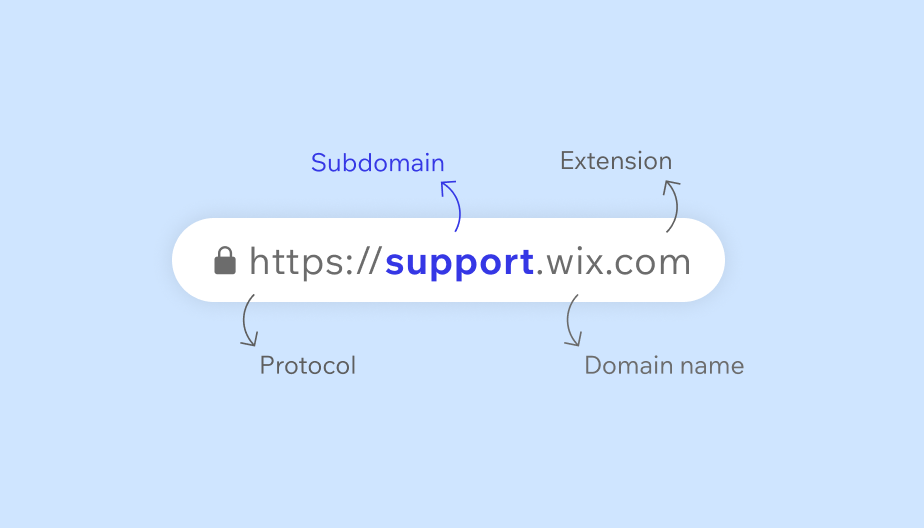
Subdomains are parts of a main website. They help organize content under one domain.
Understanding subdomains can be crucial for website management. They allow you to create separate sections of your site while keeping everything connected under a single domain name. For example, a blog or a store can have its own subdomain. This keeps things neat and easy to navigate.
Subdomains are often used to target different audiences or content. They can also help with SEO by structuring your site in a user-friendly way. Knowing how to use subdomains effectively can enhance your website’s functionality and user experience. In this blog post, we’ll explore what subdomains are and how they can benefit your site.
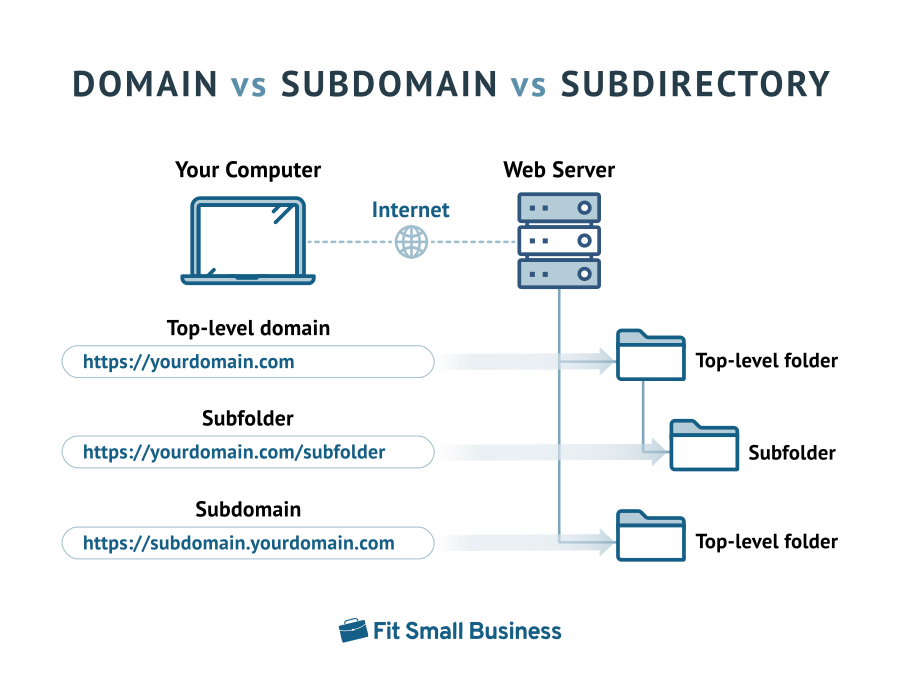
Credit: fitsmallbusiness.com
Introduction To Subdomains
Subdomains play a crucial role in website management. They help organize different sections of a website. This guide will explain what subdomains are and why they matter.
Definition
A subdomain is a part of a larger domain. It is used to separate and manage different sections of a website. For example, in the URL blog.example.com, “blog” is the subdomain. It helps keep the blog section separate from the main site.
Subdomains are often used for:
- Blogs
- Online stores
- Support pages
- Specific user areas
They make navigation easier for users and management simpler for site owners. Each subdomain can have its own unique content and design.
Importance
Subdomains offer several benefits:
- Organization: They help keep different parts of a site separate.
- SEO: Each subdomain can be optimized for specific keywords.
- User Experience: They make it easier for users to find what they need.
- Management: Different teams can manage different subdomains.
Subdomains can significantly improve site structure. They enhance the user experience and make site management more efficient.
| Subdomain | Example Usage |
|---|---|
blog.example.com |
Company blog |
shop.example.com |
Online store |
support.example.com |
Customer support |
forum.example.com |
Community forum |
Using subdomains effectively can boost your website’s performance. It can lead to better user engagement and higher search engine rankings.
How Subdomains Work
Subdomains help organize and navigate your website’s content. They act as separate sections under your main domain. For example, in “blog.example.com,” “blog” is the subdomain. It directs users to a different part of your site. Each subdomain can function like a standalone website.
Understanding how subdomains work can simplify website management. They offer flexibility and structure. Let’s delve into the technical aspects and DNS configuration of subdomains.
Technical Aspects
Subdomains use the Domain Name System (DNS). They create unique URLs under your main domain. Each subdomain can host different content or services. They can run on the same server or different servers. This setup depends on your needs.
Web developers often use subdomains for testing new features. They can also separate user areas, like “members.example.com.” Subdomains enhance your site’s organization. They provide a better user experience.
Dns Configuration
DNS configuration links subdomains to your server. It involves creating DNS records. These records define the subdomain’s destination. Common DNS records include A, CNAME, and MX records.
To create a subdomain, access your DNS settings. Add a new record for the subdomain. Specify the type (A or CNAME) and point it to your server’s IP address. This step ensures the subdomain directs traffic correctly.
Proper DNS configuration is crucial. It ensures your subdomains function without issues. Regularly check and update your DNS settings. This practice helps maintain a smooth user experience.
Benefits Of Using Subdomains
Subdomains offer several benefits for website owners. They help organize content, enhance SEO, and allow better user navigation. Let’s explore some key advantages of using subdomains.
Seo Advantages
Subdomains can help improve your site’s search engine ranking. They allow you to target specific keywords. This makes your content more relevant to search queries. Search engines treat subdomains as separate sites. This can increase the chances of appearing in search results.
Using subdomains also helps in avoiding keyword cannibalization. Your main domain and subdomain do not compete for the same keywords. This strategy can boost your overall SEO performance.
Organizational Benefits
Subdomains help in organizing your website content. You can separate different sections of your site. For example, a blog, store, or support section. This makes it easier for users to find what they need.
Subdomains also simplify site management. Each subdomain can have its own layout and content. This flexibility helps in maintaining a clean and organized main website. It also allows specific teams to manage different areas independently.
Common Uses Of Subdomains
Subdomains play a crucial role in website organization. They help in better management and navigation. Let’s explore some common uses of subdomains.
E-commerce Sites
Many businesses use subdomains for their e-commerce sites. For example, shop.example.com can be a subdomain dedicated to the shopping section. This way, the main site remains uncluttered. It also helps in tracking and managing sales separately.
Using a subdomain for e-commerce offers several benefits:
- Improved site structure
- Better user experience
- Enhanced security
A separate e-commerce subdomain can also boost SEO. It allows specific keywords to target a shopping audience.
Blogs And Portfolios
Subdomains are also popular for blogs and portfolios. For instance, a personal blog can be on blog.example.com. This keeps the main site professional while sharing personal stories or updates.
Advantages of using subdomains for blogs and portfolios include:
- Clear content separation
- Focused SEO strategies
- Organized user interface
For portfolios, a subdomain like portfolio.example.com can showcase work separately. This helps in presenting a professional image to potential clients or employers.
Creating A Subdomain
Creating a subdomain can help organize your website content. It makes it easier for users to find specific information. For instance, you can create a subdomain for your blog, shop, or support section.
Step-by-step Guide
Follow these steps to create a subdomain:
- Log in to your web hosting account.
- Navigate to the control panel (cPanel).
- Find the Domains section and click on Subdomains.
- Enter the desired name for your subdomain.
- Select the main domain to attach the subdomain.
- Click on Create.
Your subdomain is now live. You can start adding content to it.
Tools And Resources
Several tools and resources can help manage subdomains:
- cPanel: A web hosting control panel to create subdomains easily.
- Plesk: Another control panel option for managing subdomains.
- Cloudflare: Use this for DNS management and security.
- Google Domains: Manage your subdomains if you use Google Domains.
Using these tools simplifies the process. They ensure your subdomain runs smoothly.
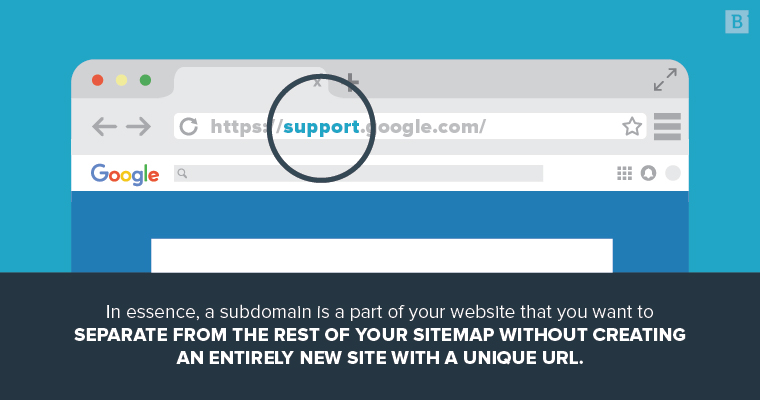
Credit: www.brafton.com
Managing Subdomains
Managing subdomains is crucial for any website owner. Subdomains help organize content and improve site structure. Proper management ensures smooth operation and security.
Maintenance Tips
Regularly update your subdomains. This ensures they stay compatible with the main site. Always check for broken links. Fix them promptly to maintain user experience.
Keep the content fresh. Old or outdated information can drive visitors away. Use analytics to monitor subdomain performance. Adjust strategies based on the data.
Security Considerations
Protect your subdomains like you protect your main site. Use strong passwords for all subdomain accounts. Enable SSL certificates. This secures the data transmitted between users and the server.
Regularly scan for vulnerabilities. Address them immediately to prevent breaches. Educate your team about phishing and malware. Awareness helps in early detection of threats.
Subdomains Vs. Subdirectories
Understanding the difference between subdomains and subdirectories is crucial for effective website management. Both are used to organize content, but they serve different purposes and have distinct impacts on SEO.
Key Differences
The primary difference lies in their structure and function within a website’s hierarchy.
| Subdomains | Subdirectories |
|---|---|
| A subdomain is a separate part of a main domain. | A subdirectory is a folder within the main domain. |
| Example: blog.example.com | Example: example.com/blog |
| Often used to separate large sections of a site. | Used for organizing content within the main domain. |
| Can be treated as a separate website by search engines. | Part of the main website, sharing its SEO. |
When To Use Each
Choosing between subdomains and subdirectories depends on your website’s goals and structure.
Use Subdomains:
- For distinct content, like a blog or support site.
- To target different languages or regions.
- For separate branding or marketing campaigns.
Use Subdirectories:
- For related content under the same brand.
- To keep SEO consolidated under one domain.
- For smaller sections like a blog or product pages.
Understanding the purpose and impact of each option will help you organize your site effectively and improve your SEO.
Case Studies
Subdomains are an essential part of a website’s structure. They help to organize content and create specific sections for different purposes. To understand their importance, let’s explore some case studies. These real-world examples will highlight successful uses of subdomains and the lessons learned from them.
Successful Examples
One notable example is news.google.com. Google uses this subdomain to separate news content from its main site. It provides a dedicated space for users interested in current events. This subdomain helps in targeting a specific audience and improving user experience.
Another example is support.apple.com. Apple uses this subdomain to offer customer support. It makes it easy for users to find help and solutions for their products. This organization enhances user satisfaction and reduces confusion.
Lastly, blog.hubspot.com is a great instance. HubSpot uses this subdomain for their blog content. It separates marketing articles from their main product pages. This strategy helps in improving SEO and user engagement.
Lessons Learned
First, subdomains can improve user experience. They create dedicated spaces for specific content. This organization makes it easier for users to find what they need.
Second, subdomains can boost SEO. They allow for focused keyword targeting. This separation can improve search engine rankings for different content areas.
Third, subdomains help in audience segmentation. They cater to different user groups. This targeted approach can enhance user engagement and satisfaction.
Fourth, subdomains simplify site management. They allow for easier updates and maintenance. This efficiency can save time and resources for website administrators.
Common Mistakes
Subdomains can be powerful tools for organizing and managing your website. But many make common mistakes that can negatively impact their site’s performance. These mistakes include poor naming conventions, overuse of subdomains, and ignoring SEO best practices. Understanding these pitfalls can help you avoid them.
Avoiding Pitfalls
One frequent mistake is using complex or long subdomain names. This can confuse visitors and affect user experience. Stick to short, descriptive names.
Another mistake is overloading your website with subdomains. Too many can dilute your main domain’s SEO value. Keep subdomains to a minimum.
Ignoring security measures is also a common error. Ensure each subdomain has a valid SSL certificate. This keeps user data secure and builds trust.
Best Practices
Follow these best practices to make the most of your subdomains:
- Consistent Naming: Use a clear and consistent naming strategy. This helps users and search engines understand your site structure.
- SEO Optimization: Treat each subdomain as a separate entity. Optimize each for its relevant keywords and content.
- Link Building: Build quality backlinks to each subdomain. This will improve their individual SEO performance.
- Regular Audits: Conduct regular SEO audits of your subdomains. This helps identify and fix any issues promptly.
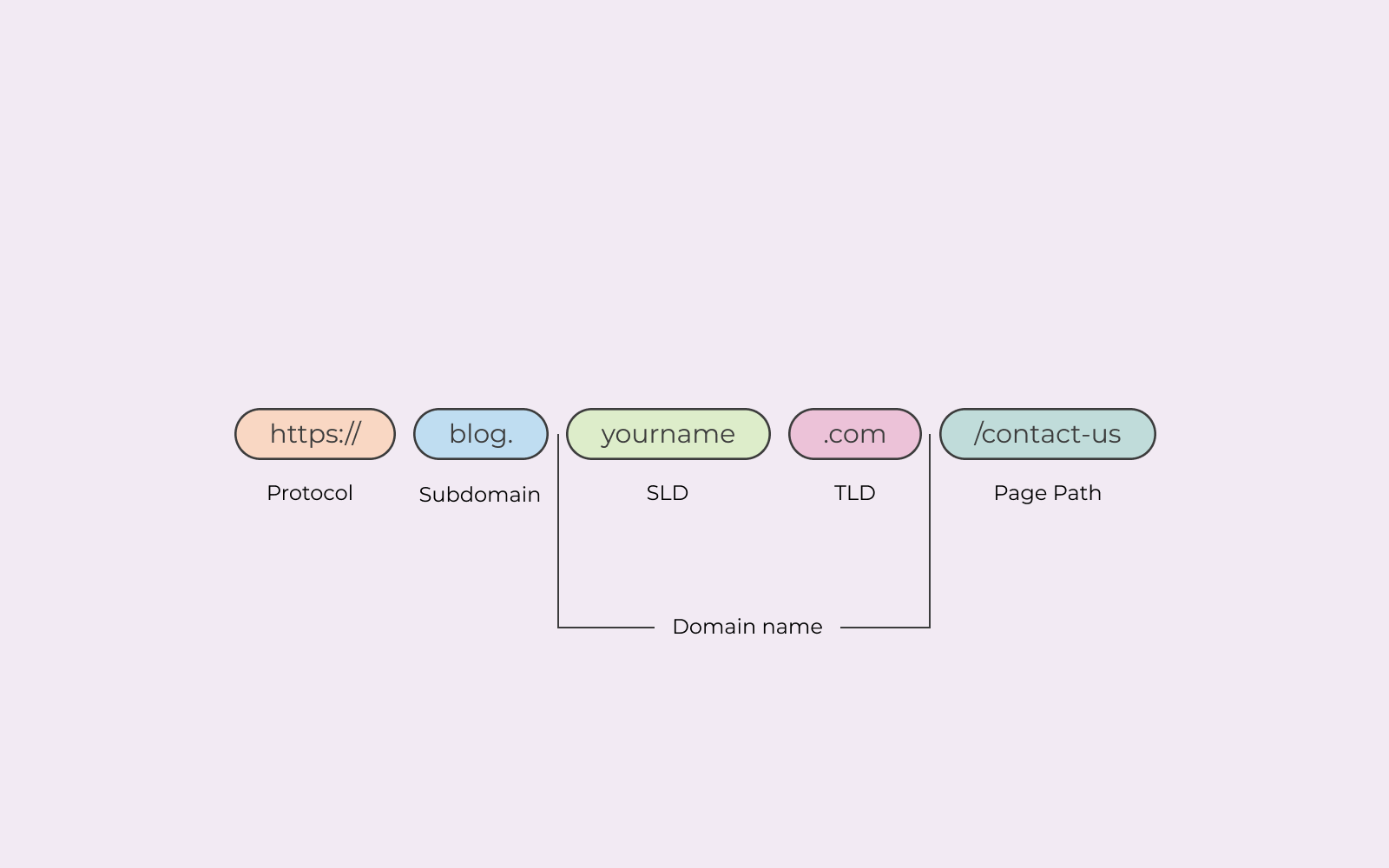
Credit: www.one.com
Future Of Subdomains
The future of subdomains in websites shows promise and potential. As technology evolves, subdomains are gaining new roles and importance. This section explores trends and emerging technologies shaping the future of subdomains.
Trends
Subdomains are becoming more prevalent in various industries. Companies use subdomains to create specialized sections of their websites. For instance:
- E-commerce platforms create subdomains for different product categories.
- Educational institutions use subdomains for departments and online courses.
- Blogs and news sites use subdomains for various topics and regions.
These trends show how subdomains help in organizing and managing large websites.
Emerging Technologies
Emerging technologies are enhancing the use of subdomains. Some key developments include:
| Technology | Impact on Subdomains |
|---|---|
| AI and Machine Learning | Better content personalization and user experience. |
| Cloud Computing | Scalable and secure hosting of subdomains. |
| Progressive Web Apps (PWAs) | Enhanced functionality and speed of subdomains. |
These technologies enable subdomains to be more efficient and user-friendly.
Subdomains continue to evolve, offering unique benefits and opportunities for website owners.
Frequently Asked Questions
What Is An Example Of A Subdomain?
An example of a subdomain is “blog. example. com”. It is a part of the main domain “example. com”.
Why Use Subdomains?
Use subdomains to organize website content, enhance user experience, and improve search engine ranking. They help target specific audiences effectively.
Do I Own A Subdomain If I Own A Domain?
Yes, owning a domain gives you control over its subdomains. You can create and manage them as needed.
What Is The Difference Between A Domain And A Subdomain?
A domain is a website’s main address, like example. com. A subdomain is a subset of the main domain, like blog. example. com.
Conclusion
Understanding subdomains is crucial for better website organization. They help categorize content efficiently. Subdomains can improve user experience and SEO rankings. They provide flexibility in managing different sections. Businesses often use subdomains for blogs, stores, or support pages. Setting up subdomains is easy and cost-effective.
They offer a smart way to expand your website. Explore subdomains to enhance your site’s structure. Implement them to meet specific needs. Happy website building!


