
Shared hosting is a type of web hosting. It involves multiple websites using one server’s resources.
This is a cost-effective option for small businesses and personal websites. Shared hosting is like living in an apartment building. You share common spaces, like the elevator and laundry room, with other residents. Each website shares the server’s resources, such as memory and CPU, with other sites.
This setup keeps costs low, making it ideal for those just starting online. Understanding how shared hosting works can help you decide if it’s the right choice for your website. Let’s dive into the details and see why shared hosting remains a popular choice for many.

Credit: www.designrush.com
Introduction To Shared Hosting
Shared hosting is a popular choice for many website owners. It’s an affordable and efficient way to get your website up and running. In this section, we will explore what shared hosting is and its benefits. Let’s dive into the basics of shared hosting.
What Is Shared Hosting?
Shared hosting is a type of web hosting service. Multiple websites share the same server and its resources. These resources include disk space, bandwidth, and processing power. This setup helps reduce costs for users. Each website on the server gets a portion of the resources. This is ideal for small to medium-sized websites. It’s also a good choice for beginners.
Benefits Of Shared Hosting
One major benefit of shared hosting is its affordability. Since resources are shared, costs are lower. This makes it a budget-friendly option for many. Shared hosting is also easy to manage. Hosting providers take care of server maintenance and updates. This means less technical work for you.
Another benefit is user-friendly control panels. These panels make it easy to manage your website. You can easily install software and monitor your website’s performance. Shared hosting plans often come with customer support. This can be helpful if you run into any issues.
How Shared Hosting Operates
Shared hosting is a popular choice for many websites. It offers an affordable way to get online. But how does shared hosting operate? Let’s dive into the details.
Server Resource Allocation
In shared hosting, multiple websites share one server. The server’s resources, like CPU, RAM, and storage, are divided among these sites. Each website gets a portion of the server’s resources. This setup keeps costs low. But it also means your site’s performance can be affected by others on the same server.
Hosting Environment
The hosting environment in shared hosting is communal. All websites on the server use the same software and operating system. They also share the server’s security measures. This shared environment makes management easier. But it can also pose security risks. If one site on the server gets hacked, others might be at risk too.
Types Of Websites Suited For Shared Hosting
Shared hosting is a popular choice for many website owners. It offers a cost-effective way to get online. But which types of websites benefit the most from shared hosting? Let’s explore.
Personal Blogs
Personal blogs are perfect for shared hosting. These websites typically have low traffic. They don’t need a lot of resources. Shared hosting provides enough power to keep them running smoothly.
Bloggers can easily update their content. They can upload images and videos. They can also interact with their audience through comments. Shared hosting supports all these activities without breaking the bank.
Small Business Websites
Small business websites also fit well with shared hosting. These sites often have limited traffic. They need a reliable but affordable hosting option.
Features like email accounts, databases, and basic security are essential. Shared hosting plans include these features. Business owners can manage their online presence without high costs.
Here’s a comparison of needs for different types of websites:
| Type of Website | Traffic Level | Resource Needs | Cost Efficiency |
|---|---|---|---|
| Personal Blog | Low | Low | High |
| Small Business | Moderate | Moderate | High |
In summary, shared hosting is ideal for personal blogs and small business websites. It provides a balance of cost and performance. It allows users to focus on their content and business rather than technical details.
Setting Up A Shared Hosting Account
Setting up a shared hosting account is easy and essential for your website. Follow these simple steps to get started with your shared hosting account.
Choosing A Hosting Provider
First, you need to choose a hosting provider. Many companies offer shared hosting services. Compare their features, pricing, and customer support. Look for a provider with a good reputation and positive reviews.
Consider these factors when choosing a hosting provider:
- Uptime guarantee
- Storage and bandwidth
- Customer support
- Pricing
- Security features
Registering A Domain Name
Next, you need to register a domain name. Your domain name is your website’s address on the internet. It should be unique and easy to remember. Many hosting providers offer domain registration services as part of their package. You can also use a separate domain registrar.
Here are some tips for choosing a domain name:
- Keep it short and simple
- Make it easy to spell and pronounce
- Use keywords related to your website
- Avoid numbers and hyphens
After you have chosen your hosting provider and registered your domain name, you can set up your shared hosting account. The process usually involves:
- Logging into your hosting account
- Adding your domain name to the account
- Setting up your website files
- Configuring your email accounts
Setting up a shared hosting account is straightforward. Follow these steps, and your website will be live in no time.
Managing Your Shared Hosting
Managing your shared hosting is essential for a smooth website experience. Understanding how to use the control panel and manage your files can save time and reduce stress.
Control Panel Overview
The control panel is the heart of your shared hosting. It allows you to manage all aspects of your website. Most shared hosting providers use cPanel or a similar tool. These tools offer a user-friendly interface.
Here are some key features:
- File Manager: Upload, edit, and delete files.
- Email Accounts: Create and manage email addresses.
- Domains: Add or remove domain names.
- Databases: Manage MySQL databases.
- Backup: Create and restore backups.
File Management
Effective file management keeps your website organized. The File Manager tool in your control panel is essential.
Here are some steps for managing files:
- Open the File Manager from the control panel.
- Navigate to your website’s root directory.
- Upload new files or edit existing ones.
- Use folders to keep files organized.
- Regularly delete unused files to save space.
Good file management can improve website performance. It also ensures that your site runs smoothly.
Performance And Security
Shared hosting is popular due to its affordability. But, how does it fare in terms of performance and security? Let’s delve into these aspects to understand better.
Speed Considerations
Speed is crucial for any website. In shared hosting, multiple websites share a single server. This can impact loading times. If one site uses many resources, others may slow down. Shared hosting providers optimize servers. They ensure fair resource distribution. Still, speed may vary based on traffic. Choosing a provider with good server management is key.
Basic Security Measures
Security is vital in shared hosting. Each website on the server shares the same environment. This increases the risk of cross-site contamination. Reputable providers implement security measures. They use firewalls to block malicious attacks. Regular updates and patches are applied. This ensures vulnerabilities are fixed promptly. Users should also use strong passwords. Installing security plugins can add an extra layer of protection.
Common Issues And Solutions
Shared hosting is a popular choice for beginners and small businesses. It is affordable and easy to set up. However, users may face some common issues. This section will help you understand these problems and their solutions.
Troubleshooting Downtime
Downtime can affect your website’s performance. It can lead to lost visitors. Check your hosting provider’s status page first. They may already know about the issue. If the problem persists, contact their support team. They can help identify and resolve the issue quickly.
Another way to reduce downtime is by monitoring your website. Use uptime monitoring tools. These tools notify you if your site goes down. Act fast to resolve the issue and keep your visitors happy.
Handling Traffic Spikes
Traffic spikes can cause your website to slow down. This happens when many users visit your site at once. Shared hosting has limited resources. Your site shares these resources with others. To handle traffic spikes, consider using a Content Delivery Network (CDN). A CDN distributes your content across multiple servers. This reduces the load on your main server.
Another solution is to optimize your website. Compress images and use caching plugins. These techniques reduce the load on your server. It helps your site handle more visitors.
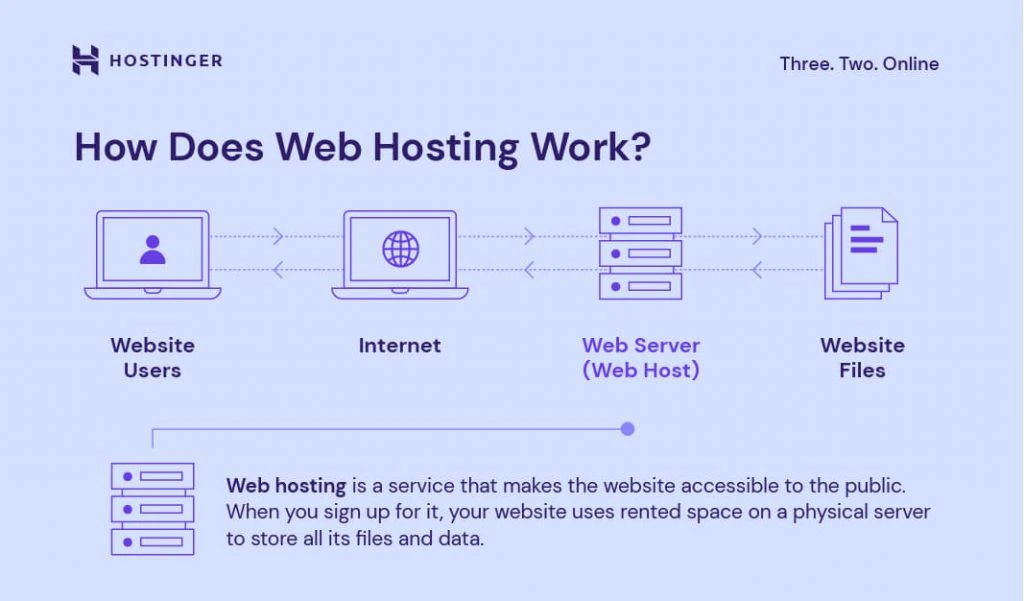
Credit: www.hostinger.com
Comparing Shared Hosting With Other Hosting Types
Understanding the differences between hosting types can help you choose the right one. Shared hosting, VPS hosting, and dedicated hosting are popular options. Each has its own benefits and drawbacks. This section will compare shared hosting with VPS and dedicated hosting.
Shared Vs. Vps Hosting
Shared hosting means multiple websites share one server. Resources like CPU and RAM are divided among all users. It’s cost-effective but can be slower during high traffic.
VPS hosting stands for Virtual Private Server. It provides a dedicated portion of a server’s resources. Your site has its own space, which improves performance. VPS is more expensive than shared hosting but offers better control and scalability.
Shared Vs. Dedicated Hosting
Dedicated hosting gives you an entire server for your website. No resource sharing with other websites. This results in high performance and security.
Shared hosting, on the other hand, is more affordable. It’s suitable for small websites with low traffic. Dedicated hosting is ideal for large sites needing high performance and security.

Credit: www.znetlive.com
Frequently Asked Questions
What Is Shared Hosting And How Does It Work?
Shared hosting is a web hosting service where multiple websites share one server. This makes it cost-effective for users. Each website gets a portion of server resources like CPU, RAM, and disk space. It’s ideal for small to medium-sized websites with moderate traffic.
What Are The Downsides Of Shared Hosting?
Shared hosting has several downsides: limited resources, slower performance, less security, potential for server overload, and limited customization options.
What Are The Problems With Shared Hosting?
Shared hosting often faces limited resources, slower speeds, security risks, and potential downtime due to server overloads.
Is Shared Hosting Cost Effective?
Yes, shared hosting is cost-effective. It’s an affordable option for small businesses and personal websites. Shared resources help lower costs.
Conclusion
Shared hosting provides a cost-effective solution for website hosting. It offers shared resources, which keep costs low. This type of hosting suits small to medium-sized websites. Easy to set up and manage. Many beginners find it user-friendly. It’s a perfect start for new websites.
As your site grows, consider more advanced hosting options. Shared hosting bridges the gap between affordability and functionality.


