
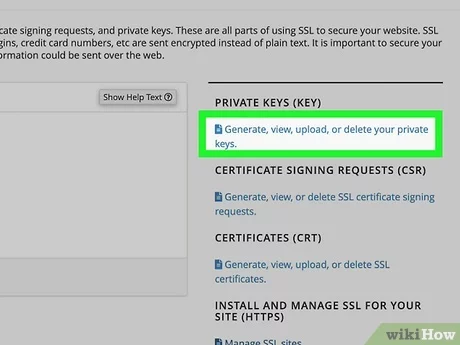
Installing an SSL certificate on your website is crucial for security. It protects data and builds trust with visitors.
SSL certificates encrypt data, ensuring safe communication between users and your site. Without SSL, sensitive information like passwords and credit card numbers can be intercepted by hackers. Plus, search engines rank secure sites higher, boosting your visibility. Installing SSL may seem complex, but it’s a straightforward process with clear steps.
In this guide, we’ll walk you through each step, making it easy to secure your website. Let’s get started on making your site safe and trustworthy.
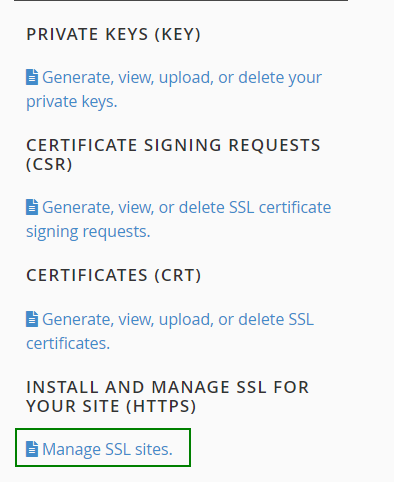
Credit: www.namecheap.com
Introduction To Ssl Certificates
SSL Certificates are essential for securing websites. They protect data transfers between the server and the user’s browser. Let’s dive into why SSL is important and the benefits it brings.
Why Ssl Is Important
SSL Certificates encrypt sensitive information. This keeps user data safe from hackers. A secure website builds trust with visitors. It also improves your site’s search engine ranking.
Google prioritizes sites with SSL. This means more visibility for your website. SSL also prevents phishing attacks. It ensures that your visitors are on a legitimate site.
Benefits Of Ssl
- Data Protection: SSL encrypts information, keeping it safe from cyber threats.
- SEO Boost: Google favors websites with SSL, which can improve your ranking.
- User Trust: A secure site builds confidence with your audience.
- Prevents Phishing: SSL helps to verify your website’s identity, deterring fraudsters.
- Compliance: Many regulations require websites to have SSL certificates.
In summary, SSL Certificates are crucial for website security. They protect your data and enhance your site’s reputation. Installing SSL is a smart move for any website owner.
“`Types Of Ssl Certificates
Securing your website with an SSL certificate is essential. But, did you know there are different types of SSL certificates? Each type offers unique features and levels of validation. Knowing these can help you choose the right one for your site.
Domain Validated (dv)
Domain Validated (DV) SSL certificates are the most basic. They only verify the domain name. These certificates are quick to obtain. No need for much paperwork. Ideal for small websites or blogs. They offer basic encryption and are the easiest to get.
Organization Validated (ov)
Organization Validated (OV) SSL certificates offer more security. They verify the organization behind the website. This process takes longer. You need to provide company details. These certificates show visitors that your website is trustworthy. Suitable for business websites.
Extended Validation (ev)
Extended Validation (EV) SSL certificates provide the highest level of trust. They require a thorough vetting process. Your business undergoes strict checks. EV certificates display a green address bar. This assures visitors of the highest security. Ideal for e-commerce and financial websites.
Choosing The Right Ssl Certificate
Securing your website with an SSL certificate is crucial. But selecting the right SSL certificate can be confusing. There are many options available. Each type serves different purposes. Choosing the wrong one could waste money. It could also leave your site less secure.
Factors To Consider
There are several factors to consider when choosing an SSL certificate. First, think about the level of security your site needs. Do you need basic encryption or higher levels of validation? Next, consider the number of domains you need to secure. A single domain, multiple domains, or subdomains?
Another factor is the level of trust you want to convey. Some SSL certificates offer more trust indicators. These include green address bars or trust seals. Also, consider the cost. Some SSL certificates are free. Others can be quite expensive.
Top Ssl Certificate Providers
Many providers offer SSL certificates. Some are well-known and trusted in the industry. Let’s look at a few top providers.
Comodo: Known for affordable options and strong security. They offer a wide range of certificates.
Symantec: A leader in security solutions. They offer high-trust SSL certificates. These come with a premium price tag.
GlobalSign: Offers enterprise-level certificates. Known for excellent customer support and reliability.
Let’s Encrypt: A popular free option. Provides basic SSL certificates. Ideal for smaller sites or those on a budget.
GoDaddy: Known for user-friendly services. They offer various SSL options at competitive prices.
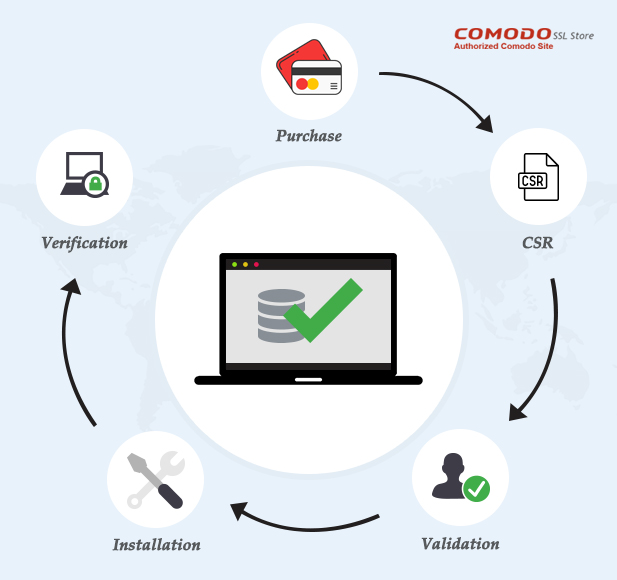
Credit: comodosslstore.com
Generating A Certificate Signing Request (csr)
Before you can install an SSL certificate on your website, you need to generate a Certificate Signing Request (CSR). This request contains information about your website and your public key. It is essential for verifying your identity to the Certificate Authority (CA). Let’s dive into what a CSR is and how to generate one.
What Is A Csr?
A Certificate Signing Request (CSR) is a block of encoded text. It is given to a Certificate Authority to apply for an SSL certificate. The CSR includes details such as:
- Your domain name
- Your organization name
- Your locality and country
- Your public key
It also contains the public key which will be included in your certificate. The private key is stored on your server and should never be shared.
Steps To Generate A Csr
Generating a CSR involves a few steps. Here’s a simple guide:
- Log into your server. Use SSH or your hosting control panel.
- Generate a private key. Use a command like this for Apache:
openssl genrsa -out yourdomain.key 2048- Create the CSR. Use the following command:
openssl req -new -key yourdomain.key -out yourdomain.csrYou will be prompted to enter the following information:
| Field | Description |
|---|---|
| Common Name (CN) | Your domain name (e.g., www.example.com) |
| Organization (O) | Your organization’s name |
| Organizational Unit (OU) | Your department’s name |
| City/Locality (L) | Your city |
| State/Province (ST) | Your state |
| Country (C) | Two-letter country code (e.g., US) |
After you enter the required information, the CSR file will be created. The file will be named yourdomain.csr.
Submit this CSR to your chosen Certificate Authority. They will use it to create your SSL certificate.
Purchasing An Ssl Certificate
Purchasing an SSL Certificate is the first step to securing your website. SSL certificates ensure encrypted communication between your website and its visitors. This builds trust and boosts your search engine rankings. Let’s dive into the details of purchasing an SSL certificate.
Where To Buy
You can buy SSL certificates from various providers. Here are some popular options:
- Certificate Authorities (CAs): Trusted organizations like Symantec, GlobalSign, and DigiCert.
- Web Hosting Providers: Many hosting companies offer SSL certificates as part of their services.
- Domain Registrars: Companies like GoDaddy and Namecheap also sell SSL certificates.
Each provider offers different types of SSL certificates. These include Domain Validation (DV), Organization Validation (OV), and Extended Validation (EV). Choose the type that best suits your website’s needs.
Information Needed
Before purchasing an SSL certificate, gather the required information. Here’s a checklist of what you need:
- Domain Name: The exact domain you want to secure.
- Server Information: Details about your web server software (e.g., Apache, Nginx).
- Contact Details: Your name, address, phone number, and email.
For OV and EV certificates, you need more information:
| Information | Details |
|---|---|
| Business Name | The registered name of your business |
| Business Address | Your business’s physical address |
| Legal Documents | Proof of business registration, like articles of incorporation |
Having this information ready speeds up the process of obtaining your SSL certificate. It ensures you meet the validation requirements without delays.
Installing The Ssl Certificate
Installing an SSL certificate is essential for securing your website. It encrypts the data between the server and users. This helps protect sensitive information. Below are steps to install SSL certificates on different servers.
Installation On Apache
To install an SSL certificate on Apache, follow these steps:
- Upload your certificate files to your server.
- Open your Apache configuration file. Typically, it is located at
/etc/httpd/conf/httpd.confor/etc/apache2/apache2.conf. - Locate the VirtualHost block for your site. It may look like this:
  ServerAdmin webmaster@yourdomain.com
  DocumentRoot /var/www/html
  ServerName www.yourdomain.com

  SSLEngine on
  SSLCertificateFile /etc/ssl/certs/your_domain.crt
  SSLCertificateKeyFile /etc/ssl/private/your_domain.key
  SSLCertificateChainFile /etc/ssl/certs/chain.crt
Save your changes and restart Apache:
sudo systemctl restart apache2Installation On Nginx
To install an SSL certificate on Nginx, follow these steps:
- Upload your certificate files to your server.
- Open your Nginx configuration file. Typically, it is located at
/etc/nginx/nginx.confor/etc/nginx/sites-available/default. - Add the following lines to your server block:
server {
  listen 443 ssl;
  server_name yourdomain.com;

  ssl_certificate /etc/ssl/certs/your_domain.crt;
  ssl_certificate_key /etc/ssl/private/your_domain.key;
  ssl_trusted_certificate /etc/ssl/certs/chain.crt;

  location / {
    root /var/www/html;
    index index.html index.htm;
  }
}
Save your changes and restart Nginx:
sudo systemctl restart nginxInstallation On Iis
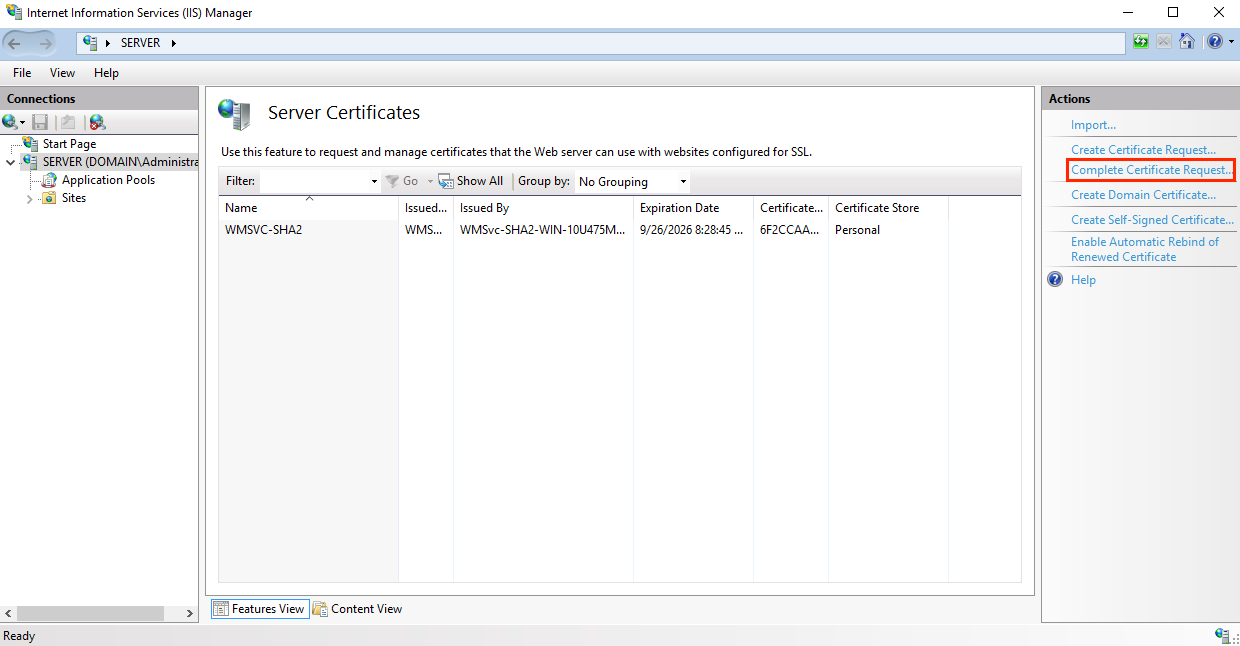
To install an SSL certificate on IIS, follow these steps:
- Open Internet Information Services (IIS) Manager.
- Select your server name in the left panel.
- Double-click on Server Certificates in the center panel.
- Click on Complete Certificate Request in the right panel.
- Browse and select your SSL certificate file.
- Enter a friendly name for the certificate and click OK.
- Go to your site in the left panel and select Bindings.
- Click Add and choose https as the type.
- Select your new certificate and click OK.
Restart your IIS to apply the changes.
Verifying The Ssl Installation
Once you have installed your SSL certificate, it’s essential to confirm that it’s working correctly. This ensures that your website is secure and that users can trust your site. There are several ways to verify if the SSL installation is successful. Let’s explore the key methods.
Checking With Online Tools
There are many online tools available to check if your SSL certificate is installed correctly. These tools are free and easy to use. Simply enter your website URL, and the tool will scan your site.
- SSL Labs: This tool provides a detailed analysis of your SSL configuration. It gives a grade based on the security level.
- Why No Padlock: This tool checks for mixed content issues and other common SSL problems.
- SSL Checker: It verifies the installation and provides information about the certificate.
Using these tools can help you identify any issues and ensure your SSL certificate is working as intended.
Troubleshooting Common Issues
Sometimes, even after installation, you might encounter issues with your SSL certificate. Here are some common problems and their solutions:
| Issue | Solution |
|---|---|
| Mixed Content Errors | Ensure all resources (images, scripts) are loaded over HTTPS. |
| Expired Certificate | Renew your certificate and update it on your server. |
| Incorrect Certificate Chain | Check that the intermediate certificates are installed correctly. |
| Browser Warnings | Ensure the domain name matches the certificate’s common name. |
Addressing these issues promptly can help maintain a secure and trustworthy website.
Credit: www.digicert.com
Maintaining Your Ssl Certificate
Maintaining your SSL certificate is crucial for your website’s security. Regular updates and monitoring ensure a secure connection for your visitors. This section covers the essential steps for maintaining your SSL certificate.
Renewal Process
Your SSL certificate has an expiration date. Renew it before it expires to keep your site secure. Follow these steps:
- Log in to your SSL provider’s account.
- Locate the expiring SSL certificate.
- Click on the renewal option.
- Fill in the necessary details.
- Complete the payment process.
- Download the renewed SSL certificate.
Install the renewed certificate on your server. This keeps your website secure and trusted.
Updating Ssl Configuration
Update your SSL configuration to ensure optimal security. Here are the steps:
- Access your server’s SSL configuration file.
- Update the certificate path with the new SSL certificate details.
- Ensure the private key path is correct.
- Verify the intermediate certificate path is accurate.
- Save the configuration changes.
Restart your server to apply the new configuration.
Check your website to confirm the SSL certificate is active and secure. Regular updates to your SSL configuration help maintain a secure website environment.
Frequently Asked Questions
How Do I Install An Ssl Certificate In My Website?
To install an SSL certificate, purchase one from a trusted provider. Generate a Certificate Signing Request (CSR). Submit the CSR to the provider. Download the certificate files. Upload and install them on your web server. Verify the installation.
How Can I Add Ssl To My Website For Free?
You can add SSL to your website for free using Let’s Encrypt. Many hosting providers offer easy integration.
How Do I Get A Valid Ssl Certificate For My Website?
To get a valid SSL certificate, choose a trusted Certificate Authority (CA). Purchase your certificate, validate your domain, and install it on your web server.
Should Ssl Be On Domain Or Hosting?
SSL should be on your hosting. Hosting providers often offer SSL certificates, ensuring secure data transmission for your site.
Conclusion
Installing SSL certificates boosts your website’s security. Visitors trust sites with SSL. Follow the steps outlined above. They are easy to implement. Secure your data and your users’ data. SSL certificates are vital. Protect your website today. Ensure a safe browsing experience.
Feel confident in your site’s safety. Enjoy peace of mind. Stay ahead in online security. Make the internet safer for everyone.


