
Domain name hijacking can be a nightmare. It can disrupt your business and harm your reputation.
So, how can you protect your domain name from hijacking? Understanding domain name hijacking is crucial. It’s when someone illegally takes control of your domain name. This can lead to lost emails, website downtime, and even identity theft. Protecting your domain name is essential for maintaining your online presence and security.
In this blog post, we will discuss practical steps you can take to secure your domain name. From choosing the right registrar to enabling security features, these tips will help you keep your domain safe from hijackers. Stay tuned to learn how to shield your valuable online asset effectively.
Importance Of Domain Security
Your domain name is the online identity of your business. It’s crucial to safeguard it. Domain security ensures your website remains under your control. Neglecting domain security can lead to severe consequences.
A compromised domain can harm your reputation and business operations. Protecting your domain is a key part of maintaining a secure online presence.
Risks Of Domain Hijacking
Domain hijacking is a significant threat. It involves unauthorized access to your domain account. This can occur through weak passwords, phishing attacks, or outdated contact information.
Once hijackers gain access, they can redirect your traffic, steal information, or demand ransom. It’s vital to understand these risks and take preventive measures.
Impact On Business
A hijacked domain can cause severe damage to your business. Customers may lose trust if they can’t access your website. This can lead to loss of sales and damaged reputation.
Search engines may also penalize your site, affecting your SEO rankings. Reclaiming a hijacked domain can be a lengthy and expensive process. Thus, investing in domain security is essential.
| Risk | Impact |
|---|---|
| Unauthorized Access | Loss of control over domain |
| Traffic Redirection | Loss of customers and sales |
| Information Theft | Compromised data and privacy |
| Ransom Demands | Financial loss and stress |
Preventive Measures
- Use strong, unique passwords for your domain account.
- Enable two-factor authentication.
- Keep your contact information up to date.
- Regularly review and update your domain security settings.
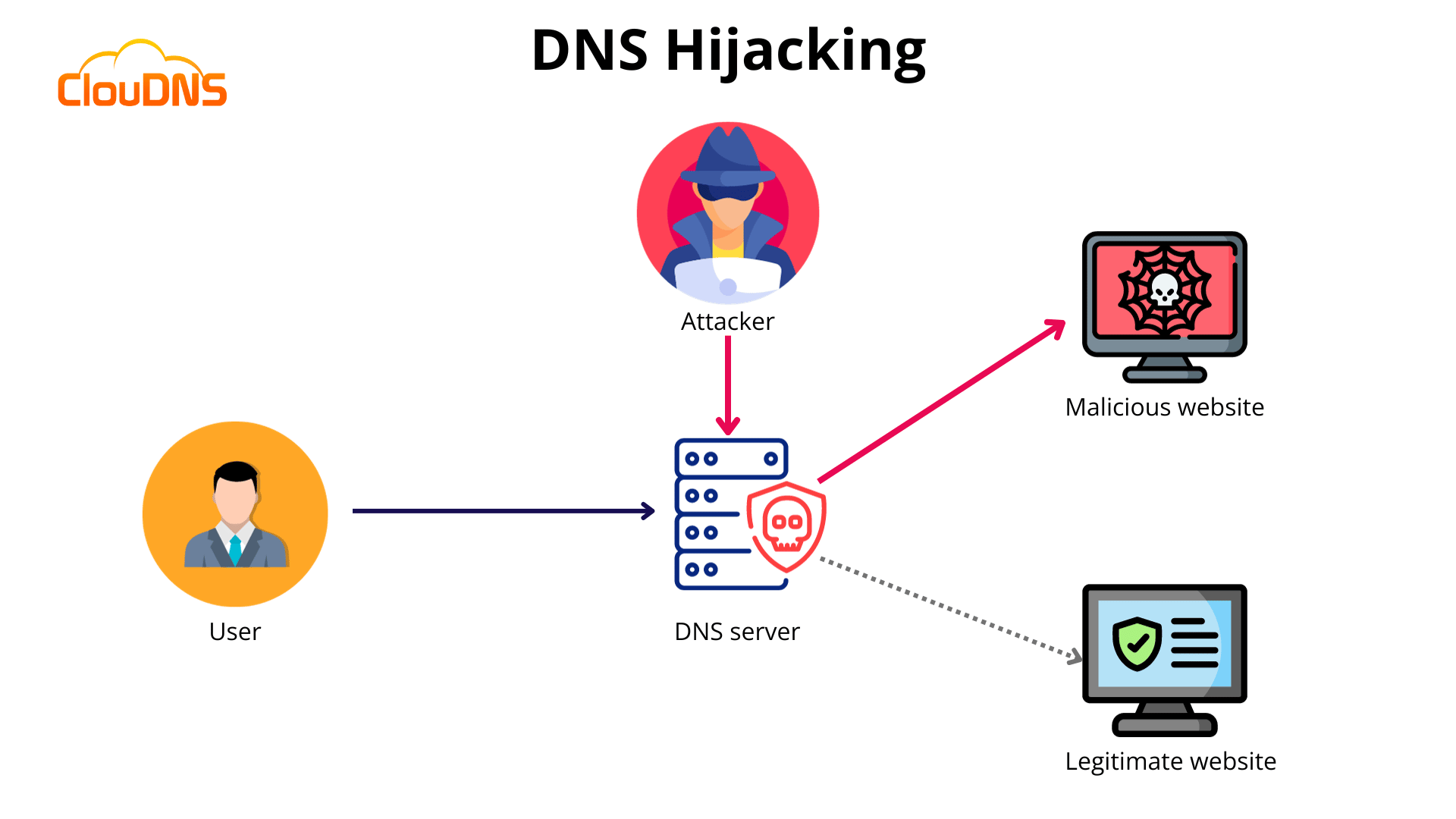
Credit: www.cloudns.net
Choose A Reputable Registrar
Protecting your domain name from hijacking is crucial for your online presence. One of the first steps is to choose a reputable registrar. A trustworthy registrar ensures your domain’s security and provides essential services. Let’s look at how to select a reliable registrar and some top recommendations.
Criteria For Selection
When choosing a registrar, consider these essential criteria:
- Security Features: Look for registrars that offer two-factor authentication.
- Support: 24/7 customer support is crucial for resolving issues quickly.
- Pricing: Compare the costs of registration, renewal, and additional services.
- Reputation: Check reviews and ratings from other users.
- ICANN Accreditation: Ensure the registrar is accredited by ICANN.
Top Trusted Registrars
Here are some of the most trusted domain registrars:
| Registrar | Security Features | Support |
|---|---|---|
| GoDaddy | Two-factor authentication, privacy protection | 24/7 phone support, live chat |
| Namecheap | Two-factor authentication, free WHOISGuard | 24/7 live chat support |
| Bluehost | Two-factor authentication, CodeGuard | 24/7 phone support, live chat |
| Google Domains | Two-factor authentication, privacy included | Email support, extensive help center |
Enable Two-factor Authentication
Protecting your domain name is crucial for your online presence. One effective way to safeguard it is by enabling Two-Factor Authentication (2FA). This security measure adds an extra layer of protection, making it harder for hackers to gain access.
Benefits Of Two-factor Authentication
Two-Factor Authentication requires two forms of identification. This makes unauthorized access more difficult. Even if someone knows your password, they still need the second factor. This second factor can be a code sent to your phone or an authentication app.
Using 2FA reduces the risk of domain hijacking. It ensures only authorized users can access your domain settings. This extra step can prevent many types of cyber attacks. It offers peace of mind knowing your domain is secure.
Implementation Steps
First, log into your domain registrar account. Go to the security settings. Look for the option to enable Two-Factor Authentication.
Next, choose your preferred method of 2FA. You can use a mobile app, SMS, or email. Follow the instructions to set it up. Most registrars provide easy-to-follow guides.
After setup, test the 2FA to ensure it works. Log out and log back in to check. Make sure you receive the second factor prompt. This confirms your 2FA is active and working.
Keep backup codes in a safe place. These codes can help you access your account if you lose your phone. Regularly update your 2FA settings to stay secure.
Credit: www.redpoints.com
Use Strong, Unique Passwords
Protecting your domain name from hijacking is crucial. One of the best ways to do this is by using strong, unique passwords. This makes it difficult for hackers to gain access to your domain account. Below, you will find tips on creating strong passwords and managing them effectively.
Password Creation Tips
Creating a strong password is your first line of defense. Here are some tips:
- Use at least 12 characters.
- Include a mix of upper and lower case letters.
- Use numbers and special characters like @, #, $.
- Avoid using common words or phrases.
- Do not use personal information like birthdays or names.
For example, instead of using “password123”, try something like “P@ssw0rd!23#”. This is harder for hackers to guess.
Password Management Tools
Remembering multiple strong passwords can be a challenge. Password management tools can help:
| Tool | Features | Cost |
|---|---|---|
| LastPass | Stores passwords, generates strong passwords, and auto-fills forms. | Free and premium versions available. |
| 1Password | Securely stores passwords, generates strong passwords, and has a travel mode. | Subscription-based with a free trial. |
| Dashlane | Stores passwords, dark web monitoring, and VPN for WiFi protection. | Free and premium versions available. |
These tools help keep your passwords secure and easily accessible. Using them will enhance your domain protection strategy.
Keep Contact Information Updated
Protecting your domain name from hijacking is crucial. One effective way is to keep your contact information updated. This step ensures you receive important notifications about your domain. It also makes sure you can act quickly if there’s suspicious activity.
Why It’s Important
Updating contact information is essential for several reasons:
- Receive Alerts: You’ll get critical alerts about your domain status.
- Prevent Unauthorized Changes: Accurate contact details prevent unauthorized changes.
- Domain Renewal Reminders: Reminders for domain renewals will reach you.
- Security Notifications: Receive notifications about potential security issues.
Outdated contact details can lead to missed alerts. This can make your domain vulnerable to hijacking.
How To Update Information
Updating your contact details is simple. Follow these steps:
- Log in to your domain registrar account.
- Navigate to the account settings or domain management area.
- Find the section for contact information.
- Update your email address, phone number, and physical address.
- Save the changes and verify the updates.
Make it a habit to check and update your contact information regularly. This ensures your details are always current.
Some registrars may offer two-factor authentication. Enabling this feature adds an extra layer of security. It ensures that only you can make changes to your contact information.
Monitor Domain Activity
Protecting your domain name from hijacking is crucial. One essential step is to monitor domain activity. Regular checks ensure your domain remains safe. This section explores ways to track changes and set up alert systems.
Tracking Changes
Regularly tracking changes is vital. Use tools to check:
- DNS records
- Contact information
- Registrar details
Ensure these details match your records. Any discrepancy can be a red flag.
Check your domain’s expiration date. Renew your domain before it expires. This prevents unwanted transfers.
Use a log to record all changes. This helps in tracking any suspicious activity.
Alert Systems
Set up alert systems for your domain. Alerts notify you of:
- Changes in DNS records
- Updates to contact information
- Registrar transfers
These alerts can be sent via email or SMS. Choose an alert system that offers real-time notifications.
Consider using a third-party monitoring service. These services provide detailed reports. They can also offer additional security features.
Having an alert system in place is a proactive measure. It helps in early detection of potential hijacking attempts.
By monitoring domain activity closely, you safeguard your digital presence. Stay vigilant and keep your domain secure.
Consider Domain Locking
Protecting your domain name from hijacking is vital for your online presence. One effective method is domain locking. This security feature prevents unauthorized transfers of your domain. It adds an extra layer of protection, ensuring only you can make critical changes.
Types Of Domain Locks
There are different types of domain locks. The most common are Registrar Lock and Registry Lock. Registrar Lock is the basic level. It prevents unauthorized domain transfers. Registry Lock offers more security. It protects against unauthorized changes at the registry level.
How To Activate
Activating domain locking is simple. Log into your domain registrar account. Navigate to the domain management section. Look for the option labeled “Domain Lock” or “Transfer Lock.” Enable the lock with a single click. Some registrars require a confirmation. Follow any additional steps they provide. Now, your domain is locked and secure.

Credit: ensureweb.ng
Regularly Review Domain Settings
Protecting your domain name from hijacking is crucial for your online presence. One effective strategy is to regularly review your domain settings. This ensures your information is up-to-date and secure. Regular reviews help you spot any suspicious activities quickly.
Checklist For Review
- Contact Information: Ensure your email and phone number are correct.
- Registrar Lock: Verify if your domain is locked to prevent unauthorized transfers.
- Nameservers: Check that your nameservers are pointing to the correct servers.
- DNS Records: Review your DNS records for any unexpected changes.
- Renewal Status: Confirm your domain is set to auto-renew.
- Two-Factor Authentication: Enable two-factor authentication for added security.
Frequency Of Reviews
Regularly reviewing your domain settings is essential. But how often should you do it? Here is a general guideline:
- Monthly: Check your contact information and registrar lock status.
- Quarterly: Review your nameservers and DNS records.
- Annually: Confirm your renewal status and enable two-factor authentication.
By following this schedule, you ensure your domain remains secure and up-to-date. A proactive approach can prevent hijacking attempts and protect your online identity.
Educate Your Team
Educating your team is crucial for protecting your domain name from hijacking. Your team must know the best practices and common pitfalls. This knowledge keeps your domain safe.
Training On Best Practices
Ensure every team member knows the basics of domain security. Teach them to use strong, unique passwords. Encourage regular updates of these passwords. Explain the importance of two-factor authentication. This adds an extra layer of security. Make sure they understand how to recognize phishing attempts. Phishing can lead to unauthorized access. Provide regular updates on new security threats. Keeping your team informed is key.
Common Mistakes To Avoid
Many people reuse passwords across multiple accounts. This is a common mistake. If one account gets compromised, others are at risk. Avoid using weak or simple passwords. They are easy to guess. Not enabling two-factor authentication is another mistake. This simple step can prevent unauthorized access. Be cautious with email communications. Phishing emails can trick team members into giving away sensitive information. Always verify the sender’s identity before clicking links or downloading attachments.
Frequently Asked Questions
What Protects Your Domain Against Hijacking Attempts?
Domain locking, two-factor authentication, and strong, unique passwords protect your domain against hijacking attempts.
How Do I Secure My Domain Name?
Secure your domain name by registering it with a reputable registrar. Enable domain privacy protection. Use strong, unique passwords. Regularly renew your registration. Monitor for unauthorized changes.
How Do I Stop Someone From Using My Domain Name?
Register a trademark and enforce it legally. Use a domain monitoring service. Contact the domain registrar for disputes.
Can Hackers Steal Your Domain Name?
Yes, hackers can steal your domain name. Protect it by using strong passwords, two-factor authentication, and monitoring your domain regularly.
Conclusion
Securing your domain name is crucial. Simple steps can prevent hijacking. Use strong passwords and enable two-factor authentication. Regularly update your contact information. Choose a reliable domain registrar. Monitor your domain for unusual activity. Act quickly if you notice any changes.
These precautions protect your online presence. Stay vigilant and safeguard your digital assets. Protecting your domain ensures your brand’s integrity.


