
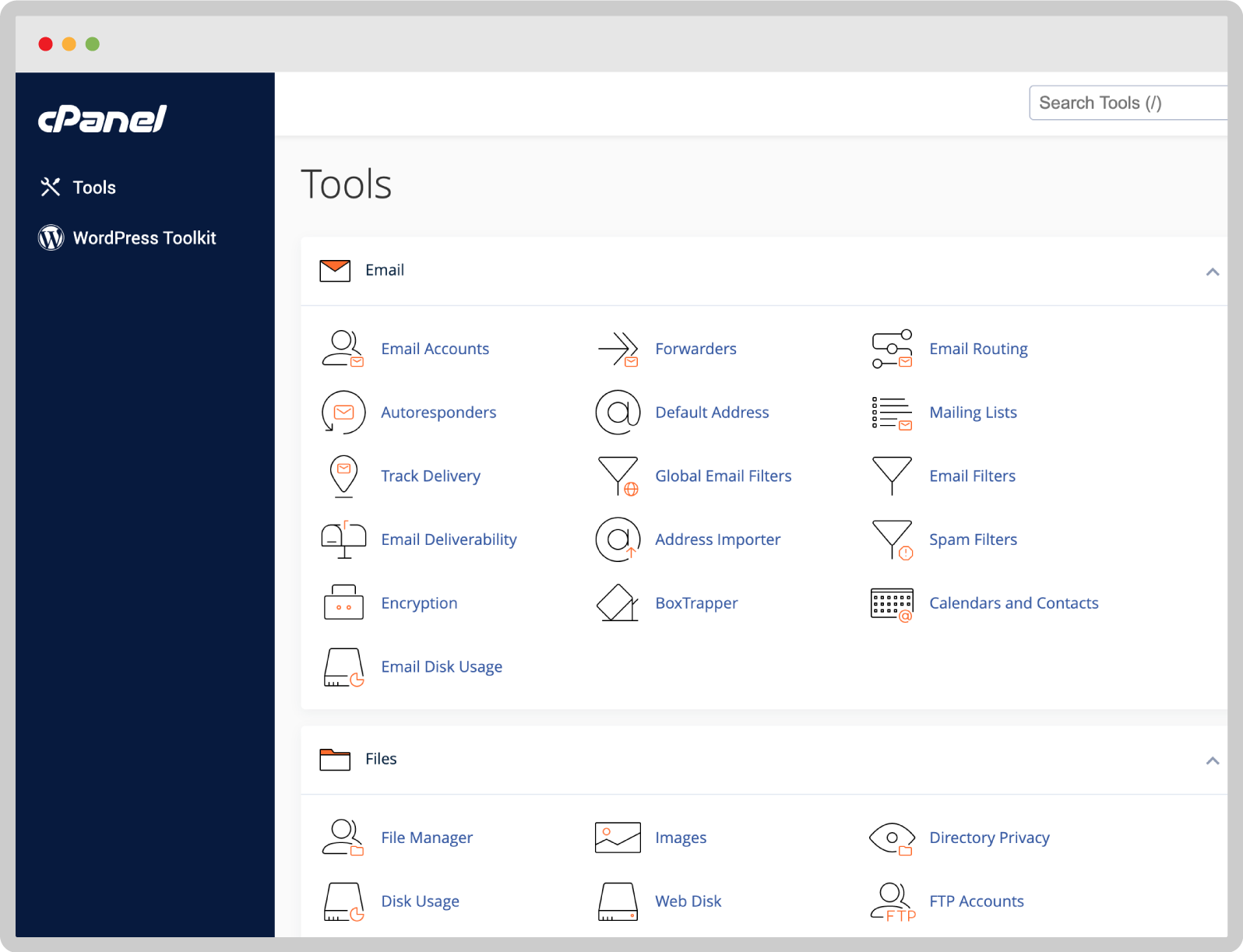
Cpanel is a popular web hosting control panel. It helps manage websites easily.
Web hosting can be complex, but Cpanel simplifies many tasks. It offers a user-friendly interface for managing files, databases, and email accounts. With Cpanel, both beginners and experts can handle web hosting tasks efficiently. Imagine having all the tools you need in one place, organized and easy to use.
This is what Cpanel offers. It’s like having a personal assistant for your website, making sure everything runs smoothly. Whether you’re a small business owner or a hobbyist, Cpanel can make your web hosting experience much simpler and more enjoyable.
Introduction To Cpanel
cPanel is a popular web hosting control panel that allows you to manage your website easily. It provides a graphical interface and automation tools. cPanel simplifies the process of web hosting. It’s user-friendly and widely used in the industry.
What Is Cpanel?
cPanel is a web-based control panel for managing web hosting accounts. It helps users control various aspects of their hosting service. With cPanel, you can:
- Manage domains and subdomains
- Create and manage email accounts
- Install software applications
- Backup and restore data
- Monitor website statistics
cPanel is designed to make hosting tasks easy. Both beginners and professionals can use it.
History Of Cpanel
cPanel was developed in 1996 by John Nick Koston. It was created to simplify website management. Over the years, cPanel has evolved significantly. It has become a leading web hosting control panel. Today, it is used by millions of websites worldwide.
Here’s a quick timeline of cPanel’s history:
- 1996: cPanel is developed by John Nick Koston.
- 1999: cPanel is acquired by Webking.
- 2002: cPanel LLC is formed.
- 2011: cPanel introduces its App Store.
- 2021: cPanel continues to innovate with new features.
cPanel’s ongoing development ensures it remains a powerful tool. Its continuous updates provide users with the latest features and security improvements.
Key Features Of Cpanel
cPanel is a popular control panel in web hosting. It offers a range of features to manage your website easily. Here are some of the key features of cPanel that make it a favorite among users.
User-friendly Interface
The user-friendly interface of cPanel is designed for easy navigation. Users can manage their websites without needing technical skills. The dashboard is intuitive, with icons and menus that simplify tasks. Beginners find it easy to use, while experts appreciate its efficiency.
File Management
File management in cPanel is straightforward. Users can upload, edit, and delete files with ease. The File Manager tool resembles a desktop file explorer. This visual interface helps users manage their files quickly. Other features include:
- Uploading files through drag and drop
- Creating and extracting archives
- Editing files directly from the browser
Email Management
Email management is another strong feature of cPanel. Users can create and manage email accounts for their domain. It also includes spam filters and auto-responders. Important email management tools in cPanel include:
- Email Account Creation
- Forwarders and Filters
- Autoresponders
- SpamAssassin for spam control
All these features help users maintain a professional email system. They ensure seamless communication for businesses and individuals alike.
Cpanel For Beginners
cPanel is a popular web hosting control panel. It makes managing your website easy. For beginners, it can seem complex. But don’t worry. This guide will help you get started with cPanel.
Setting Up Cpanel
Setting up cPanel is simple. First, log in to your cPanel account. You will need your username and password. These are provided by your web host.
Once logged in, you will see the cPanel dashboard. It has many icons and features. Do not get overwhelmed. Focus on the basics first.
Here are steps to set up cPanel:
- Log in using your credentials.
- Find the File Manager icon. Click it to manage files.
- Locate the Email Accounts icon. Use it to create email addresses.
- Click on Domains to manage your domains.
These steps will help you start using cPanel.
Basic Navigation Tips
Basic navigation in cPanel is straightforward. The dashboard is divided into sections. Each section has its own set of icons.
Here are some key sections:
- Files: Manage your website’s files.
- Databases: Manage your databases.
- Email: Create and manage email accounts.
- Domains: Manage domain settings.
- Software: Install software applications.
Remember to log out after making changes. This keeps your account secure.
| Section | Function |
|---|---|
| Files | Manage files |
| Databases | Manage databases |
| Create email accounts | |
| Domains | Manage domains |
| Software | Install applications |
Advanced Cpanel Functions
For website owners, mastering the advanced functions of cPanel can significantly enhance the management of their hosting environment. cPanel is much more than a simple control panel; it offers a range of powerful tools that can optimize your website’s performance and security. This section will explore some of these advanced functions.
Database Management
cPanel provides robust tools for database management. You can create, modify, and delete databases effortlessly. The phpMyAdmin tool allows you to manage MySQL databases through a user-friendly interface. Here are some key features:
- Create and manage databases
- Backup and restore databases
- Run SQL queries
These features make it easy to maintain your website’s data and ensure smooth operation.
Security Features
Security is crucial for any website. cPanel offers several security features to protect your site from threats. Some of the key security tools include:
| Feature | Description |
|---|---|
| SSL/TLS Manager | Manage SSL certificates to secure your website |
| IP Blocker | Block specific IP addresses from accessing your site |
| Hotlink Protection | Prevent other websites from directly linking to your files |
These tools help you keep your website secure and safeguard your data.
Benefits Of Using Cpanel
cPanel is a popular web hosting control panel. It provides users with an intuitive interface. This interface simplifies the management of websites and servers. Let’s explore the benefits of using cPanel in web hosting.
Efficiency
cPanel enhances efficiency through its user-friendly design. It allows users to perform tasks quickly. Common tasks include setting up email accounts, managing files, and creating databases. The dashboard is easy to navigate. This saves time for both beginners and advanced users.
cPanel also offers automation tools. These tools streamline repetitive tasks. For example, you can schedule backups and updates. This ensures your website runs smoothly without manual intervention.
Reliability
cPanel is known for its reliability. It has a stable architecture. This ensures your website remains up and running. Downtime is minimized, ensuring your visitors always have access.
cPanel also offers security features. These include SSL certificate management and firewall configurations. This protects your website from threats and data breaches. You can trust cPanel to keep your site secure.
Support
One of the key benefits of cPanel is its support. It has a large user community. This means you can find answers and solutions quickly. There are many tutorials and forums available.
cPanel also provides official support. This includes documentation and customer service. If you encounter issues, you can rely on their support team. They are available to help with any problems you face.

Credit: www.milesweb.in
Common Issues And Solutions
Common issues with cPanel in web hosting can cause frustration for users. Knowing how to address these problems can save time and stress. This section covers some typical issues and their solutions.
Troubleshooting Tips
Users may face login problems with cPanel. Ensure you have the correct username and password. If you forgot your password, use the “reset password” option.
Another common issue is a slow loading cPanel. Clear your browser cache and cookies. Try accessing cPanel from a different browser or device.
File upload errors also occur. Check your file size and type. Confirm you have enough storage space on your server. Adjust your upload limits in the cPanel settings if needed.
Customer Support
If troubleshooting does not resolve your issue, contact customer support. Many web hosting providers offer 24/7 support. Use the live chat feature for quick assistance.
Submit a support ticket if live chat is unavailable. Provide detailed information about your problem. This helps the support team understand and resolve your issue faster.
Many hosting providers have a knowledge base. Search for solutions in the knowledge base before reaching out. You might find a step-by-step guide to fix your problem.
Cpanel Vs. Other Control Panels
cPanel is a popular web hosting control panel. It provides a graphical interface to manage websites. There are other control panels too. How does cPanel compare to them? This section explores the differences between cPanel and other control panels.
Comparison With Plesk
Plesk is another well-known control panel. Both cPanel and Plesk offer user-friendly interfaces. Plesk supports both Linux and Windows servers. cPanel works only with Linux servers. Plesk has a single login for managing multiple sites. cPanel requires separate logins for each site. Both panels offer extensive features. Plesk includes built-in support for Docker. cPanel does not have this feature.
Comparison With Directadmin
DirectAdmin is simpler compared to cPanel. It uses less system resources. This makes it faster. DirectAdmin supports both Linux and FreeBSD servers. cPanel supports only Linux. DirectAdmin has a simpler user interface. cPanel offers more advanced features. DirectAdmin is cheaper. cPanel is more expensive but offers more support. Both control panels are reliable. Choosing between them depends on your needs.

Credit: www.interserver.net

Credit: www.ovhcloud.com
Frequently Asked Questions
Do I Need A Cpanel For My Website?
No, you don’t need cPanel for your website. Many hosting providers offer alternatives. It depends on your preferences and technical skills.
What Is The Function Of Cpanel?
CPanel is a web hosting control panel. It simplifies website management, enabling users to handle domains, files, and databases easily.
Is Godaddy Using Cpanel?
Yes, GoDaddy uses cPanel for its Linux-based hosting plans. It provides an easy-to-use interface for website management.
Why Is A Cpanel Required?
CPanel is essential for managing web hosting efficiently. It simplifies tasks like file management, email setup, and domain management.
Conclusion
Cpanel simplifies web hosting for users of all skill levels. Its user-friendly interface allows easy management of websites, emails, and databases. With cPanel, tasks like installing apps and creating backups become straightforward. This control panel saves time and reduces technical headaches.
For anyone managing a website, cPanel is a valuable tool. It brings efficiency and convenience to web hosting. Embrace cPanel for a smoother, more organized web hosting experience.


